Press the [POWER] button, the [PIANO] button light will turn on, and then you may operate the
piano as required.
Master Volume Adjustment
Turn the [MASTER VOLUME] knob clockwise to increase master volume, and counterclockwise to
decrease master volume. The master volume controls all volumes simultaneously.
Key Tone
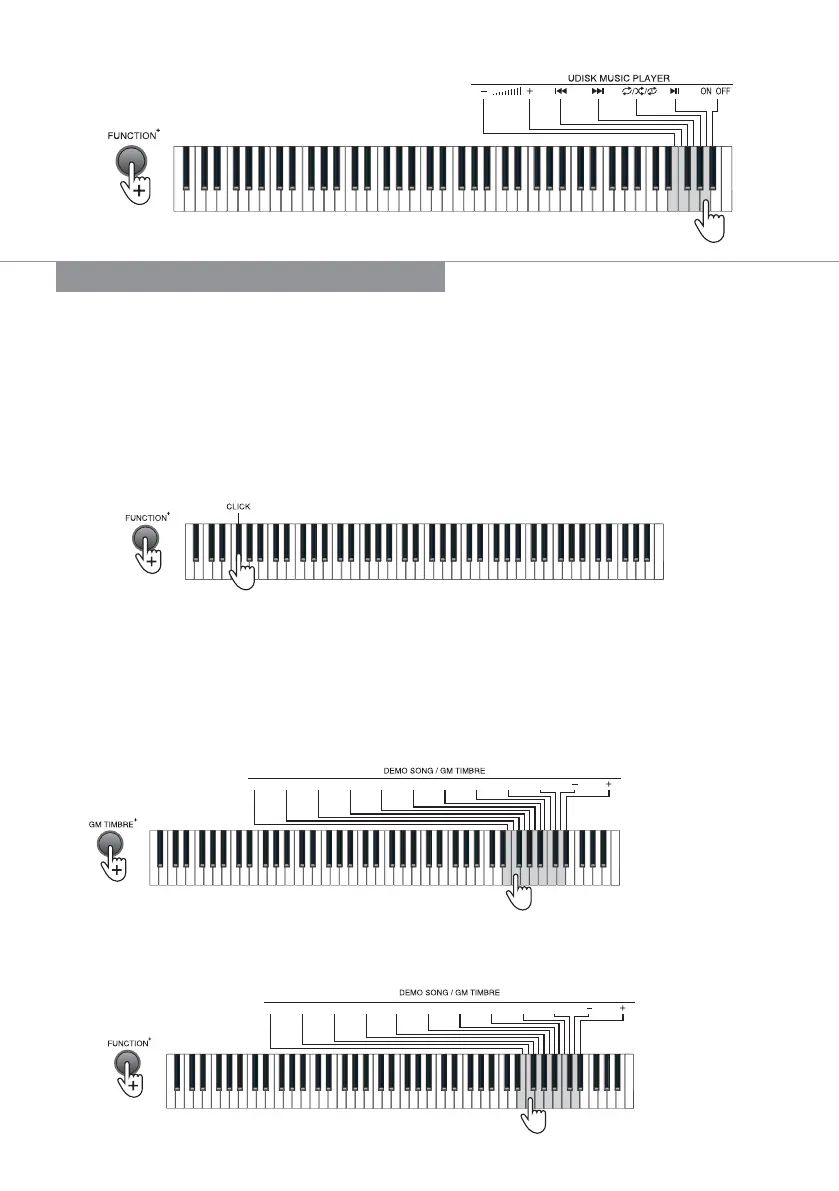
The click function is enabled by default. Press the [FUNCTION+] button + function compound key
on the keyboard, a prompted “click” tone will be heard. Press the [FUNCTION+] button + the
[Click] key to enable or disable the key tone function.
Timbre Selection
The piano provides 140 timbres, from “000” to “139”, for your selection. When the piano is turned
on, the [PIANO] button light lights on.
Default timbre: The piano provides 8 default timbres for your selection, among which, the default
timber of [GM TIMBRE] is “088 Pad 1 (New Age)”.
Select other timbres: Press the [GM TIMBRE] button + [DEMO SONG/GM TIMBER] keys to select
standard GM timbre and Chinese folk timbre from “000” to “139”.
Play Demo Songs
Press the [DEMO] button to play the demo songs, and press the [DEMO] button again to stop
playing. The piano provides 16 demo songs, from “00” to “15”, for your selection. Press the
[FUNCTION+] button + [DEMO SONG/GM TIMBER] keys to select the corresponding demo song.
0 1 2 3 4 5 6 7 8 9
Enter a 2-digit code or press the “-/+” button for selection.
BASIC PERFORMANCE METHOD
0 1 2 3 4 5 6 7 8 9
Enter a 3-digit code or press the “-/+” button for selection.
| 5


 To Next Page