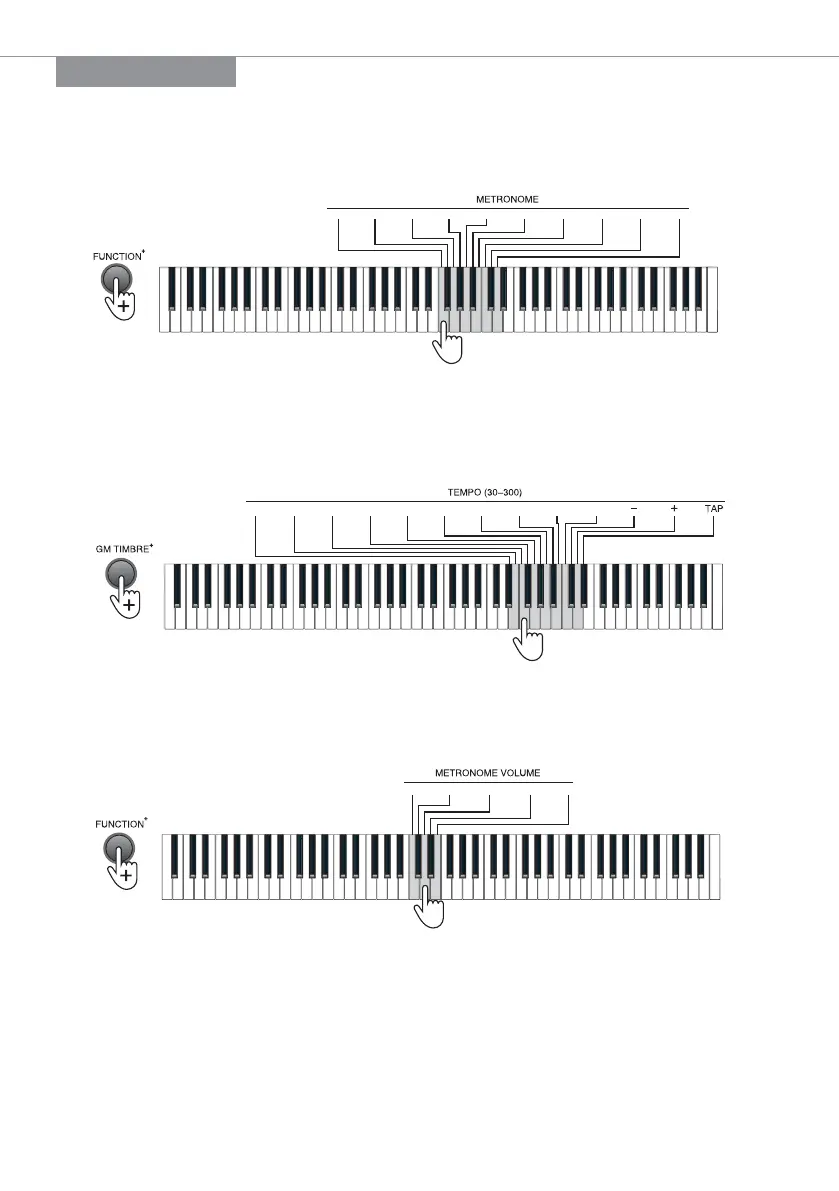
Metronome
Press the [METRONOME] button to activate the metronome. Press the [METRONOME]
button again to deactivate the metronome. The piano contains 10 tempos. Press the
[FUNCTION+] button + the [METRONOME] 1/4~12/8 keys for metronome setting.
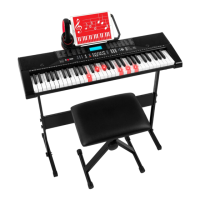
Tempo
The tempo defaults at 120, which is adjustable between the range of “30” to “300”. Press the
[FUNCTION+] button + [Tempo] number + “-/+” keys to select the required tempo. Press the
[FUNCTION+] button + the [TAP] key of the [TEMPO] to restore the default value.
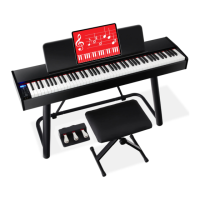
Metronome Volume
The piano contains 5 metronome volumes. Press the [FUNCTION+] button + the
[METRONOME VOLUME] 1 - 5 keys for metronome volume setting.
1 2 3 4 5
METRONOME
1 /4 2/4 3/4 4/4 6/4 3/8 6/8 7/8 9/8 1 2/8
Enter the tempo (30-300) or press the “-/+” button for selection,
and press the “TAP” key to restore the default value
0 1 2 3 4 5 6 7 8 9
6 |


 To Next Page