8 | BDIUSA.COM CORRIDOR 8172
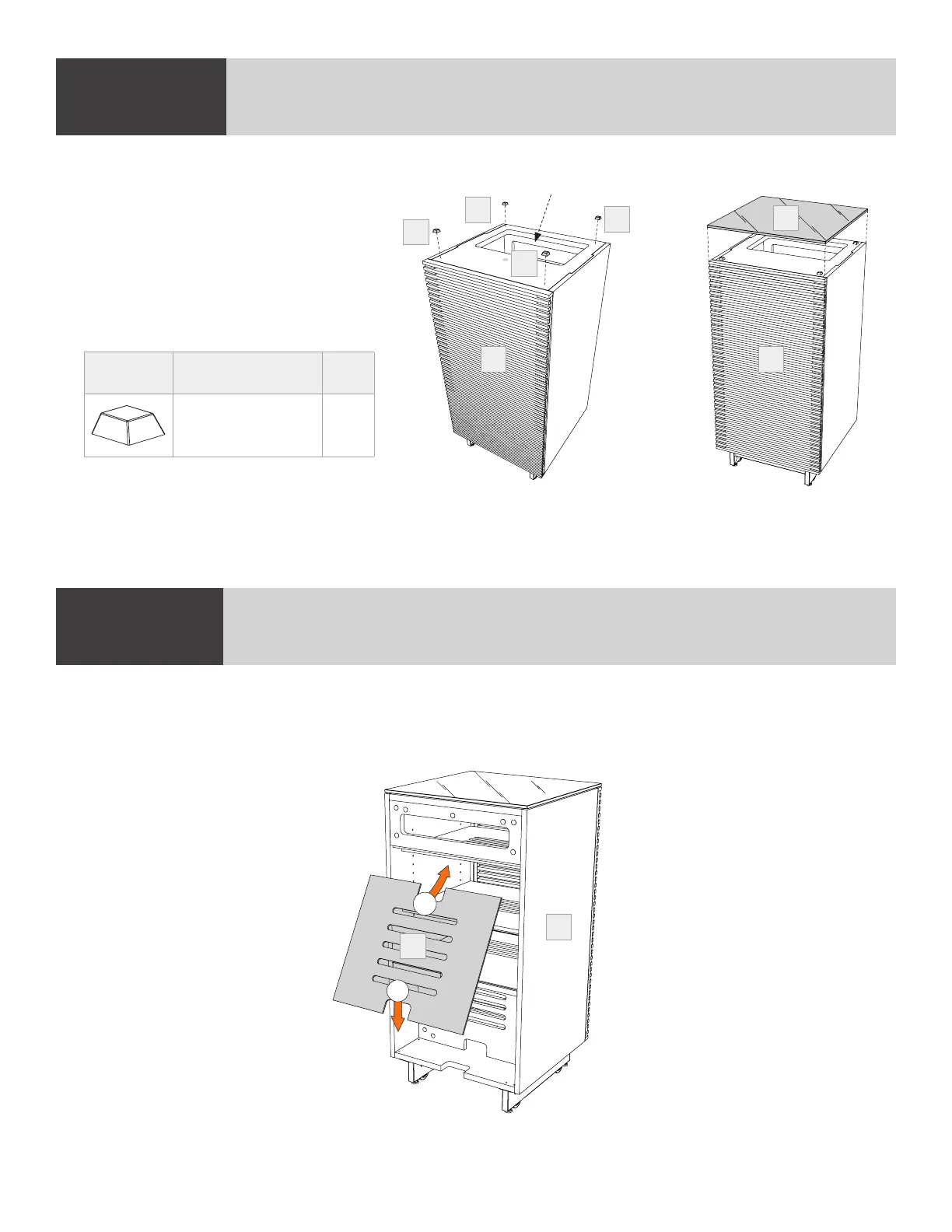
Install (K) Back Panel to the backside of the (C) Cabinet by inserting top edge in upper channel then
tipping bottom edge forward and into lower channel.
Note: Velcro straps are included for your convenience to facilitate wire management.
STEP 4. INSTALL BACK PANELASSEMBLY
2
1
K
C
STEP 3. INSTALL RUBBER BUMPERS AND PLACE GLASS TOP
Position the cabinet upright and
remove paper backing from
(H) Rubber Bumpers and place
near corners of the top of the
cabinet (within 1" of the edge).
Place (G) Glass Top on top of
(C) Cabinet centered left to right
and front to back.
ASSEMBLY
C C
H
H
H
H
PART/DESCRIPTION QTY
H-RUBBER BUMPER 4
Space for power strip
G


 To Next Page