48 49 E
REMOTE CONTROL
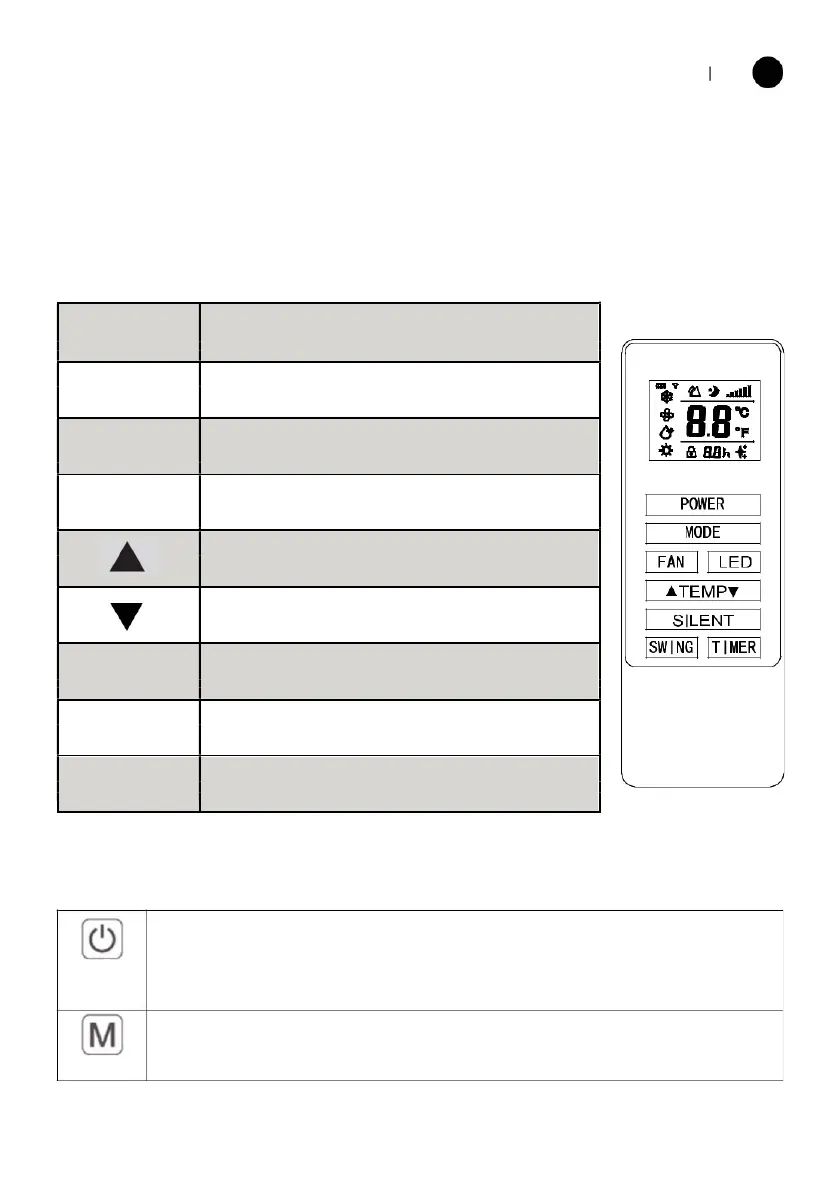
The air conditioner can be controlled with the remote control. Two AAA-batteries
(not include) are required.
NOTE: Further details of the functions can be found on the following page.
Press the POWER button to turn the machine
on or off.
Press the MODE button to select between
cooling, heating, fan and dry modes.
Press the FAN button to change between high,
medium and low fan speeds
Press the LED button to open or close the LED
background light of unit, it can be a choice for sleep
Press the UP button to increase the desired
temperature or timer duration
Press the DOWN button to decrease the
temperature or timer duration
Press it for silent mode, In Silent mode, noise will be
lower, fan works in low speed.
Press to turn the louver swing function on and off
(only activated by the remote
press the TIMER button to set the automatic
FUNCTIONS
Press “POWER” to turn the unit On or Off.
POWER
MODE
Press to change between the 4 different modes. The display will show the symbol
for the mode currently selected.



 To Next Page