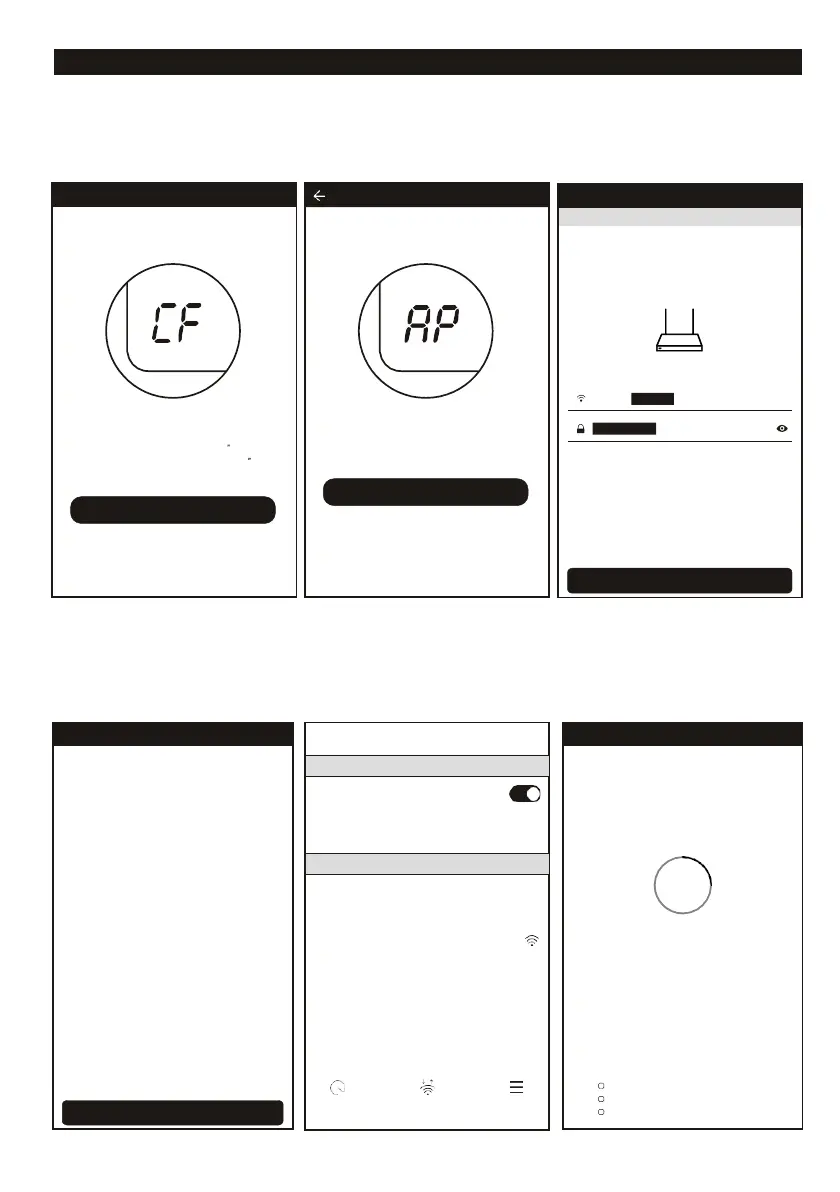
ADD THE DEVICE (AP MODE)
AP MODE Long term, stable connection
1. Click the “AP Mode” to the “AP” page. Press “Next Step” to continue and follow the instructions
on your smartphone.
2. Select the home router, fulfill the password, press “Next” to continue.
3. Select the AC device as name “SmartLife-XXX” at the WLAN setting, then back to the APP interface.
The APP will automatically do match and on the display of the airconditioner shows “PP” and after that
“SA”.
<
Back
Trying
to
Connect
Device
26%
Device is connecting
Make sure your phone and device
are as close to your router as possible.
Searching for device
Registering device to the cloud
Initializing your device
SmartLife-xxx
Scan WLAN Direct Menu
<
Back
Trying to Connect Device
Open phone "setting-WLAN" and
connect to the Wi-Fi network
Not connecting? Refer to help
Connect now
<
Back Enter Wi-Fi password
This app is supported only 2.5GHz Wi-Fi channels
Press the DISPLAY on the remote control
key 6 times in the time of 6 seconds until
the LCD screen show "AP"
Next Step
LCD screen in other status
Cancel
Add Device
AP Mode
Press the "DISPLAY" key on the remoter
6 timers within 6 seconds
until the LCD screen show "CF
Next Step
Instructor light is in other status














 To Next Page