EasyManua.ls Logo

Be Cool BC14KL2101F - Air Conditioner Control Panel; Basic Controls and Modes

Be Cool BC14KL2101F
Print Icon
To Next Page IconTo Next Page
To Previous Page IconTo Previous Page
Loading...
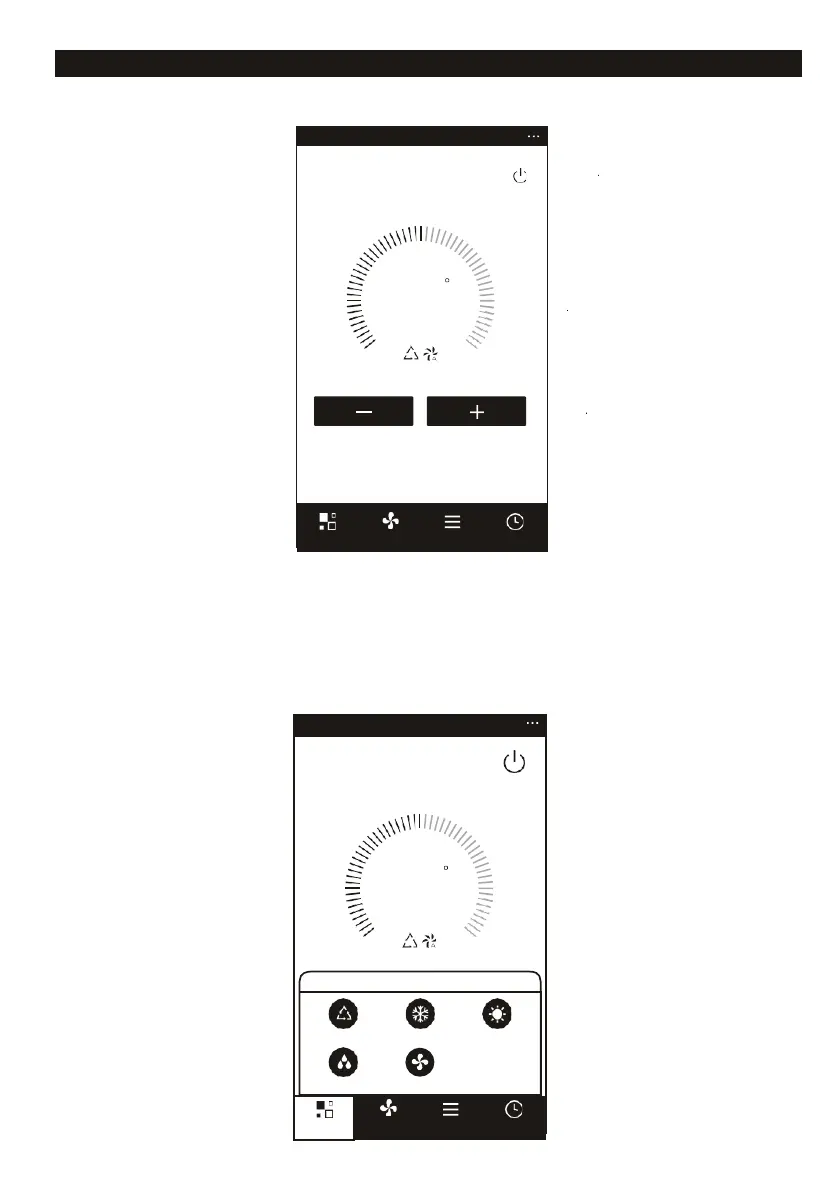
AIR CONDITIONER CONTROL
1. Click the air conditioner name to enter the control interface.
2. Set the desired functions.
<
Back
Air Conditioner
Turn ON/OFF.
23
C
Disp
lay the setting
temperature.
Set Temperature
Decrease setting
temperature.
Increase setting
temperature.
Mode
Fan
Function
Timer
3. Adjust the different operating mode, Cool, Heat, Dry, Fan, Feel mode. Click the “Modebutton, and
choose different running mode as you like.
For the cooling only unit, the heat mode has no affection.
For Dry mode, at the first 3 minutes, the APP temperature display may be little different from the unit
display, caused by the unit temperature fast changing.

<
Back Air Conditioner
23
C
Set Temperature
Mode
Feel Cool Heat
Dry Fan
Mode
Fan Function Timer

Related product manuals