14
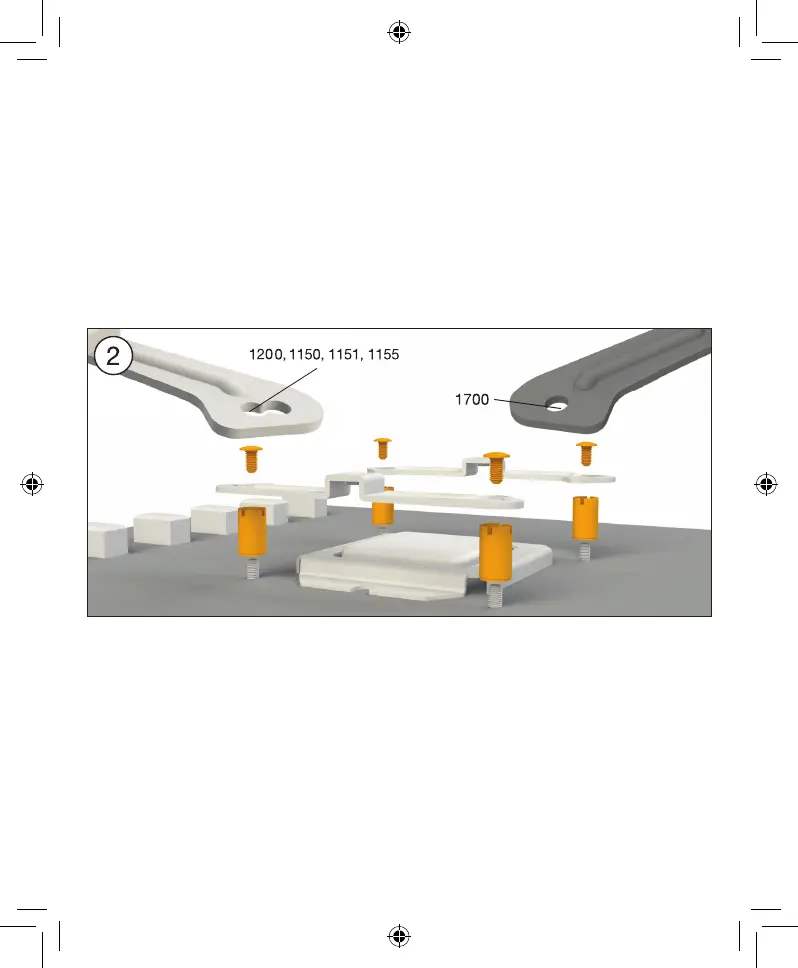
Installation of the mounting bridges
Screw the Intel spacer nut B onto the
previously positioned Intel backplate. Then
position, depending on your socket, the Intel
mounting brackets or Intel mounting brackets
LGA 1700 over the Intel spacer nut B and affix
these with the mounting bracket fastening
screws. You can use any cross-tip screwdriver
for this.
Installation der Montagebrücken
Schrauben Sie die Intel Gewindebolzen B auf
die zuvor platzierte Intel Backplate. Dann
positionieren Sie abhängig von Ihrem Sockel
die Intel Montagebrücken oder Intel Montage-
brücken LGA 1700 auf den Intel Gewinde-
bolzen B, um sie dann mit den Befestigungs-
schrauben für die Montagebrücken zu
fixieren. Hierzu können Sie einen üblichen
Kreuzschraubendreher nutzen.






 To Next Page