13
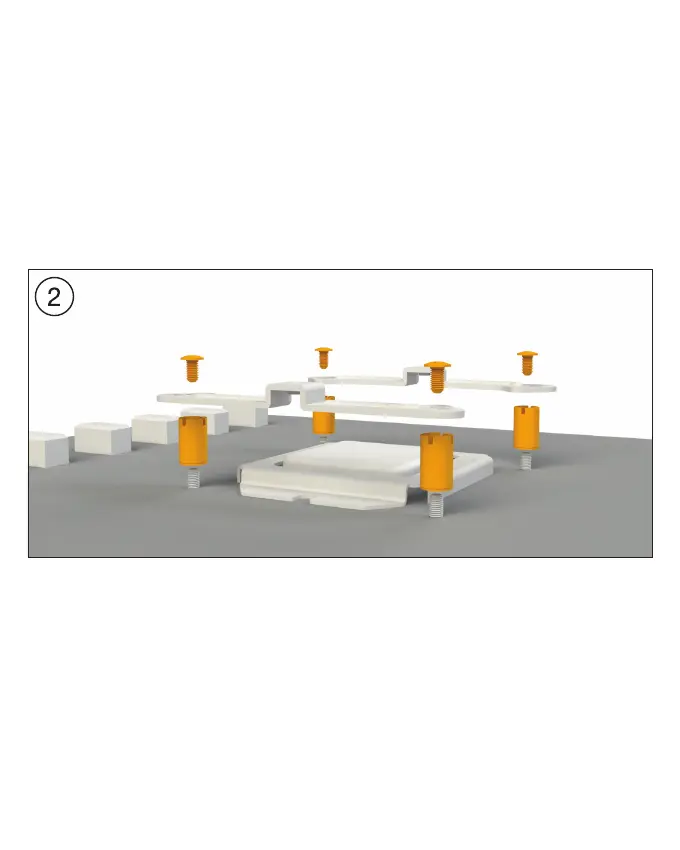
Installation of the mounting bridges
Screw the Intel spacer nuts B (7) onto the
previously located Intel backplate (3). Then
position the Intel mounting brackets (4) over
the Intel spacer nuts B (7), in order to affix them
with the fixing screws for the mounting brackets
fastening screws (9). For this you can use a
normal crosshead screwdriver.
Installation der Montagebrücken
Schrauben Sie die Intel Gewindebolzen B (7)
auf die zuvor platzierte Intel-Backplate (3). Dann
platzieren Sie die Intel Montagebrücken (4)
auf den Intel Gewindebolzen B (7), um sie
dann mit den Befestigungs-schrauben für die
Montagebrücke (9) zu fixieren. Hierfür können
Sie einen üblichen Kreuz-Schraubendreher ver-
wenden.







 To Next Page