21 3
Page 4 of 8 75.5886.01 BR2-900 20170630
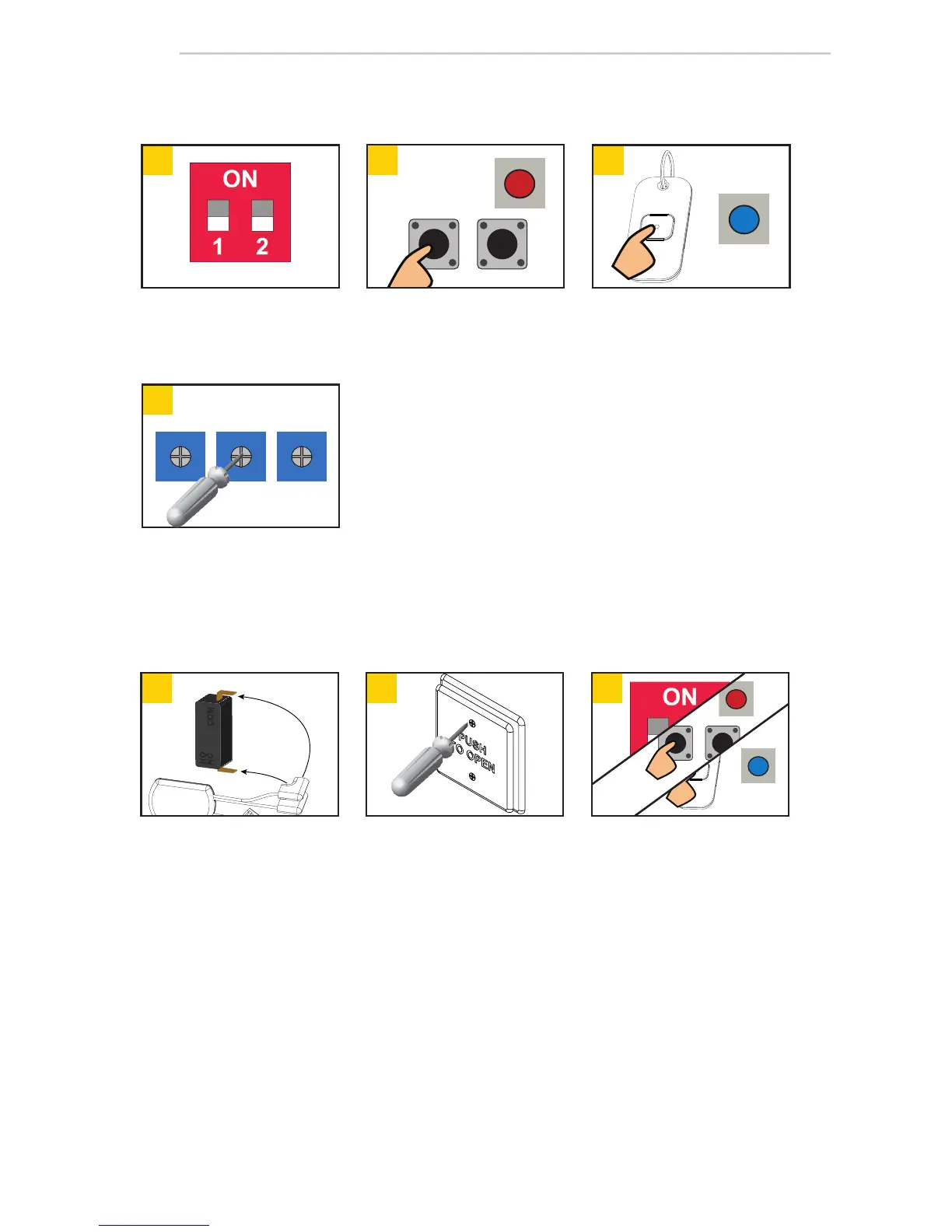
Connect transmitter
1
to push
plate (NO & COM) and insert
into box.
Follow steps 1 – 4 in Hand-Held
Configuration.
Install push plate.
Universal transmitters (10TD900HH1U) do not need programmed (or "learned") to the Br2-900. Their
unique serial number is automatically recognized by the Br2-900.
During the Hand-Held Configuration or the Push Plate Configuration steps (above), standard transmitters
must be programmed/learned as either "Secure" or "Unsecure" transmitters. When set to Universal,
learned, standard transmitters will function as programmed/learned.
Set DIP-switches as desired.
For DIP-switch settings, please
refer to table on page 3 (USER
INTERFACE).
Press transmitter twice (white
and blue LEDs on receiver will
illuminate).
Press and release desired learn
button (red LED on Br2-900 will
illuminate).
Adjust POTs as desired.
See page 3 for descriptions
("Potentiometers").
see hub image on page 1
Push Plate Configuration
Hand-Held Configuration
NOTES:
1. 10TD900PB required for push plates.
Universal Mode
SET-UP
R1 R2
DELAY



 To Next Page