20 Beachcomber Hot Tub Owner’s Guide www.beachcomberhottubs.com 21
Sn Sensors out of balance
HL Possible flow through heater problem
LF Confirmed flow through heater problem
dr Possible dry heater problem
dY Confirmed dry heater problem
IC Freeze condition sensed
Sy Tub is in Standby
PLEASE REFER TO TROUBLE SHOOTING GUIDE FOR A
COMPLETE EXPLANATION OF DIAGNOSTIC MESSAGES.
The Turbo will come on automatically for 30 seconds at the start
of each filter cycle to purge the Turbo plumbing.
Light
To activate this press the button once to turn on and again
to turn off. The light will automatically turn off after 4 hours. If
your tub has an EverLite 6 or any additional lighting features see
the instructions on page 23 of this manual.
Standby Mode
The Standby feature is used primarily to temporarily shut the
circulation pump off before removing the Microfilter for cleaning
or replacement. This prevents debris or objects from entering
the circulation pump while the skimmer basket and filter are out.
Standby can also be used if you want to have total quiet while
using the hot tub; however, during this time the hot tub will not
heat. Use the instructions below to put your hot tub into Standby.
Please note: Do not use Standby to drain and refill your hot tub.
Always shut off power at the main breaker before draining your
hot tub to prevent damage to the hot tub equipment.
Press
then to put the tub into Standby. Display will
show SY. Press any button to take the hot tub out of standby.
Setting Filter Cycles
Filter cycles come preset from the factory. For hot tubs without
the Hush option, filter cycles are default to run two hours each
time, twice a day. For hot tubs with the Hush option, filter cycles
are default to 24 hours.
Filter cycle duration and frequency are adjustable and can be
changed by following the instructions below.
Press the
then press to bring up F2 keep pressing
to select F4, F6, F8, FC (12 hours). Then press to bring
up 2C (two cycles per day). If you want to change press
to select 1d (day cycle which will start 6 minutes after turning
power off and back on) and again to select 1n (night cycle
which starts 12 hours after turning power off and back on.).
Press
to exit programming.
Note: If your tub is Hush Pump equipped the Filter Cycles settings
only affect the times the heater will be able to operate when
using the Economy heating Mode
Diagnostic Display Messages
If nothing appears on the display screen, power to the Hot Tub is off.
- Current temperature not known
HH Possible overheated heater: do not enter Hot Tub
HS Possible overheated Hot Tub: do not enter Hot Tub
SA Sensor problem
Sb Sensor problem
SHOCK HAZARD! NO USER SERVICEABLE PARTS.
DO NOT ATTEMPT SERVICE OF THIS CONTROL. CONTACT
YOUR RETAIL STORE OR SERVICE PROVIDER FOR ASSISTANCE.
FOLLOW ALL OWNER’S GUIDE POWER CONNECTION
INSTRUCTIONS. INSTALLATION MUST BE PERFORMED
BY A LICENSED ELECTRICIAN AND ALL GROUNDING
CONNECTIONS MUST BE PROPERLY INSTALLED.
ALWAYS TEST WATER TEMPERATURE PRIOR TO ENTRY USING
THE TOPSIDE CONTROL PAD. ENSURE COMFORT BY ALSO
CHECKING WATER WITH AN ACCURATE THERMOMETER.
TAMPERING WITH OR MODIFYING THIS EQUIPMENT MAY
VOID YOUR GUARANTEE.
WARNING
Operation of Hot Tub Features
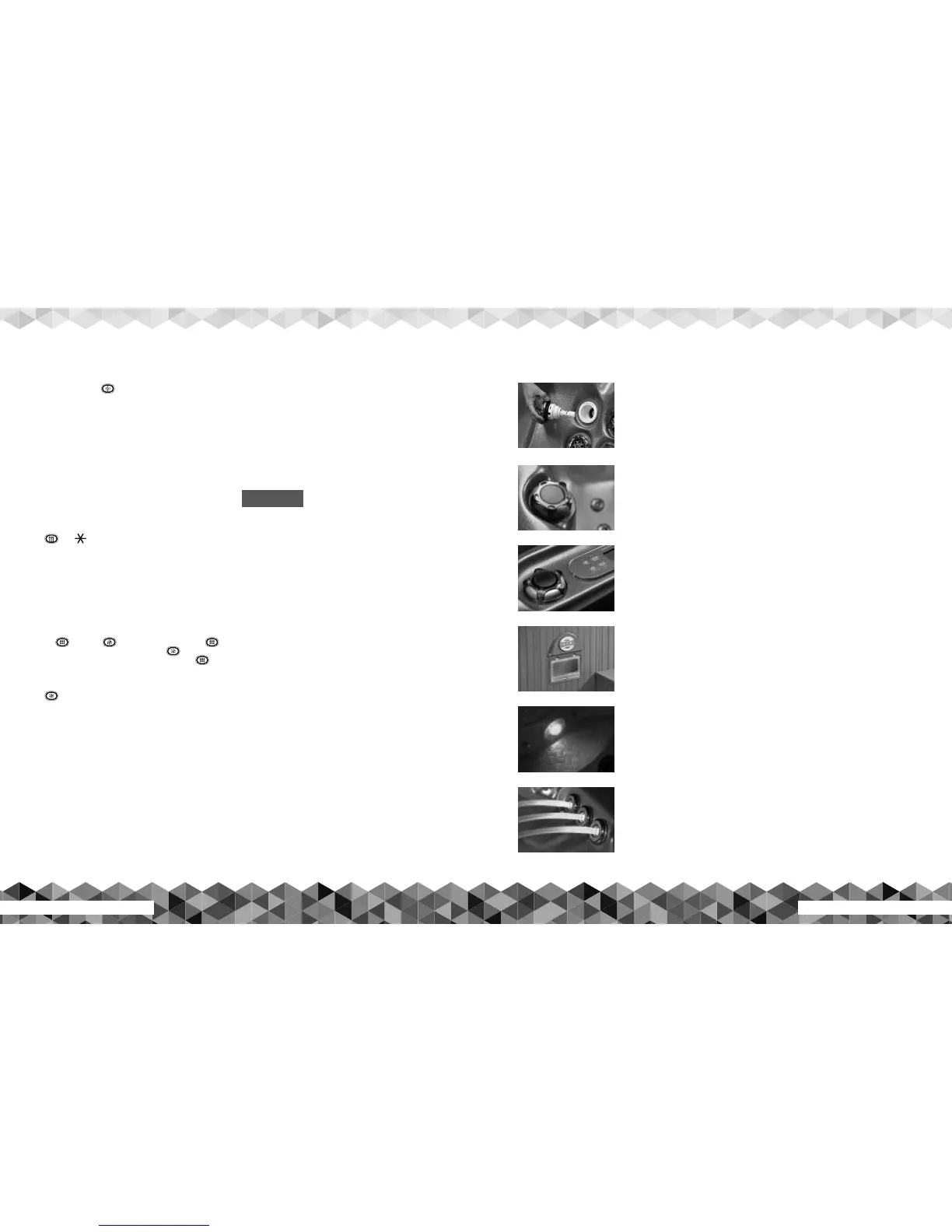
FlexJet Inserts
The jets in a Beachcomber Hot Tub are known as FlexJets and are available in four sizes; small,
medium, large and extra large. They are interchangeable within the same sizes. Simply turn them
counter-clockwise to unscrew. To reinstall, turn the jet insert clockwise to screw them back in. The jets
can also be individually turned off or on by turning the jet face. Turning it clockwise will turn off the
water flow and counter-clockwise turns on the water flow. To turn on the neck jet, twist the jet face
counter-clockwise; to turn off, twist it clockwise. If this jet does not turn off, contact your local dealer
for more information.
Reflex Foot Massage (RFM) Diverter Valve
This top side valve diverts water flow between either the RFM foot jets or the seat jets. On 700 series
hot tubs it diverts water flow from massage 2 pump between the RFM foot jets or the seat jets on the
left side of the hot tub. Always turn the pump to low speed or off before attempting to turn the RFM
Diverter Valve. Failure to do this could cause the handle to break due to the high velocity of water
moving through the valve. NOTE: When the hot tub is not being used, the diverter valve handle must
be left in the center position. This ensures that water in both zones is always in circulation during
periods of non use.
Air Control Valves
There are two air control valves located on either side of the touch pad, as shown. These air controls
improve the massage experience in your hot tub by adding more turbulence to the water flow. To turn
on the air, turn the knob counter-clockwise. On all models, more air is drawn in when the jet pump
is on high speed than when the pump is on low speed. On 300, and 500 series hot tubs, the left air
control services all the seat jets. If equipped with the Reflex Foot Massage (RFM) option, the right air
control services the RFM jets (or footwell jets on non-RFM equipped models) when the water flow is
diverted to them, and the left air control services all the seat jets. On 700 series hot tubs, the left air
control allows air flow to jets running off Massage Pump 1. The right air control allows air flow to
jets running off Massage Pump 2. The right air control would also allow air flow to the RFM jets if the
diverter valve is diverting water flow from Massage Pump 2 to the RFM jets.
Quintessential Surround Sound (QSS) System
To operate the optional Quintessential Surround Sound System shown, lift up the front cover located
on the outside of the Enviroskirt Cabinet and connect your smart phone or music device via Bluetooth
(see manual for details), or Aux. In wired connection.
Hot Tub Underwater Lighting
All Beachcomber Hot Tubs come standard with either a 12 volt incandescent light or a digital
EverLite™ LED light. Refer to EverliteTM Instructions on page 23. Your local Beachcomber store is
best equipped to replace either unit. Drain the hot tub and locate the lens removal tool included with
the hot tub. Carefully unscrew the light lens. Carefully pull out the light unit and replace with a new
one, available from your local Beachcomber store. Screw the lens back in until tight, but do not over
tighten.
Roman Arch Waterfall
Hot tubs equipped with the optional Roman Arches Waterfall feature shown above, will have a
topside control valve to increase or decrease the water flow to the Waterfall. The Waterfall feature
receives its flow from the Hush Pump. If your hot tub is equipped with the Eclipse Lighting Feature,
the Waterfall will also be backlit. NOTE: The control valve must be partially left open when the hot
tub is not in use. If the water is not operating at normal flow, remove the front covers by turning them
clockwise a 1/4 turn, remove the internal nozzle and rinse off debris.
FlexJet Inserts
RFM Diverter Valve
Air Control Valves
QSS System
EverLite LED Lighting
Roman Arch Waterfall


 To Next Page