Bea-fon T850 -7-
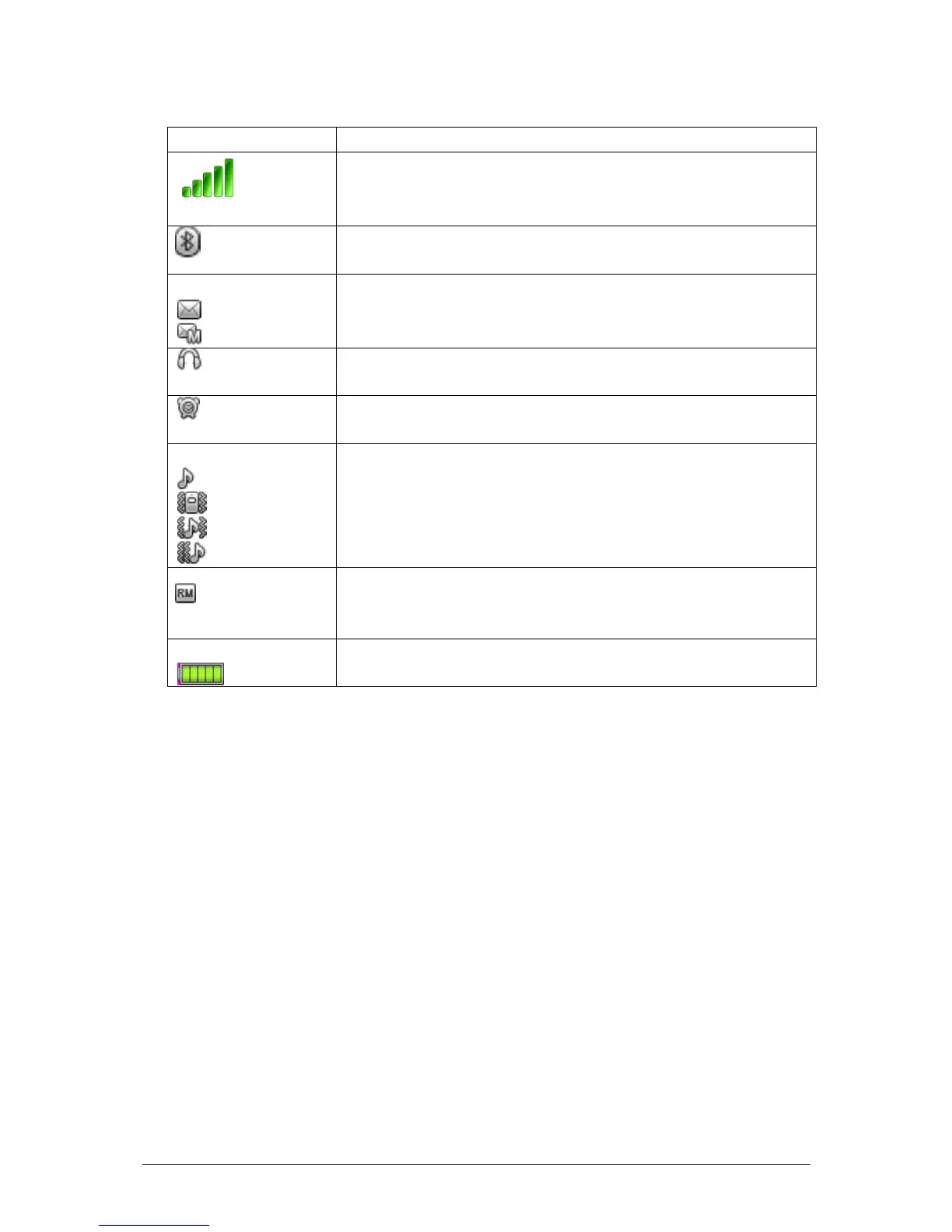
2.3 Icons
Network signal strength
Straight stripe is more, the network signal is
stronger.
Bluetooth
The phone opens Bluetooth function.
Message
Receive new SMS message.
Receive new MMS message.
Earphone
The phone is inserted earphone.
Alarm
Set the alarm time and activate the function.
Incoming call alert type:
That is “Ring”.
That is “Vib. only”.
That is “Vib. And ring”.
That is “Vib. then ring”.
Roaming
This icon shows when your phone is in roaming
state. SIM card is roaming.
Battery
Straight stripe is more, the battery is more.
3 User Guide
3.1 Installing/ Removing the battery
1) Installing the battery
With the top of battery (the terminal with pole) facing right toward
the contacting points in the battery compartment, press the bottom
of battery slightly until it enters into place;
Slide battery cover forward along the side slot until it clicks into
place.
2) Removing the battery
Long press Power key to switch the phone off;
Open the battery cover;



 To Next Page