5
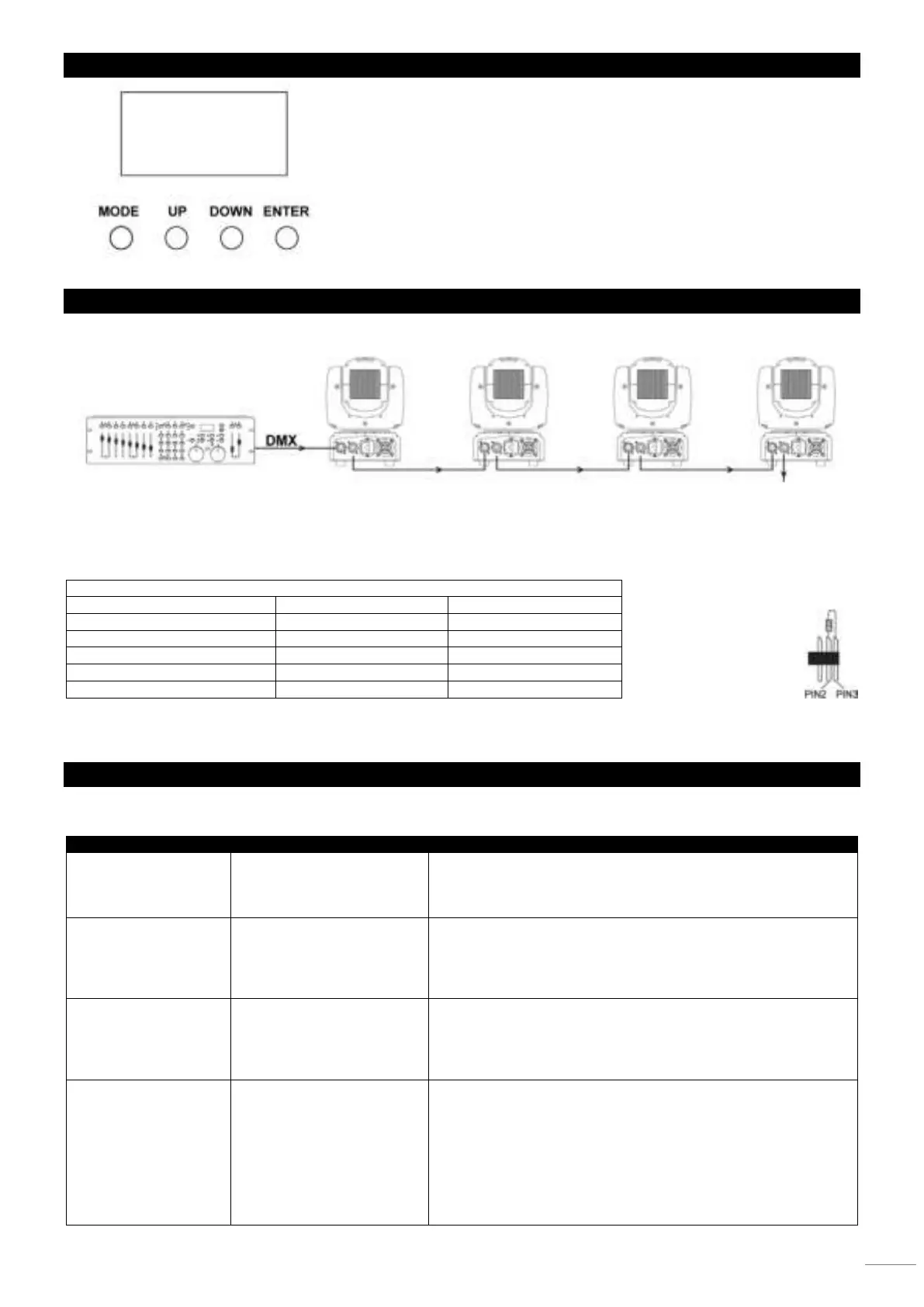
DISPLAY
The control board offer several features: you can simple set the starting address,
run the pre-programmed program or make a reset. The main menu is accessed
by pressing the Mode-button, browse through the submenu by pressing Up or
Down.
Press the Enter-button in order to select the desired menu.
You can change the selection by pressing Up or Down. Confirm every selection
by pressing the Enter-button.
You can leave every mode by pressing the Mode-button. The functions provided
are described later in this manual.
DMX-512 CONNECTION
If you are using a standard DMX controller, you can connect the DMX output of the controller directly to the DMX input of the
first unit in a DMX chain. Always connect the output of one unit with the input of the next unit until all units are connected.
5-pin XLR DMX Connectors.
Some manufactures use 5-pin DMX-512 data cables for DATA transmission in place of 3-pin. 5-pin DMX fixtures may be
implemented in a 3-pin DMX line. When inserting standard 5-pin data cables in to a 3-pin line a cable adaptor must be used.
The chart below details a proper cable conversion.
3-Pin XLR to 5-Pin XLR Conversion
Data Compliment (- signal)
At the last fixture, the DMX cable has to be terminated. Solder a 120 Ohm resistor between signal (-) and signal (+) into a 3-pin
XLR connector and plug this into the DMX output of the last fixture in the chain.
TROUBLESHOOTING
This section describes a few common problems that may occur during operation and provides some suggestions for easy
troubleshooting:
tom Potential cause Remedies
or fans not working.
such as blown fuse,
faulty connector or
Check whether fixture’s power indicator LED is lit.
Check all power connections and cables.
Replace fixture fuse.
react to music beat
disabled.
Sound activation
sensitivity too low for
Ensure that fixture is not connected to a DMX signal.
Adjust sound activation microphone sensitivity.
Tap microphone to check correct functionality. The
fixture should react when in sound activation mode.
channels is
unresponsive or only
responds
fault.
Damaged step motor or
cable connection
Contact your Beamz by Tronios authorized
distributor or service center for assistance.
respond to DMX
control.
addressing.
Fault on DMX link due to
damaged connector or
cable, or potential
interference from
proximity to a high voltage
installation.
Ensure that fixture’s DMX address matches address set on DMX
control device.
Check that fixture DMX check all DMX cables and connections.
Ensure that DMX link is terminated.
Check that all components on DMX link use standard DMX
polarity.
Attempt to control the fixture with another DMX control device.
Move or shield link if it is close to an unshielded high-voltage


 To Next Page