13
EN
Power Button+Mode button
Robot is powered on;
This cleaning mode is selected
Solid white light
ReturningFlashing white light
2
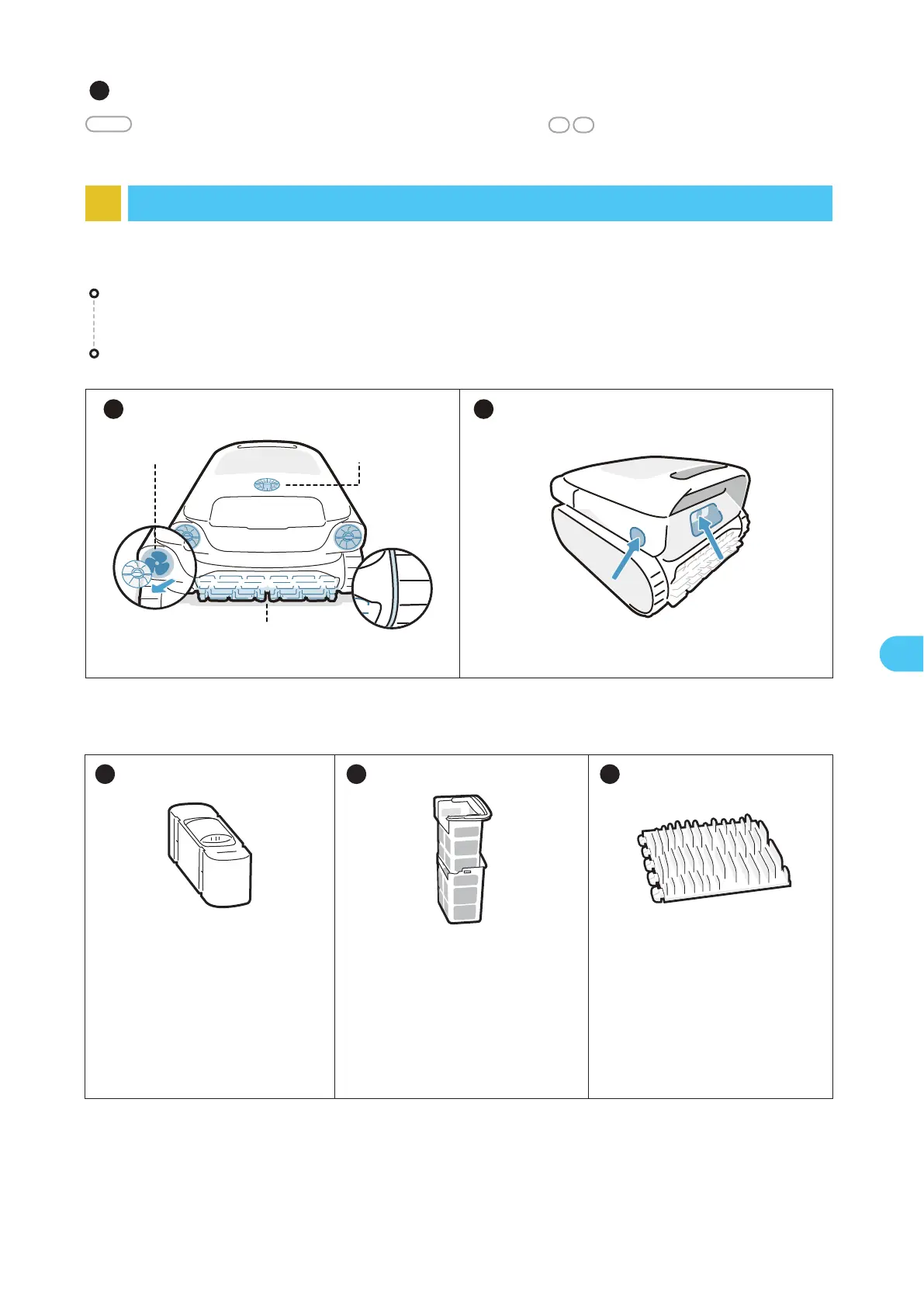
Clean the ultrasonic smart sensors. Ensure no obstacles on the sensors before cleaning.
After each use, check and clean any foreign objects, such as tangled hair and trapped sand, from the
water outlet, track wheels, propellers (which can be disassembled for cleaning) and roller brushes.
9.2 Replaceable Accessories
Clarifying Agent Kit
It is not included in the package.
You can contact Beatbot to
purchase it. Please refer to the
accessory manual for specific
usage instructions.
Dual Filter Basket
It is recommended to regularly
check the condition of the filter
basket and replace it as
needed to ensure the system is
functioning at its best.
Roller Brush
It is recommended to regularly
inspect the condition of the roller
brush and replace it as neces-
sary to keep the robot running
smoothly and effectively.
1 2 3
1 2
Roller Brush
Water Outlet
Propeller
9 Maintenance and Replacement
9.1 Maintenance


 To Next Page