EasyManua.ls Logo

BEC EG-210N - Rear Panel Connectors

Default Icon
11 pages
Print Icon
To Next Page IconTo Next Page
To Previous Page IconTo Previous Page
Loading...
BEC EG-210N GigaConnect
®
Smart Gateway
3
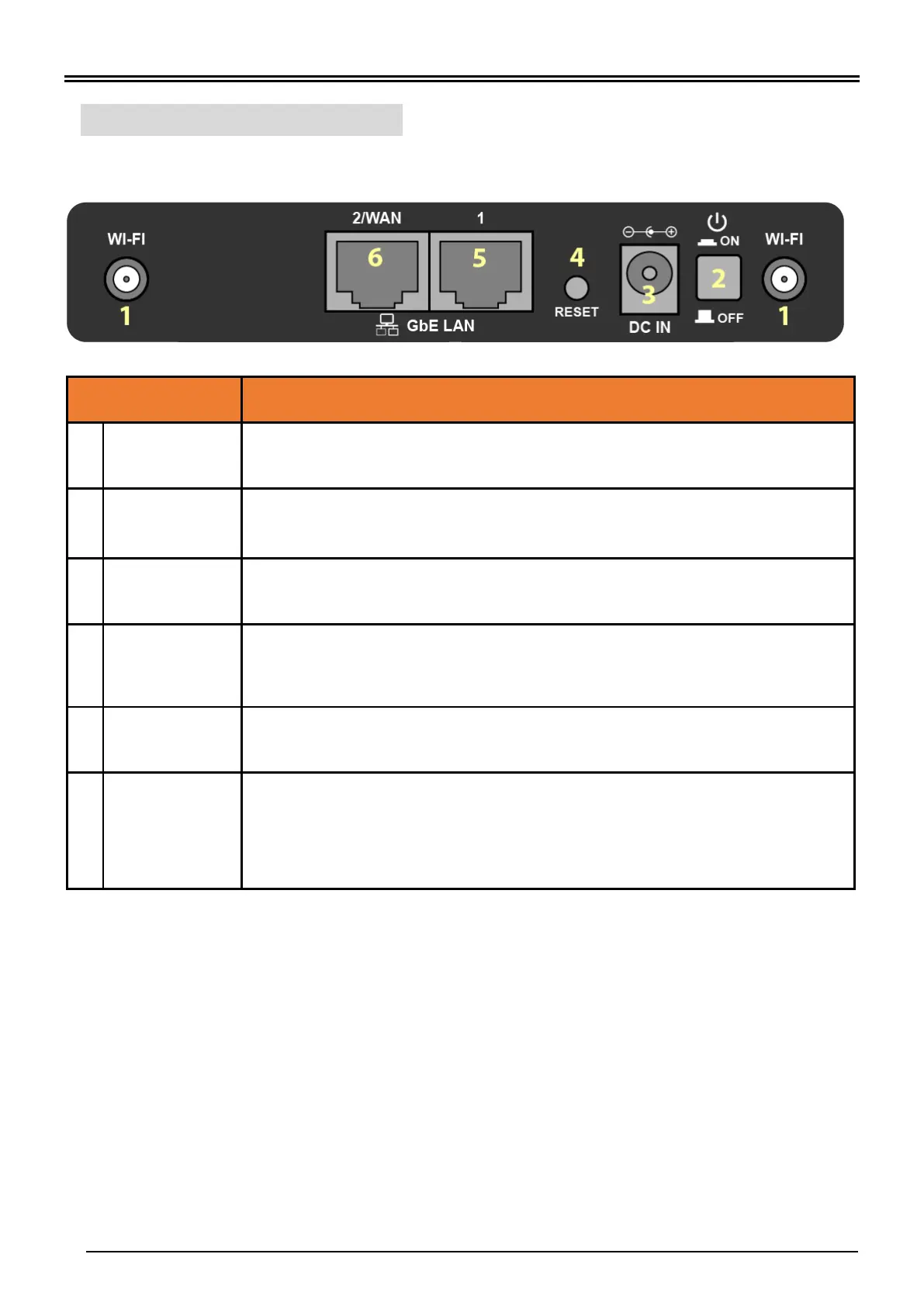
Rear Panel Connectors
INTERFACE
MEANING
1
Wi-Fi Antenna
Connectors
Screw the supplied Wi-Fi antennas onto the antenna connectors on both sides
2
Power Button
Power ON/OFF switch
3
Power Jack
(DC IN)
Plug in the supplied Power Adapter to this jack
4
RESET
After the device is powered on, press it 6 seconds or above: to restore to factory
default settings (this is used when you cannot login to the router, e.g. forgot your
password)
5
Gigabit Ethernet
(LAN 1)
Connected to a 10/100/1000Mbps Ethernet device
6
Gigabit Ethernet
(LAN 2 / WAN)
Ethernet LAN: Connected to a 10/100/1000Mbps Ethernet device
OR
Ethernet WAN: Software configurable in the GUI. Connect to a broadband device
such as a cable modem, ADSL/VDSL modem or fiber modem.

Related product manuals