8 / 40 EN
Air cooler / User Manual
3.2 Instructons for operaton of body
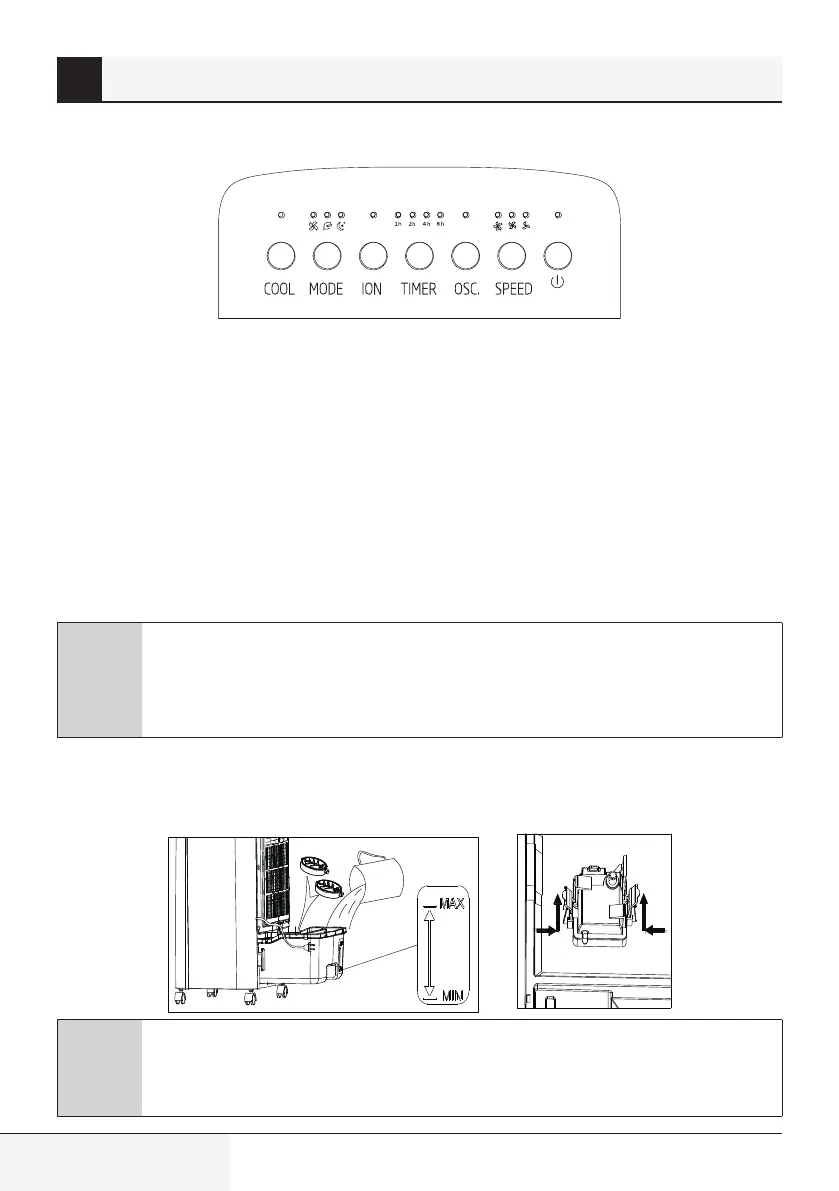
Press a key on the unit to activate a corresponding function.
For instance:
•
Press [OSC.] key to activate or deactivate swing function.
•
Press [SPEED] key to adjust 3 speeds of air flow.
•
Press [MODE] key to switch between normal, natural and sleep functions.
•
Press [TIMER] key to set 1-15 hour timer setting.
•
Press [ION] key to activate or deactivate negative Ion function.
•
When [COOL] key is pressed, the indicator lights up constantly if the operation is normal; when the
indicator flashes, it denotes a water shortage, please add water immediately.
C
Consderate hnt:
1. Push buttons on the unit may differ based on the actual product model.
2. "0N/0FF"LED light will be pale white when product is only plugged In and turn to
brighter white while In operation.
•
When the air cooler is plugged into the electrical outlet the ON/OFF button will come on and stay ON.
Simply unplug the product from the electrical outlet sto extinguish the light.
Using the ice box
Pump
C
Consderate hnt:
When humidifying, water level in the water tank must remain under max indication;
replenish water if level gets lower than min indication.
3 Instructons for use


 To Next Page