7
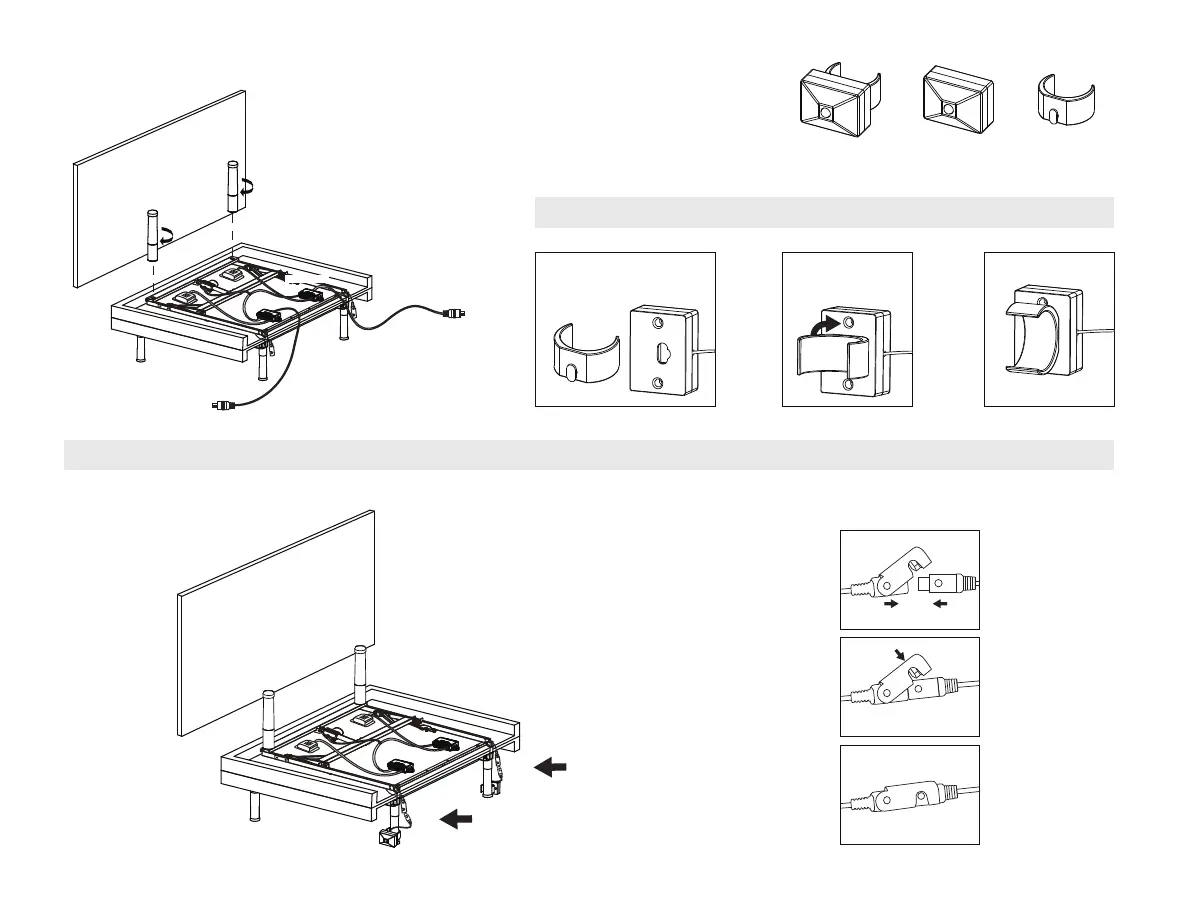
Install the remaining 2 legs on
the foot end of the bed
, make
sure the legs are tight
.
Uncoil the two DC power cords
(connected to the control boxes)
and put them to the side of the bed.
8
Motion sensor installation
= +
Motion
Sensor
Mounting
Bracket
Prepare The Motion Sensor Hardware.
Connect The Motion Sensor Connectors.
STEP 1: Connect the motion
sensor to the mounting
bracket.
STEP 2: Rotate the
mounting bracket 90
degrees clockwise
STEP 3:
DONE !
STEP 2: Connect the motion sensor connectors as illustrated.
Note there are two connectors, one on each side of the bed.
STEP 1: Clip the mounting bracket onto the center adjustable legs as illustrated.
HEADBOARD
HEADBOARD
DC Power Cord
DC Power Cord
Control Box
- 5 -


 To Next Page