CH CH-
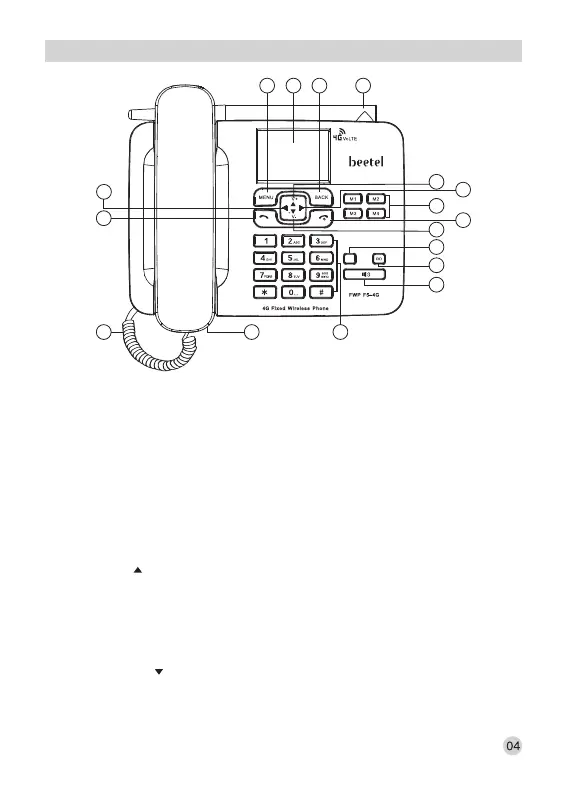
PHONE LAYOUT
1. MENU KEY(LEFT SOFT KEY):
Press to go in to the main menu in idle mode.
In sub Menu mode: Press to confirm the selection.
Press to answer the incoming calls (if wants to attend the call).
2. LCD DISPLAY:
Displays signal strength, battery status, date and time in idle mode.
3. BACK KEY (RIGHT SOFT KEY):
Press to access the Phonebook in idle mode.
In sub Menu mode: Press to go back to previous level.
In editing /pre-dialling mode: Press to clear a character/ digit.
In editing /pre-dialling mode: Long press to clear all character/ digits.
Press to reject the incoming calls (if do not wants to attend it).
4. UP KEY ( ):
Press to access the calendar in idle mode.
In menu mode: Press to scroll up the menu items (In Page Menu mode).
In sub-menu mode: Press to scroll up the sub-menu items.
In phonebook list/missed calls list / received calls list/ dialled calls list: Press to scroll up
the list.
During FM Radio use: Press to increase the FM Radio Volume.
5. DOWN KEY ( ):
Press to access the “Settings” in idle mode.
In menu mode: Press to scroll down the menu items (In Page Menu mode).
In sub-menu mode: Press to scroll down the sub-menu items.
2 3 171
7
8
16
4
5
12
10
11
6
9
13
1415
WIFI



 To Next Page