16 EN
PICTURE SETTING S
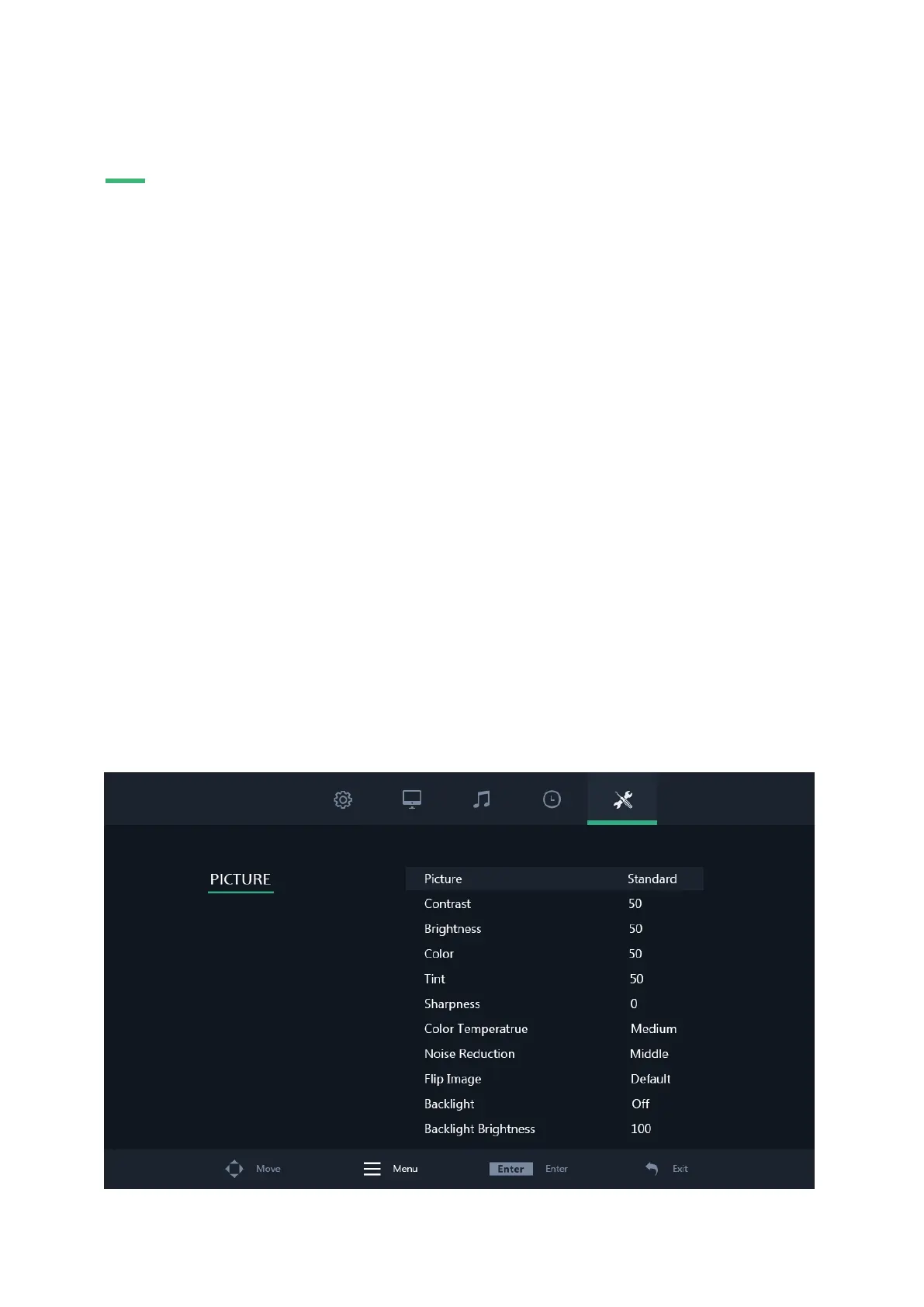
Picture settings
01 | Picture
Select your preferred picture mode. Select the ''User'' preset to manually adjust each value.
02 | Contrast
Adjust picture contrast. This value can only be changed if the picture mode has been set to "User".
03 | Brightness
Adjust picture brightness. This value can only be changed if the picture mode has been set to "User".
04 | Color
Adjust picture color intensity. This value can only be changed if the picture mode has been set to "User".
05 | Tint
Adjust picture tint. This value can only be changed if the picture mode has been set to "User".
06 | Sharpness
Makes the image look sharper or softer. This value could only be changed if the picture mode has been set to "User".
07 | Color temperature
Adjust the color temperature. A low setting will decrease the color temperature. The screen appears cooler with a blue tint. A high
setting will increase the color temperature. The screen appears warmer with a red/yellow tint.
08 | Noise reduction
Adjust noise reduction level.
09 | Flip image
Select your preferred flip mode. Available options are: Horizontal, Vertical and Vertical + Horizontal
10 | Backlight
Select how the backlight brightness is adjusted.
11 | Backlight brightness
Adjust the backlight brightness from 1-100.


 To Next Page