19 EN
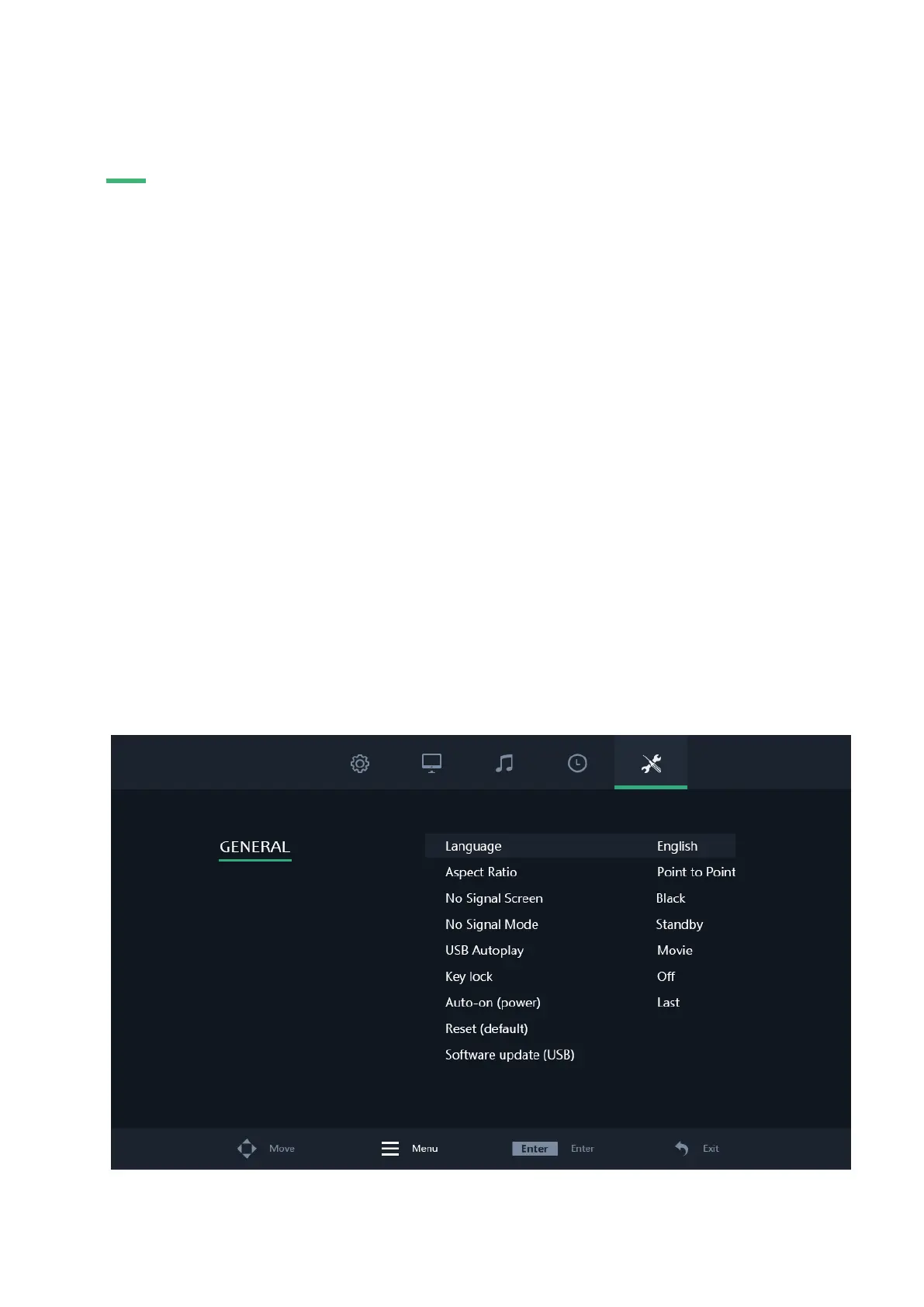
GENERAL SETTINGS
General settings
01 | Language
Defines the language of the menu. The default setting is English (US).
02 | Aspect ratio
Set the relationship between the width and height of the picture shown on the monitor.
03 | No signal screen
Choose a blue or black “no signal” screen.
04 | No signal mode
Select whether the monitor turns off, shows a black screen or shows NO SIGNAL when not receiving a signal.
05 | USB autoplay
Select what type of USB file will be autoplayed when the monitor receives current.
06 | Key lock
Turn on/off the key lock. When turned on all buttons on the monitor are blocked. The remote is needed to deactivate this
feature.
07 | Auto-on (power)
Turn on/off the auto-on (power). When this setting is activated the monitor will turn on automatically when it receives
power.
08 | Reset (default)
Reset to the default/factory settings.
09 | Software-update (USB)
Update the firmware. A USB with valid firmware must be connected. A Yes/No window will be prompted.


 To Next Page