V7.4 Plus OP-L
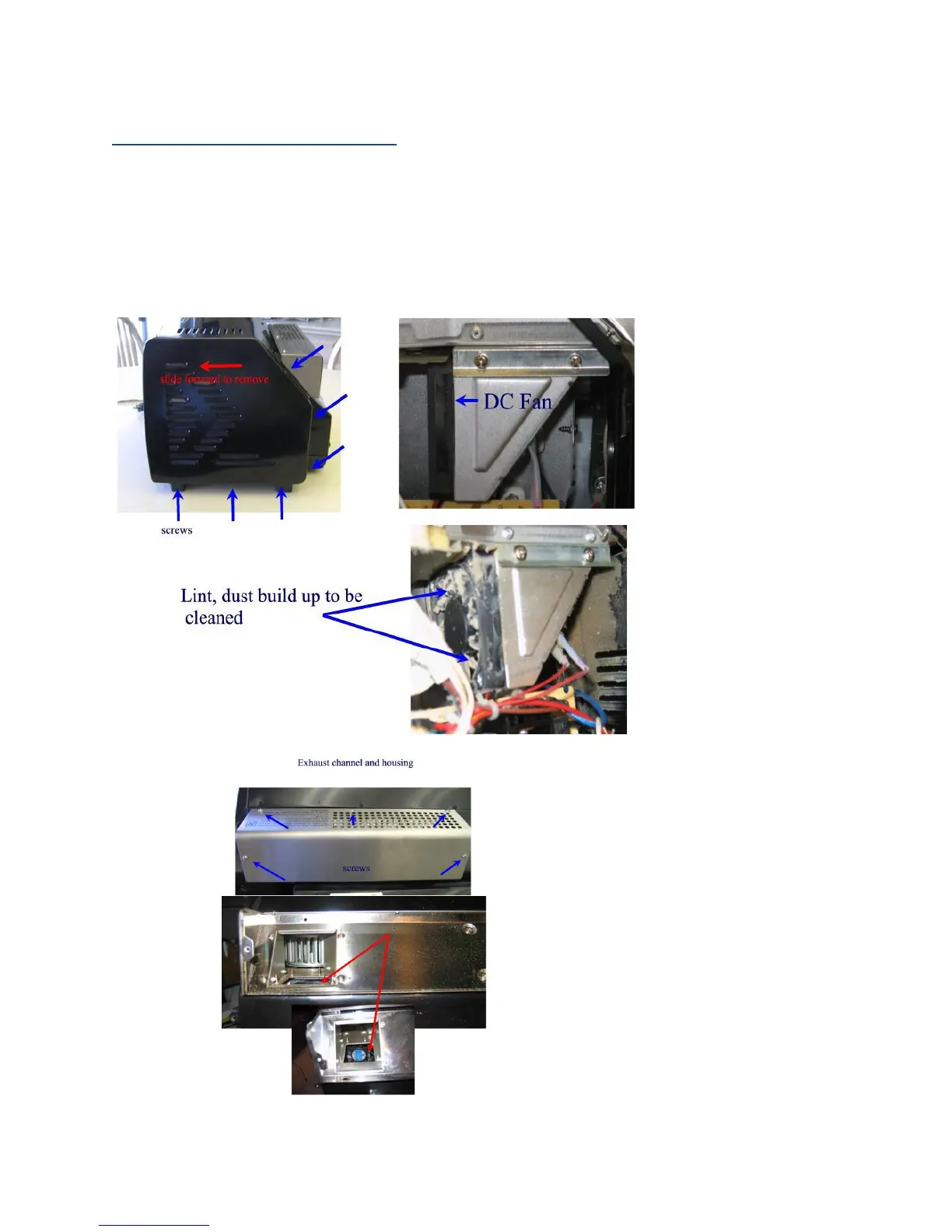
3. We also recommend that you clean your DC fan’s impellors/ electronics chamber every four months or sooner. In some
locations, such as areas of high dust, or other airborne particulates, the impellor blades of the fan/ PCBs will get coated with
buildup. This can cause the system’s roast times to become extended as adequate and proper air circulation is restricted or
cause component failures. The described procedure is found on our website in Update #3 at
http://www.behmor.com/behmor-1600.php
a. Begin this procedure by removing the six screws holding the right outside panel in place, using a Philips
head screwdriver.
b. Once the panel is removed, a few strong gusts of air on the impellors should remove the buildup. We then
suggest you plug in the roaster and press cool. Clean all areas covered with dust to include PCBs.
to insure the fan is rotating properly. If not, contact tech support.
c. While performing the above also we recommend removing the exhaust channel cover (see Fig. D) and
cleaning any lint, dust, or stray chaff from the back of the cover and exhaust channels. This maintenance
will insure air is allowed to flow freely and not clog exhaust holes.
Fig. C
Fig. D


 To Next Page