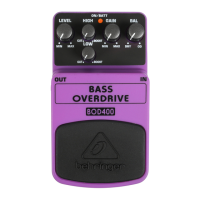
BASS OVERDRIVE BOD400
Authentic Tube-Sound Overdrive Eects Pedal
Thank you for showing your condence in us by purchasing the
Behringer BASS OVERDRIVE BOD400. This high-quality eects
pedal is specically designed for bass applications. Thanks to its
high-performance features you will achieve tube-like distortion,
smooth sustain and super fat tone with maximum punch.
1. Controls
(1) The LEVEL control adjusts the output level.
(2) The HIGH control allows you to boost/cut the high-frequency range.
(3) The LOW control allows you to boost/cut the low-frequency range.
(4) Use the GAIN control to adjust the amount of overdrive.
(5) With the BAL(ance) control you can adjust the amount of the dry
direct signal and the eect signal.
(6) The ON/BATT LED illuminates when the eect is activated. It also
serves as a battery level indicator.
(7) Use the footswitch to activate/deactivate the eect.
(8) Use this ¼" TS IN connector to plug in the instrument cable.
(9) The ¼" TS OUT connector sends the signal to your amp.
Use the DC IN connection at the front of the unit to plug in a 9 V power
supply (not included).
The BATTERY COMPARTMENT is located on the bottom. Open the lid to
install or replace the 9 V battery.
◊ ◊ The BOD400 has no on/o switch. As soon as you insert the
jack into the in connector, the BOD400 begins running.
When not using the BOD400, remove the jack from the in
connector. This extends the life of the battery.
The SERIAL NUMBER is located on the bottom.
V 1.0
(1)
(3)
(9)
(8)
(5)
(6)
(7)
(4)
(2)

 Need help?
 General






 To Next Page