DIGITAL SNAKE SD16/SD8 Quick Start Guide
DIGITAL SNAKE SD16/SD8 Channel Management
(EN)
Step 3: Channel
Management
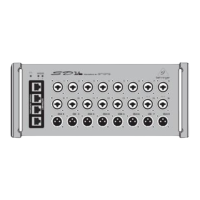
Signals are routed to and from the SD8/16 and a mixer or S16/DL16 via CAT-5e cable, with
maximum cable runs up to 100 meters. The clock source is always received on AES50 port A,
and the P-16 ULTRANET signals are carried on AES50-A channels 33-48. The 8 analog outputs
can carry AES50-A channels 1-8, 9-16, or 17-24, selectable via the 3-position switch on the side
of the stagebox.
SD8 Channel Routing
To mixer
TX RX
TX
RX
SD16
SD8
= AES50-A,
ch33-ch48
From mixer
RX TX
RX
TX
When chaining multiple SD8 or SD16 units, the signals from the second stagebox in the
chain are sent via AES50-A to the next stagebox’s AES50 port B. The signals from the second
stagebox are shifted up by 8 or 16 channels when merged with the first stagebox (see chart for
details). The output select switch would typically be set to the ‘9-16’ position to allow different
signals to be sent from the 2 stageboxes.
SD16 Channel Routing
To mixer
RX
TX
MIDI Control with S16/DL16
RX
TX
TX
RX
TX RX
From mixer
TX
RX
TX RX
Though the SD-series stageboxes will commonly be used with an X32/M32 digital console, it is possible to incorporate these products as
part of a standalone digital snake. The SD8/16 head amp gain and phantom power settings can be remotely controlled via MIDI when used
standalone with a BEHRINGER S16 or MIDAS DL16 master unit.
Note that the S16/DL16 will only accept MIDI preamp controls when its preamps are not controlled via AES50 already. Slave connection to an
X32/M32 console or another S16/DL16 in SN Master mode will inhibit MIDI preamp control. MIDI channel 1 controls the SN Master unit’s local
preamps (transmit and receive), while MIDI channel 2 controls the Slave unit, which in this case would be the SD8/16.
S16/DL16 MIDI Chart
RX TX
RX
TX
RX
TX
RX
TX
Note - each row in the above tables represents a block of 8 AES50 channels.
18 DIGITAL SNAKE SD16/SD8 19 Quick Start Guide






 To Next Page