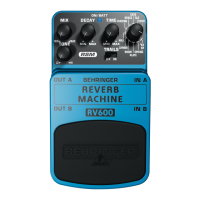
REVERB MACHINE RV600
Ultimate Reverb Modeling Eects Pedal
Thank you for showing your condence in us by purchasing the BEHRINGER REVERB MACHINE RV600.
This ultimate eects pedal is specically designed to deliver 24-bit, high-resolution stereo reverbs
comparable to state-of-the-art studio processors. Thanks to its 11 well-known modes and the extensive
parameter control that allow for maximum creativity, you’ll have plenty of great sounds at your disposal
for every situation.
1. Controls
(1) The TONE control allows you to shape
your overall sound.
(2) The MIX control determines the amount
of reverb added to the signal.
(3) The DECAY control determines how
quickly the reverb fades. In ECHO
mode, it determines the amount of
signal feedback.
(4) The blue ON/BATT LED illuminates when
the eect is activated. It also serves as a
battery level indicator.
(5) The TIME control determines the
pre-delay time, that is, the delay time
between the original dry sound and the
actual, audible reverb eect. In SPACE
mode, it determines the harmonic
density of the signal.
(6) This control lets you choose one of the eleven reverb type eects:
ECHO: Very fat echo with reverb.
TILE: Emulates the acoustics of a tiled room with bright early reections, like a bathroom.
CAVE: Deep and large echo, like being inside a cave.
SPACE: Ambiental, lush reverb with a dense, harmonized, octave-shifted content.
DUCKNG: Hall reverb with a ducking eect. The reverb “ducks” under your instrument’s signal
while you are playing to avoid clouding your sound, and reemerges when you stop, adding a rich
and smooth tail to it.
HALL: Bright and open reverb that simulates the reections of a concert hall.
CHMBR: Emulates the highly reective acoustics of a typical reverb chamber.
ROOM: Clear and natural acoustics of a room.
PLATE: Metallic, resonant sound of a plate reverb.
SPRING: Simulates the distinct and beloved sound of a spring reverb.
‘63 SP: Emulates the classic sound of a 1963 guitar combo spring reverb.
(7) With the TRAILS switch turned on, the reverb will smoothly fade away once you bypass the eect
instead of simply being cut o.
(8) Use the two ¼" TS connectors IN A and IN B to plug in a stereo input signal. For mono signals
connect to IN A.
(9) The two ¼" TS connectors OUT A and OUT B send the signal to your amp. Use both outputs to
achieve a full stereo eect. For mono use, connect to OUT A.
(10) Use the footswitch to activate/deactivate the eect.
(1)
(2)
(7)
(6)
(10)
(5)
(3)
(9) (8)
(4)

 Need help?
 General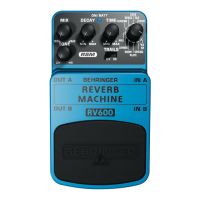




 To Next Page