7
ULTRABASS BX1200
1.2 Before you begin
Your BX1200 was carefully packed in the factory and the packaging is designed to protect the unit from rough
handling. Nevertheless, we recommend that you carefully examine the packaging and its contents for any
signs of physical damage, which may have occurred during transit.
+ If the unit is damaged, please do not return it to BEHRINGER, but notify your dealer and the
shipping company immediately, otherwise claims for damage or replacement may not be
granted. Shipping claims must be made by the consignee.
Be sure that there is enough space around the unit for cooling and please do not place the ULTRABASS on
high temperature devices such as radiators etc. to avoid overheating.
+ Before you connect your ULTRABASS to the mains, please make sure that your local voltage
matches the voltage required by the unit!
The mains connection of the BX1200 is made by using the enclosed mains cable and a standard IEC receptacle.
It meets all of the international safety certification requirements.
+ Please make sure that all units have a proper ground connection. For your own safety, never
remove or disable the ground connector of the unit or of the AC power cable.
You will find additional information in chapter 5 INSTALLATION.
1.3 Control elements
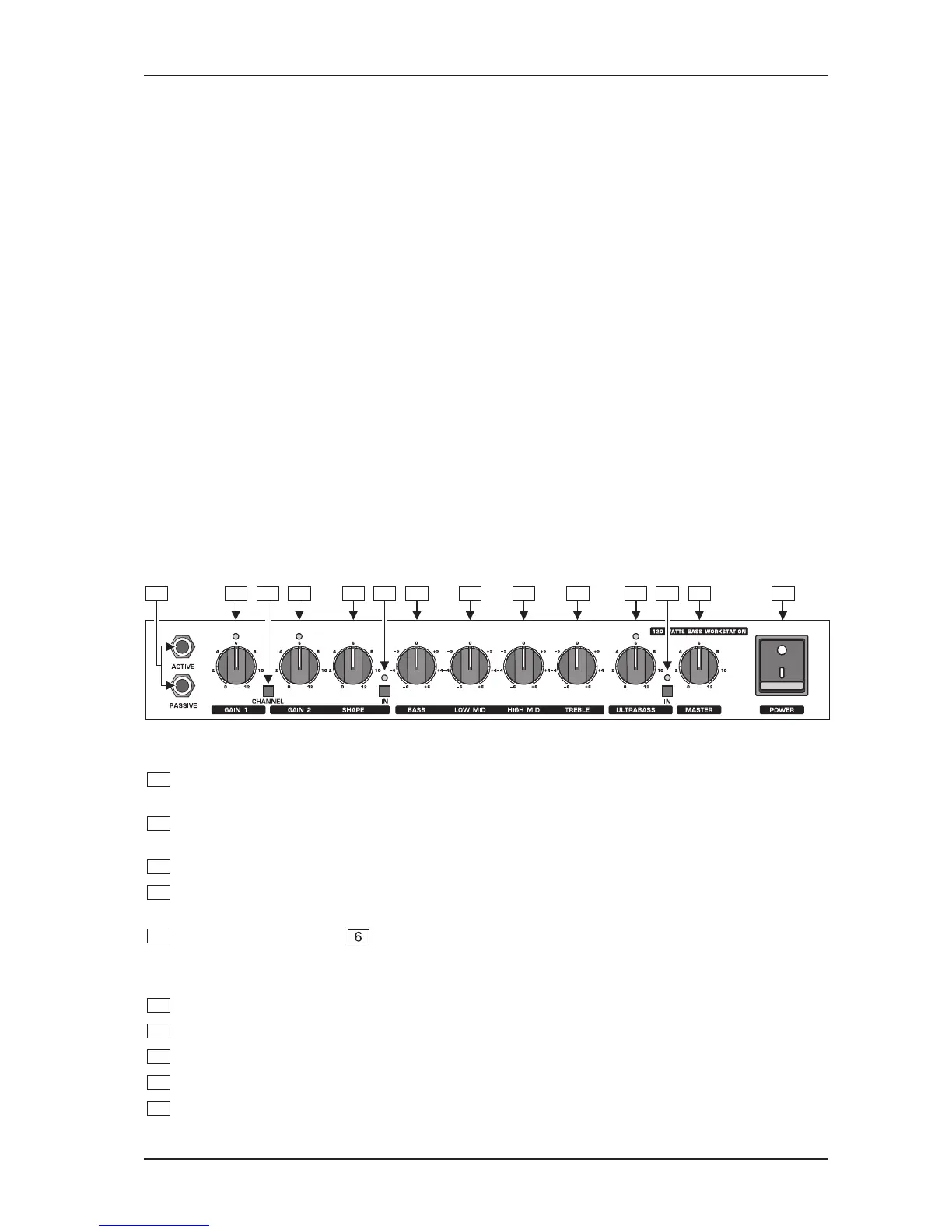
1.3.1 Front panel
1 2 3 4 5 6 7 8 9 10 11 12 13 14
Fig. 1.1: Front panel control elements







 To Next Page