16
WING-DANTE Quick Start Guide
5. Connection Scenarios
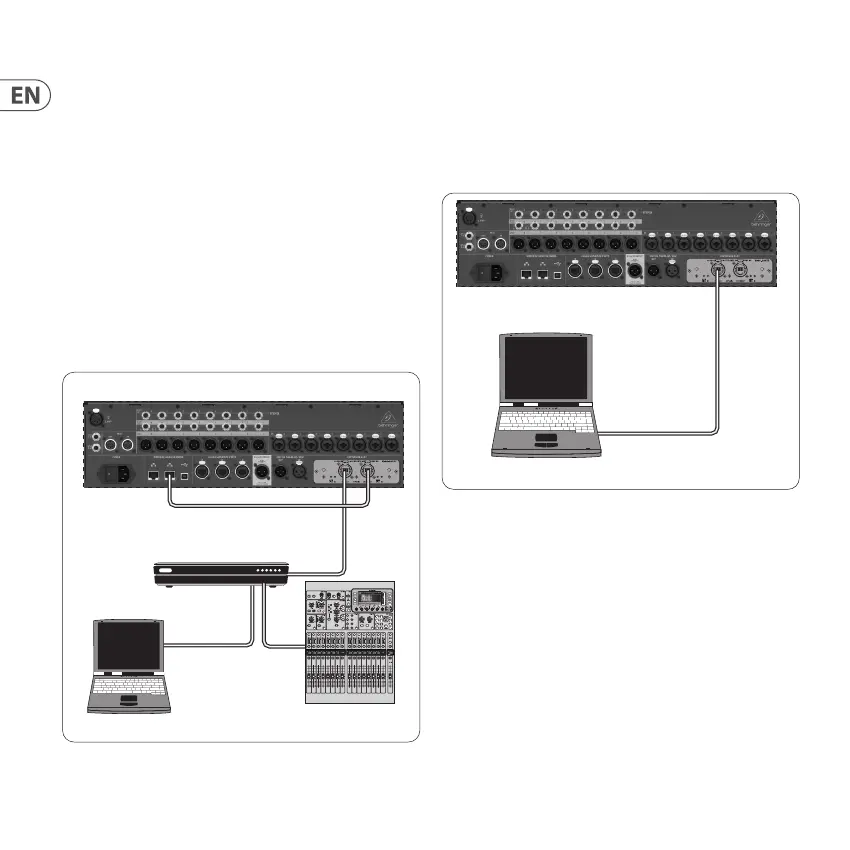
5.1 WING-DANTE connection to
Dante network
WING network router
1
PC and other Dante-enabled audio
devices, e.g. generic digital console with Dante card
1
for advice on suitable network routers for use with Dante networks visit audinate.com
Here the PC performs 3 tasks concurrently:
a) run Dante Controller app for signal routing
b) run Dante Virtual Soundcard (DVS) for recording/playback of
all audio channels of both mixers
c) run applications for editing or control of the mixer by
patching the Secondary connector to the mixer’s
networking port
5.2 WING-DANTE straight connection to PC /
Mac and Dante Virtual Soundcard
DVS
2
for recording/playback up to 64 x 64 channels
2
for advice on using and licensing Dante Virtual Soundcard visit
audinate.com
Behringer WING
Laptop
Behringer WING
Router/Switch
Primary
Secondary
Laptop
Other digital mixer
with Dante option





 To Next Page