Microwave Oven / User Manual
17 / EN
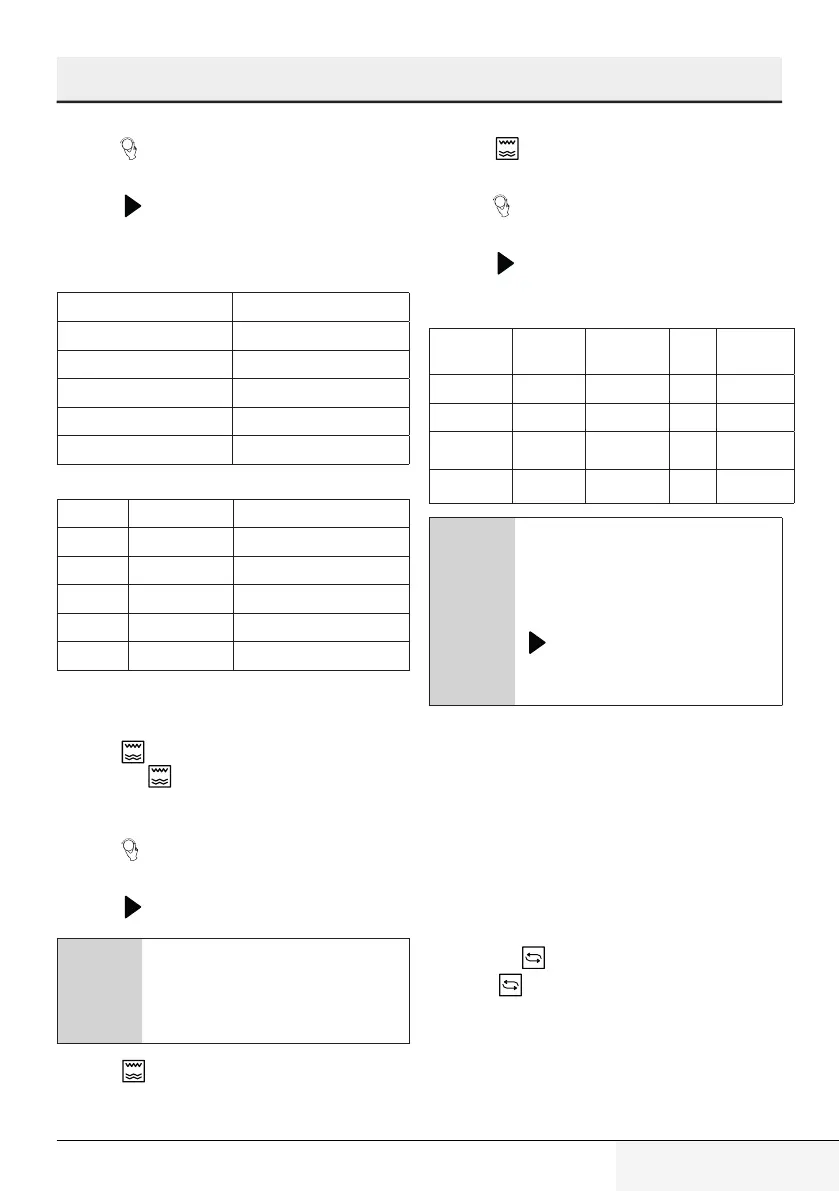
7. Turn “ ” to adjust the cooking time until the
oven displays "20:00".
8. Press “ ” to start cooking.
The steps for adjusting the time in coding
button are as below:
Setting the duration Increment amount
0-1 minute 5 seconds
1-5 minutes 10 seconds
5-10 minutes 30 seconds
10-30 minutes 1 minute
30-95 minutes 5 minutes
Microwave keypad instructions
Order Screen Microwave Power
1 PL10 100%
2 PL8 80%
3 PL5 50%
4 PL3 30%
5 PL1 10%
4.4 Cooking with grill or
combination mode
1. Press “ ” and "G” will be displayed in LED scre-
en. Press “ ” repeatedly to select the desired
power. Each time you press the key, “C-1, C-2,
C-3 and C-4” will be displayed respectively.
2. Turn “ ” to set the cooking time to a value
between 0:05 and 95:00.
3. Press “ ” again to start cooking.
C
Example:
If you want to use Combi
(MWO+Grill) (C-2) to cook for 10
minutes, you can operate the oven
with the following steps.
1. Press “ ” once and "G” will be displayed in the
screen.
2. Press “ ” twice again select the Combination
2 mode.
3. Turn “ ” to adjust the cooking time until the
oven displays "10:00".
4. Press “ ” to start cooking.
(Grill/Combination) Keypad instructions
Instruc-
tions
Display Micro-
wave
Grill Convec-
tion
1 C-1 • •
2 C-2 • •
3 C-3 • •
4 C-4 • • •
C
When half the grill time passes, the
oven sounds twice, and this is nor-
mal. In order to have a better grilling
effect, you should turn the food
over, close the door, and then press
“ ” to continue cooking. If no ope-
ration is performed, the oven will
continue cooking.
4.5 Convection
4.5.1 Convection cooking(with
preheating funtion)
The convection cooking can let you to cook the
food as a traditional oven. Microwave is not used.
It is recommended that you should preheat the
oven to the appropriate temperature before pla-
cing the food in the oven.
1. Press the “ ” key once, and “130˚C“ displays.
2. Press “ ” repeatedly to select the convec-
tion function. When convection temperature
displays, it indicates convection function. The
temperature can be chosen from 130 degrees
to 220 degrees.
4 Operation


 To Next Page