Microwave Oven / User Manual
19 / EN
C
Kitchen timer functions different
than 24-hours system. Kitchen ti-
mer is just a timer.
4.10 Auto menu
1. Turn “ ” clockwise to select the desired menu.
Menus between “AC01” and “AC10”.
2. Press “ ” to confirm.
3. Turn “ ” to choose the default weight in ac-
cordance with the menu chart.
4. Press “ ” to start cooking.
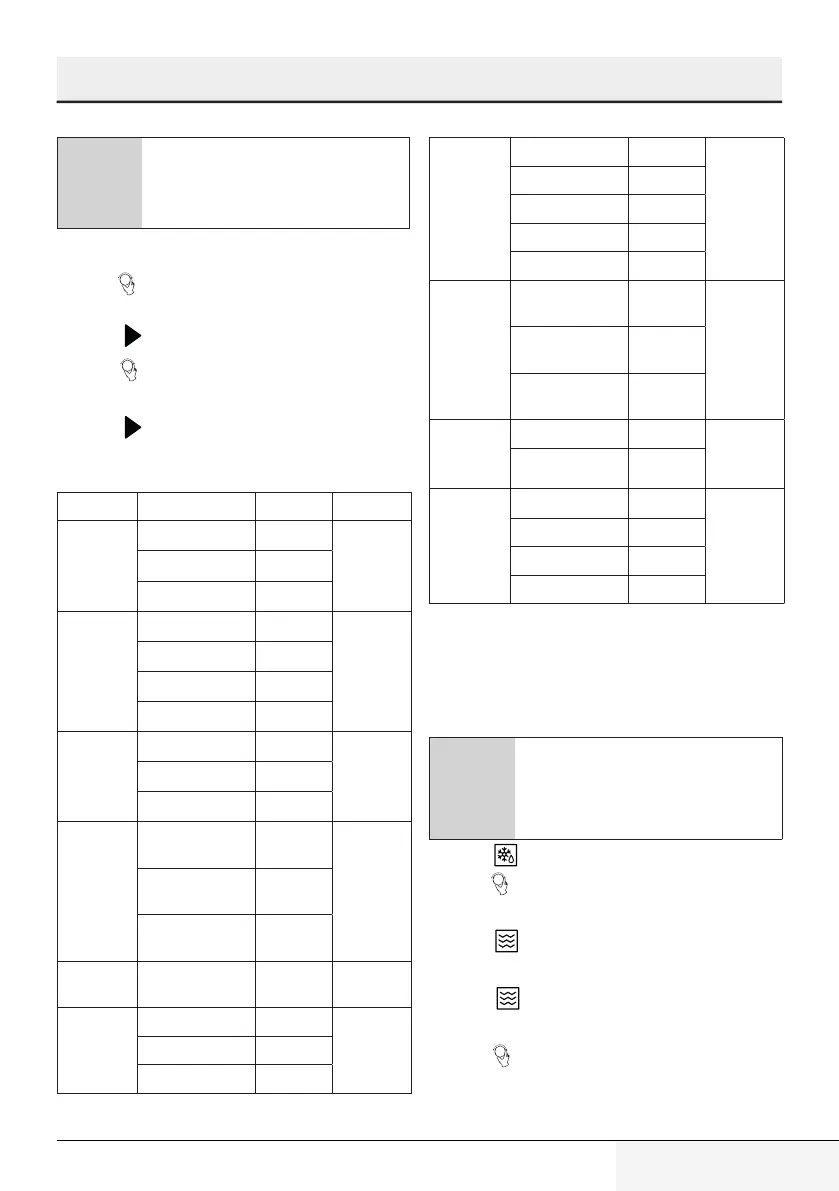
Auto cooking menu
Menu Weight Display Power
AC01
Pizza
200 g 200 g
C-4 / Grill
300 g 300 g
400 g 400 g
ACO2
Meat
150 g 150 g
100%
300 g 300 g
450 g 450
600 g 600 g
AC03
Vegetable
150 g 150 g
100%
350 g 350 g
500 g 500 g
AC04
Pasta
50 g (with 450 g
cold water)
50 g
80%
100 g (with 800 g
cold water)
100 g
150g (with 1200
g cold water)
150 g
AC05 Cake 475 g 475 g Preheat to
160
0
C
AC06
Potato
1 (about 230 g) 1
100%
2 (about 460 g) 2
3 (about 690 g) 3
AC07
Fish
150 g 150 g
80%
250 g 250 g
350 g 350 g
450 g 450 g
650 g 650 g
AC08
Beverage
1 cup (about
240 g)
1
100%
2 cup (about
480 g)
2
3 cup (about
720 g)
3
AC09
Popcorn
50 g 50
100%
microware
100 g 100
AC10
Chicken
500g 500g
C-4/
200
0
C
750g 750g
1000g 1000g
1200g 1200g
4.11 Multi-step cooking
At most 3 steps can be set for cooking. In multi-
step cooking, if one step is defrosting, then def-
rosting must be placed in the first step.
C
If you want to thaw food for 5 minu-
tes and then cook with 80% micro-
wave power for 7 minutes, perform
the following steps:
1. Press “ ” for twice.
2. Turn “ ” to select the defrost time until "5:00"
is displayed in the screen.
3. Press “ ” once and “PL10” will be displayed in
the screen.
4. Press “ ” once again to set 80% microwave
power.
5. Turn “ ” to adjust the cooking time until the
oven displays "7:00".
4 Operation


 To Next Page