Control Unit
14” (37 cm), 15” (38 cm) 20” (51 cm) and 21” (55 cm) TV s:
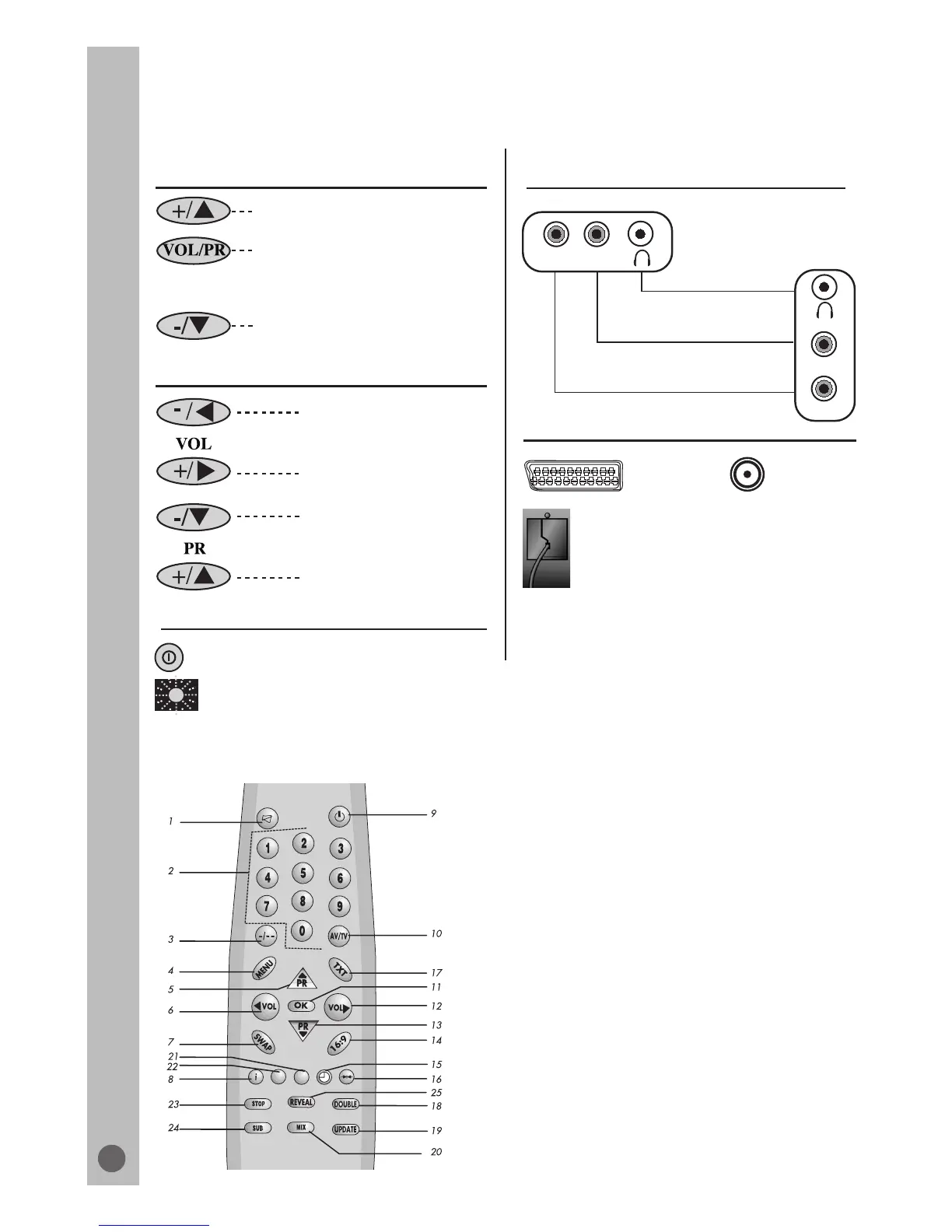
Program/Volume selection button:
This button allows you to select
program or volume mode on the
front panel.
Program/Volume increase button
Program/Volume decrease button
General
Power ON/OFF switch
Stand by indicator
20” (51 cm), 21” PF (55 cm) TV s:
Volume increase button
Volume decrease button
External Connections: (Front or side)
AV1 scart
External connections: (Rear)
Aerial socket
Power cable
Front
Side
V
A
Left audio PHONO
Mono PHONO (White)
Video PHONO (Yellow)
Headphone socket
VA
MUTE
Numeric
Two digit program (-/--)
MENU
Program up
Volume decrease
Return to selected programme (SWAP)
Information (i)
STAND-BY
AV-TV selection
OK
Volume increase
Program down
16:9 picture format
Sleep timer
Normalization
1.
2.
3.
4.
5.
6.
7.
8.
9.
10.
11.
12.
13.
14.
15.
16.
Yellow fastext
Blue fastext
Teletext/TV select
Enlarge
UPDATE
MIX
Green fastext
Red fastext
STOP
SUB-PAGE
REVEAL
15.
16.
17.
18.
19.
20.
21.
22.
23.
24.
25.
For Teletext Function (Opt.)
Program increase button
Program decrease button
Please note:
The Audio/Video PHONO and Headphone socket
can be placed on the front panel or on the right-
hand side of the cabinet depanding to the model of
your TV.
Remote control
Front and rear panel
6
Model dependant



 To Next Page