To verify if monitors are communicating correctly, change setting
no. 56 on one unit. Press → until you reach option 56. Press
↑ to switch from 0 to 1, to turn on the network display. Press
↑ and ← simultaneously to save, then press and hold ← for a
few seconds to return home. The unit will display each monitor
connected in order of their address. If the unit does not display
the others scrolling by, check the following;
• each unit must have a unique address, setting 39, with no
duplicates
• end-of-line jumpers are set on units at ends of cable only
• polarity of the communication cable and the 24 Vac is the
same on all units
• verify wire connections for shorts, and loose wires, etc.
8. To further test communication, press and hold the up button on
a monitor for 5 seconds to start manual mode (5 minutes). This
will close the relay 1 on that unit and all of the other units on the
network. See section 5 to set up a conguration for multiple
zones.
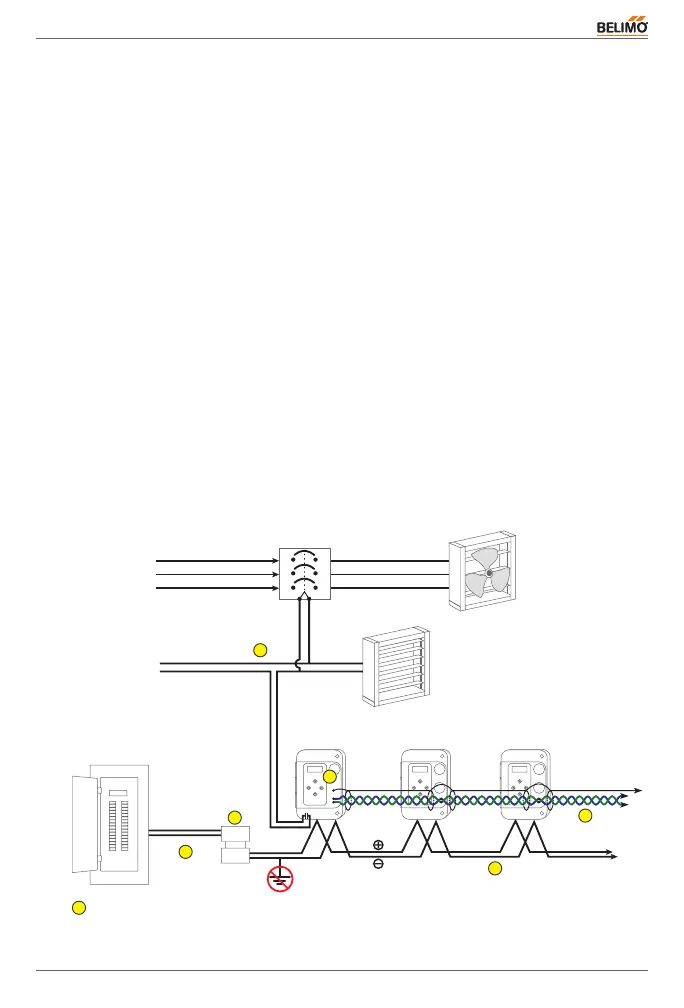
3.3 Installation
Electrical
Distribution
Panel
Magnetic
Starter
Exhaust Fan
Dampers
Fan Power
Source
Power source
for controls
to other
H
S
L
5
6
4
3
2
1
1
Transformer
24 V AC/DC
Monitors


 To Next Page