EasyManua.ls Logo

Belimo EXT-HA-8023 Series - User Manual

Belimo EXT-HA-8023 Series
3 pages
Print Icon
To Next Page IconTo Next Page
Loading...
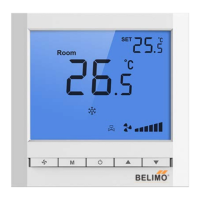
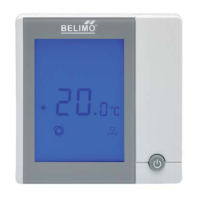
EXT-HA-8023 Series Touch Pad fan coil unit thermostats are designed to control
the room temperature in air-conditioning fan coil unit system or
dust pipe channel
system. EXT-HA-8023 series thermostats with microprocessor and big LCD display.
It
shows the following items: working status (cool, heat or ventilation), fan speed,
room temperature, set-point temperature etc. Keys include on/off ( ),mode
( ),fan speed ( ) and temperature adjustment (
).
BASIC FEATURES LCD Display
Room temperature setting
Manual or auto 3-speed changeover
Defrost (low temperature protection)
Blue back light
Key lock ( Optional )
Auto-restart
Working Status: Cooling
, Heating or Ventilation
Fan SpeedLow Med High
or AUTO
FCU valve status
Room temperature display
Temperature setting display
SPECIFICATIONS
Sensing element:
NTC
1
Set-point range:
5 to 35℃℃
Display range:
055
Operation environment: 045
Operating Humidity: 5 90%RH
(non-condensing)
Power supply:
AC 85260V, 50/60Hz
Wirings: Accepting 2 × 1.5 mm
2
or 1 x 2.5 mm
2
wires
Switch current rating: Resistive: 2 A, Inductive: 1 A
Housing: PC + ABS Fire Retardant
Dimensions: 90×88×15.5 mm ( W × H × D )
Hole pitch: 60 mm ( S
tandard )
Protection Class: IP30
Rated Power: < 1W
Accuracy:
Key: Soft touch
OPERATION
On/Off: Press “ ” to turn on, press “ ” again to turn off thermostat and its output.
Setting temperature: Press “” to reduce set-point, press “to raise set-point, and 0.5 changed once.
Mode Selection: Press to change system working in cooling ”, heating or ventilation mode, the
related icon will flash
Fan Speed Selection: Press “ ” to change fan speed among “ (Hi)”, (Med)”, “ (Low)” or “AUTO
(Auto)”.
Under auto fan speed “AUTO”, the fan-speed will be changed automatically. Auto LOW-speed When the difference
between room-temperature and set-point is 1; Auto MED-speed When difference is 2; Auto Hi-speed When
difference is 3.
Control Motorized Valve: If the differential temperature between room temperature and set-point exceed 1, FCU
valve will be open; if room temperature
and set-point are equal, EXT-HA-8023 will close the FCU valve with
the fan still running.
EXT-HA-8023 Series
Thermostat
www.belimo.com
EXT-HA-8023 • en-ap • 2020-11-10 • subject to changes
1
Question and Answer IconNeed help?

Do you have a question about the Belimo EXT-HA-8023 Series and is the answer not in the manual?

Summary

Basic Features of EXT-HA-8023 Thermostat

LCD Display Information

Technical Specifications

Thermostat Operation

On;Off Control

Turns the thermostat and its output on or off with the power button.

Setting Temperature

Adjusts the target room temperature in 0.5°C increments using dedicated buttons.

Mode Selection

Changes the system's operating mode to cooling, heating, or ventilation.

Fan Speed Selection

Selects fan speed manually (Low, Med, High) or automatically.

Motorized Valve Control

Controls the FCU valve based on temperature difference and auto fan speed.

Advanced Functions

Keyboard Lock Functionality

Automatically locks the keypad after inactivity to prevent unauthorized operation.

Low Temperature Protection

Automatically turns off the fan and valve when room temperature drops below 5°C.

Temperature Adjustment

Allows manual adjustment of temperature settings within a ±5°C range.

Alarm Indicators

Displays error codes (E1, E2) for sensor failures and status (HI, LO) for temperature extremes.

Wiring Diagrams

Installation Guide

Summary

Basic Features of EXT-HA-8023 Thermostat

LCD Display Information

Technical Specifications

Thermostat Operation

On;Off Control

Turns the thermostat and its output on or off with the power button.

Setting Temperature

Adjusts the target room temperature in 0.5°C increments using dedicated buttons.

Mode Selection

Changes the system's operating mode to cooling, heating, or ventilation.

Fan Speed Selection

Selects fan speed manually (Low, Med, High) or automatically.

Motorized Valve Control

Controls the FCU valve based on temperature difference and auto fan speed.

Advanced Functions

Keyboard Lock Functionality

Automatically locks the keypad after inactivity to prevent unauthorized operation.

Low Temperature Protection

Automatically turns off the fan and valve when room temperature drops below 5°C.

Temperature Adjustment

Allows manual adjustment of temperature settings within a ±5°C range.

Alarm Indicators

Displays error codes (E1, E2) for sensor failures and status (HI, LO) for temperature extremes.

Wiring Diagrams

Installation Guide

Overview

EXT-HA-8023 Series Thermostat

The EXT-HA-8023 Series Touch Pad fan coil unit thermostats are designed for precise control of room temperature within air-conditioning fan coil unit systems or dust pipe channel systems. These thermostats feature a microprocessor and a large LCD display, providing clear and comprehensive information.

Function Description:

The thermostat displays various operational parameters including:

  • Working Status: Indicates whether the system is in cooling, heating, or ventilation mode.
  • Fan Speed: Shows the current fan speed setting (Low, Medium, High, or Auto).
  • FCU Valve Status: Displays the status of the Fan Coil Unit valve.
  • Room Temperature: Shows the current ambient room temperature.
  • Temperature Setting: Displays the user-defined set-point temperature.

The device includes intuitive controls:

  • On/Off (①): To power the thermostat on or off.
  • Mode (M): To switch between different operating modes (cooling, heating, ventilation).
  • Fan Speed (⑱): To adjust the fan speed.
  • Temperature Adjustment (▲▼): To increase or decrease the set-point temperature.

Important Technical Specifications:

  • Sensing Element: NTC
  • Accuracy: ±1°C
  • Set-point Range: 5°C to 35°C
  • Display Range: 0°C to 55°C
  • Operation Environment: 0°C to 45°C
  • Operating Humidity: 5% to 90% RH (non-condensing)
  • Key Type: Soft touch
  • Power Supply: AC 85-260V, 50/60Hz
  • Wirings: Accepts 2 x 1.5 mm² or 1 x 2.5 mm² wires
  • Switch Current Rating: Resistive: 2 A, Inductive: 1 A
  • Housing: PC + ABS Fire Retardant
  • Dimensions: 90 × 88 × 15.5 mm (W × H × D)
  • Hole Pitch: 60 mm (Standard)
  • Protection Class: IP30
  • Rated Power: < 1W

Usage Features:

On/Off:

  • Press "①" to turn on the thermostat.
  • Press "①" again to turn off the thermostat and its output.

Setting Temperature:

  • Press "▼" to reduce the set-point temperature.
  • Press "▲" to raise the set-point temperature.
  • Each press changes the temperature by 0.5°C.

Mode Selection:

  • Press "M" to cycle through cooling (❄), heating (☀), or ventilation (⑱) modes. The corresponding icon will flash on the display.

Fan Speed Selection:

  • Press "⑱" to select fan speed among "■■■" (Hi), "■■" (Med), "■" (Low), or "AUTO" (Auto).
  • Auto Fan Speed: The fan speed adjusts automatically based on the difference between room temperature and set-point:
    • LOW-speed: When the difference is 1°C.
    • MED-speed: When the difference is 2°C.
    • HI-speed: When the difference is 3°C.

Control Motorized Valve:

  • If the differential temperature between room temperature and set-point exceeds 1°C, the FCU valve will open.
  • If room temperature and set-point are equal, the EXT-HA-8023 will close the FCU valve, with the fan continuing to run.

Keyboard Lock Function:

  • Keypad Lock: The keypad automatically locks after 30 seconds of inactivity to prevent unauthorized operation.
  • Keypad Unlock: Press "⑱" for 5 seconds to unlock the keypad.

Low Temperature Protection Function:

  • Automatic Activation: If the room temperature drops below 5°C, the thermostat automatically turns on the fan and valve, indicated by "❄".
  • Automatic Deactivation: When the room temperature reaches 7°C, the thermostat automatically closes the output.
  • Setting Low Temperature Protection:
    • Turn off the thermostat.
    • Press and hold "M" for 3 seconds. The display will show "OF" (invalid) or "ON" (valid).
    • Use "▲" or "▼" to adjust the setting. The default is "OF".

Temperature Adjustment (Offset):

  • This feature allows for a temperature offset of ±5°C.
  • Turn off the thermostat.
  • Press and hold "▲" and "▼" for 3 seconds. The display will show "XX °C" (without displaying the thermostat model).
  • Use "▲" or "▼" to adjust the temperature value.
  • The setting is automatically confirmed after 6 seconds.

Maintenance Features:

Alarm System:

  • Sensor Failure: If the sensor fails, the thermostat closes the fan and valve and displays an error code:
    • E1: Sensor in short circuit alarm.
    • E2: Sensor in open circuit alarm.
  • Temperature Out of Range:
    • HI: Displayed when the temperature is higher than 55°C.
    • LO: Displayed when the temperature is lower than 0°C.

Installation Notes:

  • The installation process involves opening the face cover, removing cables from the control board, connecting wires according to the diagram, fixing the backboard to the wall, connecting cables to the control board, hanging the unit on hooks, and finally pressing down the sides to secure the cover.
  • Crucial Warning: Ensure all wires are connected strictly according to the wiring diagrams. Keep the unit away from water, mud, and other materials to prevent damage.

Belimo EXT-HA-8023 Series Specifications

General IconGeneral
BrandBelimo
ModelEXT-HA-8023 Series
CategoryThermostat
LanguageEnglish

Related product manuals