EasyManua.ls Logo

Belimo EXT-RCF-24 - User Manual

Belimo EXT-RCF-24
4 pages
Print Icon
To Next Page IconTo Next Page
Loading...
O56001 03/12 - Subject to change. © Belimo Aircontrols (USA), Inc.
800-543-9038 USA 866-805-7089 CANADA 203-791-8396 LATIN AMERICA / CARIBBEAN
Application
EXT-RC series of proportional and fl oating thermostats are used to control room
temperature in commercial applications.
Features
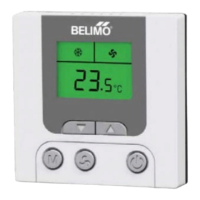
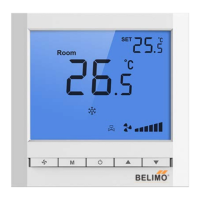
LCD with green backlight
Detects and displays room temperature
On/Off capability of cooling and heating equipment
Room temperature setting
Fahrenheit (°F) or Celsius (°C) display
Selectable single or three speed fan control
Remote sensor input
Technical Data
Power AC 24V +10%, 50Hz/60Hz
Output signal
EXT-RCP-24
AC 24V x 2 (0.5A resistive)
0-10 VDC (5 mA) / 4-20 mA (600Ω)
Output signal
EXT-RCF-24
AC 24V x 2 (0.5A resistive)
oating point control
Input signal dry contact (NO)
Dimensions 3.4” w x 3.4” h x 0.9” d [86mm x 86mm x 23mm]
Fixing screw width 60mm (standard)
Set temperature range 0° to 99.5° adjustable
Accuracy displayed 0.1°
Accuracy
+0.5°
Rated power < 1W
Sensor type NTC
Display LCD
Basic Features
Working modes
Cooling , Heating , Ventilating , Auto
Fan speed
3 speed ( Low , Medium , High ) / Auto
Operation Instructions
On/Off
Press
button.
Setpoint
Press
to reduce the setpoint, press to increase the setpoint
in 0.5°C increments. The setpoint will be confi rmed automatically
after 5 seconds and then will return to display status. Press or
to check setpoint.
Mode
Press
to change the working mode- Cooling , Heating ,
Vent
.
Fan speed
Press to select the desired speed- low , medium , high ,
or auto
. If single speed fan is chosen, only medium speed will
be available.
Auto speed
The fan speed will be changed automatically to the following:
Low speed- when room temperature is 1° difference with setpoint.
Med. speed- when room temperature is 2° difference with setpoint.
High speed- when room temperature is 3° difference with setpoint.
Sleep
Thermostat will go into sleep function after programming.
To set:
Press button for 3 seconds until display shows. A countdown
will start in the center of the screen. Use or to adjust the
desired sleep time. The maximum setting is 48 hours. Thermostat
will return to working status after 5 seconds. will fl ash to start
countdown. The setpoint will be replaced by the sleep setpoint.
To quit:
When the thermostat is in sleep function, will fl ash. Press or
to quit.
Keypad lock
Press and for 10 seconds. This will activate the display.
under this function, the keypad is locked. To unlock, press and
for 10 seconds until disappears.
Set parameters
With thermostat off, press for 10 seconds to enter the menu to set
all parameters.
Dimensions (mm)
LCD Electronic Thermostat
EXT-RCF-24, EXT-RCP-24
1
Question and Answer IconNeed help?

Do you have a question about the Belimo EXT-RCF-24 and is the answer not in the manual?

Summary

Technical Data and Features

Product Specifications

Details power, output signals, input signals, dimensions, and basic features.

Key Features

Highlights include LCD display, room temperature detection, and on/off control.

Operation Instructions

Basic Controls

Instructions for On/Off, Setpoint adjustment, and Mode selection.

Fan Speed and Sleep Mode

Guidance on fan speed selection, auto speed, and activating sleep mode.

Advanced Settings

Information on keypad lock and parameter settings.

Parameter Settings

Configuration Options

Details on power status, fan speed, fan mode, sensor selection, and temperature display.

Setpoint and Dead Band

Configuration for minimum/maximum setpoints and dead band.

Wiring Diagrams

EXT-RCF-24 Wiring

Diagram illustrating wiring connections for the EXT-RCF-24 model.

EXT-RCP-24 Wiring

Diagram illustrating wiring connections for the EXT-RCP-24 model.

Installation Manual

Mounting Method

Step-by-step guide for physically installing the thermostat unit.

Summary

Technical Data and Features

Product Specifications

Details power, output signals, input signals, dimensions, and basic features.

Key Features

Highlights include LCD display, room temperature detection, and on/off control.

Operation Instructions

Basic Controls

Instructions for On/Off, Setpoint adjustment, and Mode selection.

Fan Speed and Sleep Mode

Guidance on fan speed selection, auto speed, and activating sleep mode.

Advanced Settings

Information on keypad lock and parameter settings.

Parameter Settings

Configuration Options

Details on power status, fan speed, fan mode, sensor selection, and temperature display.

Setpoint and Dead Band

Configuration for minimum/maximum setpoints and dead band.

Wiring Diagrams

EXT-RCF-24 Wiring

Diagram illustrating wiring connections for the EXT-RCF-24 model.

EXT-RCP-24 Wiring

Diagram illustrating wiring connections for the EXT-RCP-24 model.

Installation Manual

Mounting Method

Step-by-step guide for physically installing the thermostat unit.

Overview

The Belimo EXT-RCF-24 and EXT-RCP-24 are LCD Electronic Thermostats designed for precise room temperature control in commercial applications. These devices offer a comprehensive set of features for managing heating, cooling, and ventilation, ensuring optimal comfort and energy efficiency.

Function Description

At its core, the EXT-RCF-24 and EXT-RCP-24 function as intelligent thermostats that detect and display the current room temperature. They are capable of controlling both cooling and heating equipment, making them versatile for various HVAC systems. The thermostats allow users to set a desired room temperature, which the device then maintains by activating or deactivating the connected equipment. The EXT-RCF-24 specifically uses floating point control, while the EXT-RCP-24 utilizes proportional control, both designed for accurate and responsive temperature regulation.

A key aspect of their functionality is the ability to manage fan speed. Users can select between low, medium, or high fan speeds, or opt for an auto mode where the fan speed adjusts automatically based on the temperature difference from the setpoint. For instance, in auto mode, the fan will run at low speed if the room temperature is 1° different from the setpoint, at medium speed for a 2° difference, and at high speed for a 3° difference. This intelligent fan control contributes to both comfort and energy savings.

The thermostats also incorporate a "sleep" function, allowing users to program a period during which the thermostat operates under specific settings, potentially for energy conservation during unoccupied hours. This function can be set for up to 48 hours, after which the thermostat reverts to its normal working status.

For enhanced security and to prevent unauthorized changes, the device includes a keypad lock function. This ensures that once settings are configured, they remain consistent unless intentionally unlocked.

Usage Features

The EXT-RCF-24 and EXT-RCP-24 are designed for user-friendly operation, featuring an LCD with a green backlight for clear visibility of information.

  • Basic Operation: Turning the device on and off is straightforward, accomplished with a single button press.
  • Setpoint Adjustment: Users can easily adjust the desired room temperature in 0.5°C increments using dedicated up and down buttons. The setpoint is automatically confirmed after a few seconds, and the display returns to showing the current room temperature.
  • Mode Selection: The thermostat supports multiple working modes: Cooling, Heating, and Ventilating, along with an Auto mode that intelligently switches between heating and cooling as needed. Users can cycle through these modes with a dedicated button.
  • Fan Speed Control: A fan button allows users to select their preferred fan speed (low, medium, high) or activate the auto fan speed function. If the system is configured for single-speed fan operation, only the medium speed option will be available.
  • Sleep Function Programming: To activate the sleep function, users press and hold a button for 3 seconds. A countdown appears, and the desired sleep time (up to 48 hours) can be set using the up/down buttons. The thermostat will then operate according to the sleep setpoint during this period. To exit the sleep function, a flashing icon indicates its active state, and pressing a button will deactivate it.
  • Keypad Lock: The keypad can be locked by pressing and holding two specific buttons for 10 seconds, which activates a lock icon on the display. To unlock, the same buttons are pressed and held until the icon disappears. This feature is particularly useful in public or commercial settings to maintain desired settings.
  • Parameter Settings: Advanced parameters can be accessed and configured when the thermostat is off by pressing and holding a button for 10 seconds. This allows for customization of various operational aspects, such as power-on status, fan speed configuration, fan mode (e.g., whether the fan shuts off with the valve or continues running), sensor selection (internal or remote), temperature display unit (Celsius or Fahrenheit), temperature calibration, minimum and maximum setpoints, and dead band.
  • Modulating Output Options: For more complex HVAC systems, the device offers modulating output options that can be configured via a 5-pole switch on the PCB. These options include setting resistance between AB wires, and configuring modulation for Port 1 (0-20 mA or 0-10 VDC) and Port 2 (0-20 mA) and Port 3 (0-10 VDC). This allows for fine-tuned control of connected equipment.

Maintenance Features

While the manual primarily focuses on installation and operation, certain aspects indirectly contribute to ease of maintenance or indicate a robust design:

  • Durable Design: The device's compact dimensions and clear LCD suggest a design intended for longevity and ease of integration into various environments.
  • Easy Installation: The installation manual outlines a straightforward process involving opening the back panel, connecting wires according to a diagram, securing the base, and reattaching the front panel. This modular approach simplifies initial setup and potential future servicing.
  • Parameter Accessibility: The ability to access and adjust a wide range of parameters, including temperature calibration, allows for fine-tuning and correction over time, ensuring continued accuracy and optimal performance without requiring physical intervention on the sensor itself.
  • Remote Sensor Input: The option to use a remote sensor input means that if the internal sensor is not suitable for a particular application or if it fails, an external sensor can be easily integrated, providing flexibility and redundancy.
  • Diagnostic Information: Although not explicitly detailed as a diagnostic feature, the clear display of current temperature and operational mode provides immediate feedback on the device's status, which can be helpful in troubleshooting.
  • Warranty: The inclusion of a 5-year warranty indicates the manufacturer's confidence in the product's reliability and provides assurance for long-term use.

Belimo EXT-RCF-24 Specifications

General IconGeneral
Control TypeElectronic
Display TypeLCD
Product TypeRoom Thermostat
Mounting TypeWall
Connection TypeScrew Terminal
Housing MaterialPlastic

Related product manuals