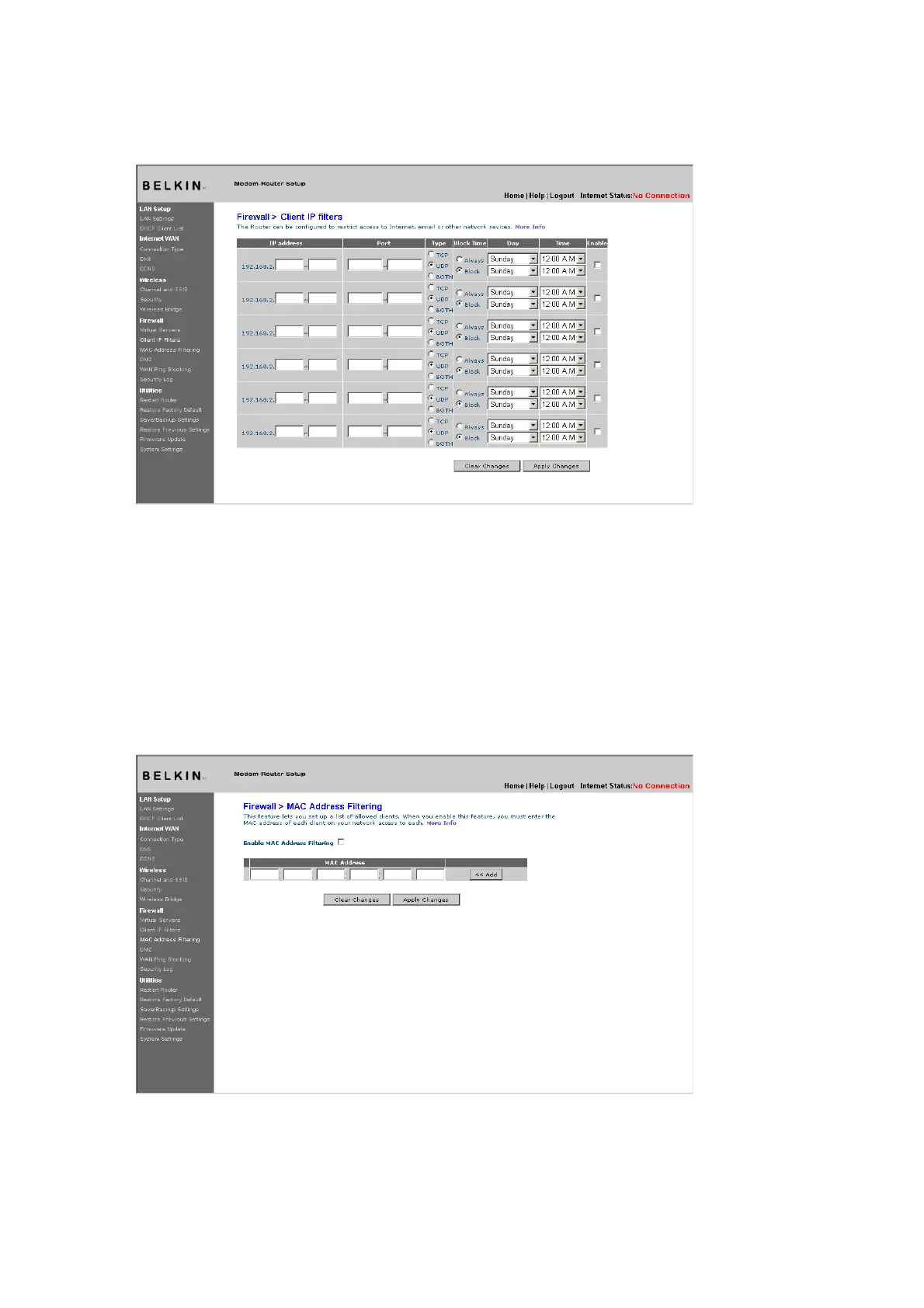
(1) (2) (3) (4)
To restrict Internet access to a single computer for example, enter
a name of the filter in “Filter Name” box
(1) and IP address of the
computer you wish to restrict access to in the IP field
(2). Next, enter
“80:80” in the Port field
(3). Select protocol from the “Protocol”
drop-down box
(4). Click “Apply Changes”. The computer at the IP
address you specified will now be blocked from Internet access.
MAC Address Filtering
The MAC address filter is a powerful security feature that allows you
to specify which computers are allowed on the network. Any computer
attempting to access the network that is not specified in the filter list
will be denied access. When you enable this feature, you must enter a
name for the user and the MAC address of each client on your network
to allow network access. Next, click “Add” to save the settings.
[use existing screenshot]
DMZ (Demilitarized Zone)
If you have a client PC that cannot run an Internet application











 To Next Page