8
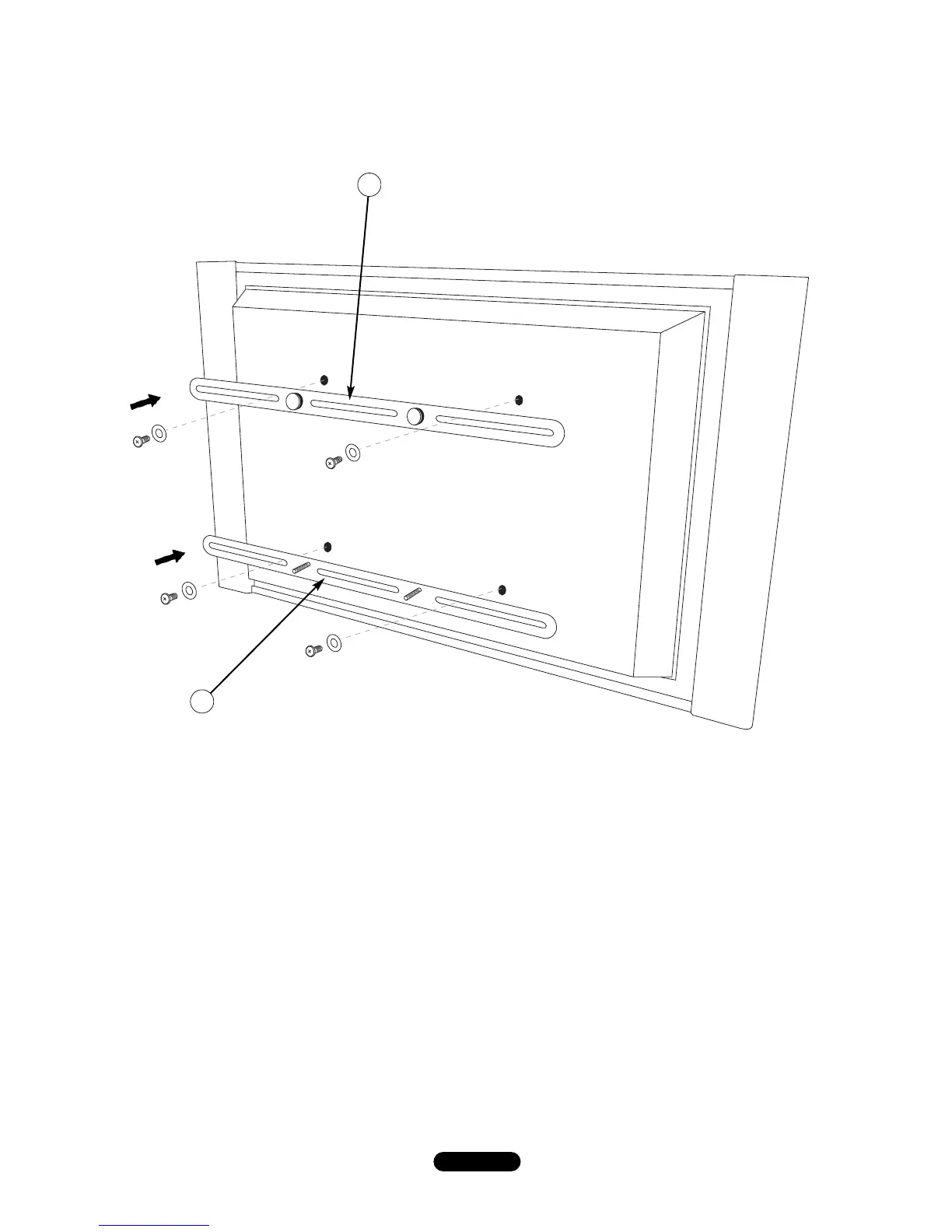
I. MOUNT the Flat Panel Mounting Bars (F&G) to the rear of the TV, as described below and as shown in Fig. 6,
using the screws that were included with your TV. If you do not have the TV screws, there is an assortment of
common sizes included with this Flat Panel Mounting System.
J. With the posts on the TOP Mounting Bar (F) facing away from the TV, CENTER and ALIGN the TOP Mounting
Bar [the one with the larger wider post heads] with the upper mounting holes on the rear of your TV. SECURE
the bar to the TV using a washer and the proper screws as shown in Fig. 6.
K. REPEAT this assembly for the BOTTOM mounting bar (G) [the one with the threaded posts]. TIGHTEN FULLY
BUT DO NOT OVERTIGHTEN.
L. If the TV back is NOT flat you may have to use a longer screw along with the spacers that are also included with
the hardware.
G
F
Fig. 6


 To Next Page