10
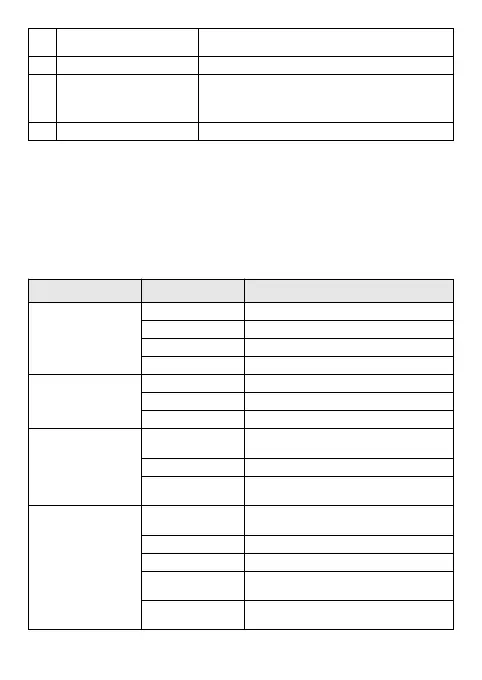
Self-Timer Countdown
Indicates that the camera is currently in
10-second countdown (self-timer)
Zoom indication Indicates the current digital zoom ratio
Battery
Indicates the current battery status; when the
icon is in red, it indicates low battery and the
camera will be automatically shut down soon
Flash light Indicates that the flash light has been turned on
Menu Setup
Press the menu key to open the main menu for video recording, press the W/T
key to select a menu option and then press the shutter key to enter the
sub-menu. In the sub-menu, press the shutter key to confirm and to return to the
main menu (or directly press the power key to return to the main menu), and
press the W/T key to conduct selection. After returning to the main menu, you
can press the power key to exit the menu.
In menu selection, the selected menu option will be highlighted.
Main Menu Sub-Menu Description
Resolution
(image size)
2592x1944 5 million-pixel resolution
2048x1536 3 million-pixel resolution
1280x960 1.3 million-pixel resolution
640x480 0.3 million-pixel resolution
Quality
(image quality)
Super fine Superb image quality
Fine Fine image quality
Normal Normal image quality
Metering
Center
Taking the center of as the basis for
metering
Multi Multi-stop metering
Spot
Using one spot as the basis in
metering
White balance
Auto
Automatic white balance is suitable for
most cases
Daylight Suitable for daylight environment
Cloudy Suitable for cloudy environment
Fluorescent
Suitable for fluorescent lamp light
source environment
Tungsten
Suitable for tungsten lamp light source
environment


 To Next Page