4
RADIO OPERATION
When the vehicle is turned on or is on accessory power, press the POWER key
button on the unit or on the remote control. The unit will turn on and enter into the
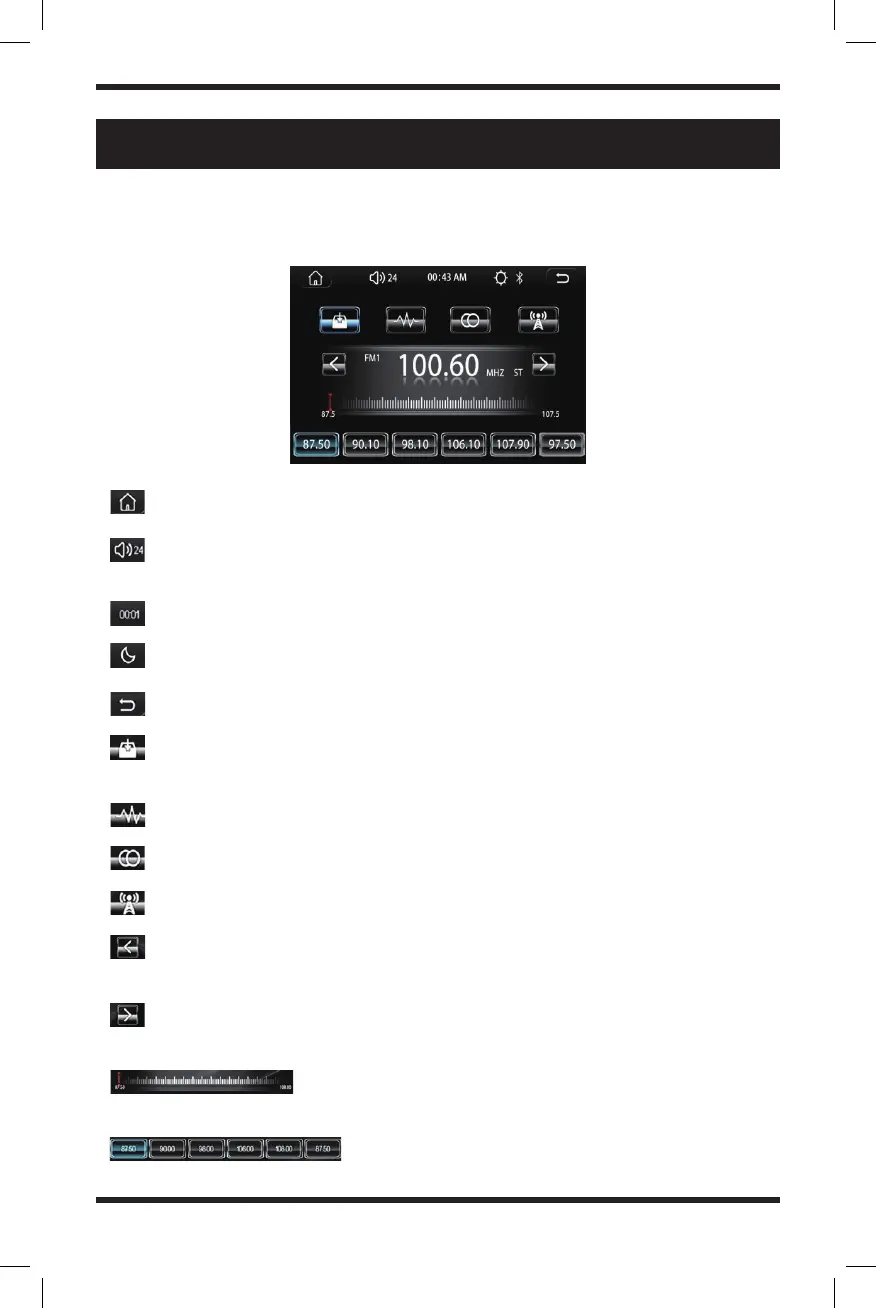
radio interface. The radio interface will appear like the image below:
Press this icon to enter into the main interface
Volume icon: Press to enter volume adjustment, touch, and slide to adjust
the volume
Time display
Press this icon to switch the backlight mode (day, night off-screen) 3 mode
Back button: Press to go back to the main interface
Short press this icon to browse radio stations. Long press the icon to search
and save stations automatically.
BAND switch: Switch between FM1/FM2/FM3/AM1/AM2
ST stereo switch: Switch ST stereo and MONO modes
Switch between LOC and DX (LOC: strong signal; DX: weak signal)
Short press to scan to the low end manually and long-press to scan to the
low end automatically.
Short press to scan to high end manually and long-press to scan to high end
automatically.
Radio progress bar: Press and slide to manually adjust
radio stations
Press to select a station, long press to store your
favorite station


 To Next Page