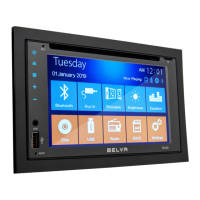
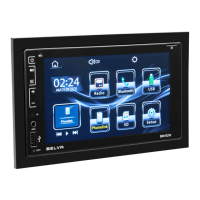
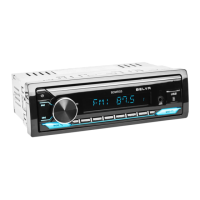
The Belva BDMRS5 is a single DIN CD car stereo receiver with Bluetooth® capability, designed to provide a comprehensive audio experience in your vehicle. This owner's manual guides users through the installation, operation, and troubleshooting of the device, ensuring a smooth and enjoyable experience.
Function Description
The BDMRS5 serves as a central audio hub for your car, offering multiple ways to enjoy music and manage calls. Its primary functions include:
- CD Playback: The unit supports CD playback, allowing you to listen to your favorite albums in traditional format.
- Bluetooth Connectivity: Equipped with Bluetooth, the receiver enables hands-free calling and wireless music streaming from your mobile device. This feature supports incoming and outgoing calls, with phone numbers displayed on the screen. It's important to note that while it handles calls and music playback, it does not support a phone book function.
- USB and SD Card Playback: The device features a USB port and an SD card slot, allowing you to play MP3/WMA audio files directly from USB drives or SD cards. However, it does not support video playback or image display.
- AM/FM Radio: The BDMRS5 includes an AM/FM tuner, providing access to a wide range of radio stations.
- Auxiliary Input: An auxiliary input is available for connecting external audio devices via a 3.5mm cable, offering another versatile option for music playback.
- Pre-Outs: The unit includes 5V pre-outs (3 pairs: Front, Rear, and Sub), allowing for connection to external amplifiers for enhanced audio performance.
- Remote Control: An optional IR remote control is supported, providing convenient operation from a distance.
Usage Features
The BDMRS5 is designed for user-friendly operation, both from its front panel and an optional remote control.
Front Panel Controls:
- On/Off: A dedicated button for powering the unit on or off.
- Mute: Quickly mutes or unmutes audio output.
- Mode/Answer Call: Toggles between different audio modes (CD, Bluetooth, USB, SD, AUX, Radio) and answers incoming phone calls.
- Band/Reject Call: Selects radio bands (FM1, FM2, FM3, AM1, AM2) and rejects or hangs up phone calls.
- Station Tuning & Fast Forward/Rewind: Used for tuning radio stations or navigating tracks during media playback.
- Clock Adjustments: Allows for setting and adjusting the device's clock.
- Preset Stations: Buttons for quickly accessing stored radio stations.
- Aux Input: A physical port for connecting auxiliary audio devices.
- SD Card Slot: A slot for inserting SD cards for media playback.
- USB Port: A port for connecting USB drives for media playback.
- IR Remote Control Window: The receiver for signals from the optional remote control.
- Display: Shows current status, track information, radio frequency, and call details.
Bluetooth Connection:
To connect to Bluetooth, users need to turn on the unit and search for "Belva BDMRS5" on their mobile device. Once connected, the Bluetooth icon on the stereo's screen will stop flashing. Answering calls is done by pressing "MODE," and hanging up by pressing "BAND."
Remote Control Functions:
The optional remote control offers a comprehensive set of functions for convenient operation:
- Power On/Off - Mode: Powers the unit and cycles through modes.
- Mute: Mutes audio.
- Band: Selects radio bands.
- Last Track/Next Track: Navigates between tracks or radio presets.
- Volume Up/Down: Adjusts the audio volume.
- Multifunctional Selection Key: Used for various selections within menus.
- Radio Search: Initiates a search for radio stations.
- Digital EQ: Accesses equalizer settings.
- Digital Keys (0-9): For direct input or selection.
- Display: Toggles display information.
Installation:
The manual provides a detailed wiring diagram and installation steps. Key points include:
- Wiring Diagram: Clearly outlines connections for speakers (front, rear, sub), power (ignition switch, battery, ground), and antenna/remote.
- Pre-Installation: Emphasizes removing the protection collar and bracket from the unit using release keys before mounting. These keys should be kept for future removal of the unit.
- Mounting: Involves positioning the bracket in the dashboard, bending claws for a tight fit, mounting the unit, and attaching the protection collar.
- Precautions: Advises careful selection of installation location to avoid interference with driving, dust, dirt, excessive vibration, or high temperatures. It also stresses using only supplied mounting hardware and insulating loose leads.
- Power Supply Lead (Yellow): Notes that if connecting with other stereo components, the car circuit's amperage rating must exceed the sum of all components' fuse amperage ratings.
- Mounting Angle: Recommends adjusting the mounting angle to less than 30 degrees.
Maintenance Features
While the manual doesn't explicitly detail routine maintenance, it provides extensive troubleshooting information that implicitly guides users on how to address common issues, which can be seen as a form of operational maintenance.
Troubleshooting:
The manual includes a comprehensive troubleshooting guide to help users resolve problems they might encounter. This guide covers general issues, USB issues, and Bluetooth issues.
General Issues:
- No sound or low sound: Check fader control, unit/device volume, wiring connections, and fuse.
- Head unit won't power on: Verify wiring connections, check for short-circuiting, and replace the fuse if blown.
- Display/illumination flashes: Ensure sufficient power supply from the car battery (12V DC).
- Buttons not functioning: Press the reset button on the panel; if issues persist, unplug and replug the power.
- Stations cannot be received/sound hampered by noises: Check antenna connection, power antenna control lead, and consider weak broadcast signals.
- Preset tuning not possible: Indicates a weak broadcast signal.
USB Issues:
- Cannot play items via USB hub: The unit does not recognize USB devices via a USB hub.
- USB device takes longer to play: May occur if the USB device contains files with a complicated tree structure.
Bluetooth Issues:
- Connecting device cannot detect unit: Set the unit to pairing standby mode.
- Connection not possible: Ensure connection is initiated from one side (unit or Bluetooth device) but not both.
- Detected device name does not appear: May depend on the status of the other device.
- Talker's voice cannot be heard: Connect front speakers to the unit, as talker's voice outputs only from front speakers.
- Call partner says volume is too low/high: Adjust volume using Mic gain adjustment.
- Echo or noise in phone calls: Lower volume, reduce ambient noise (e.g., close windows, lower AC), and ensure good cellular phone reception.
- Phone sound quality poor: Relocate the car to an area with better cellular signal.
- Volume of connected audio device low: Adjust volume on the audio device or the unit.
- Sound skips during Bluetooth audio playback: Reduce distance between devices, remove cases that interrupt signals, turn off other nearby Bluetooth devices, and note that momentary stops during connection are not malfunctions.
- Connected Bluetooth audio device cannot be controlled: Check if the device supports AVRCP.
- Bluetooth function cannot operate: Turn the unit off and on again.
- No sound from car speakers during hands-free calls: Set the cellular phone to output sound from car speakers.
By following these guidelines and troubleshooting steps, users can effectively manage and maintain their Belva BDMRS5 car stereo receiver, ensuring long-lasting performance and an optimal in-car audio experience.


 To Next Page
 General