2
1. Power On/off - Mode
2. Mute
3. Band
4. Last Track
5. Next Track
6. Display
7. Volume Down
Turn on the unit. Find the Bluetooth name “Belva BDMRS5” on your phone then click
to connect. Once connected, the Bluetooth icon on the screen of the device will
stop flashing. To answer phone calls press “MODE” and “BAND” to hang up.
OPEration guide
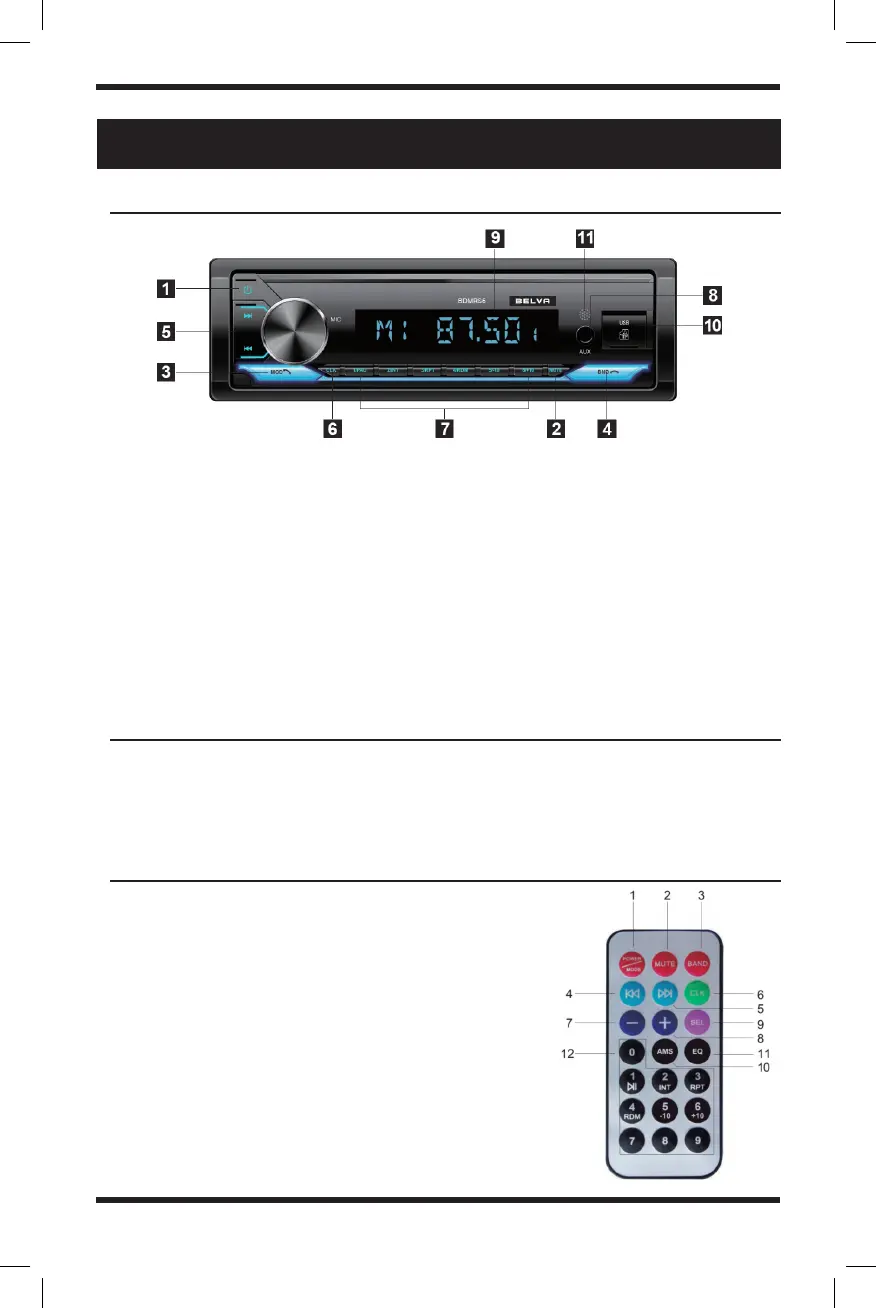
Panel functions
how to connect to bluetooth
remote functions
1. On/Off
2. Mute
3. Mode/Answer a call
4. Band/Reject or hang up a call
5. Station tuning & fast forward/rewind
6. Clock adjustments
7. Preset stations
8. Aux input
9. SD Card Slot
10. USB port
11. IR remote control window (optional)
12. Display
8. Volume Up
9. Multifunctional
Selection Key
10. Radio Search
11. Digital EQ
12. 0.1.2.3.4.5.6.7.8.9.
digital key


 To Next Page