3
REMOTE CONTROL OPERATION
NOTE: This remote uses a CR2025 lithium battery
NOTE: This remote uses a CR2025 lithium battery
• Aim the remote control directly at the IR sensor on the unit
• DO not expose the remote sensor to strong light (direct sunlight or artificial light)
WARNING: To prevent accidents and damage
WARNING: To prevent accidents and damage
• DO NOT install any battery other than CR2025
• Store the battery in a safe place where children cannot reach
• Make sure to safely dispose of the battery when it no longer holds a charge
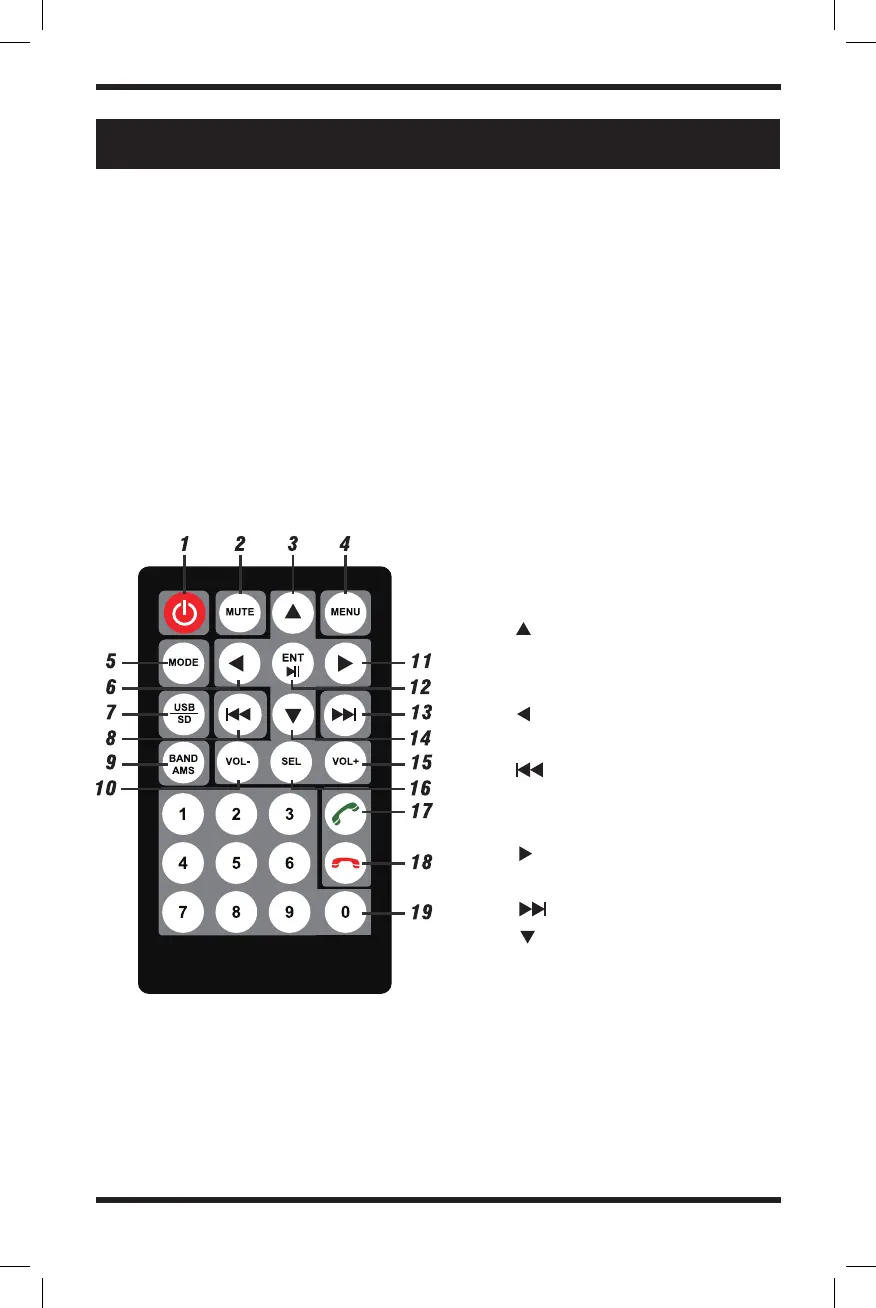
1. Power switch
2. Mute
3. Up
4. Menu Button
5. Switch Modes
6. Left
7. USB / SD Card Mode
8. Previous Song
9. Band / Automatic
10. Volume Up
11. R i g h t
12. Enter/Play/Pause
13. Next Song
14. Down
15. Volume Down
16. Select
17. Answer Phone
18. Hang Up
19. Number Keys


 To Next Page