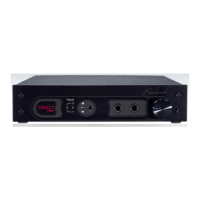
DAC1 USB
Instruction Manual Revision D Page 16
Rack Mounting
(DAC1 USB Black RM only)
The rack-mount version of the DAC1 USB is
part of Benchmark’s ½-wide System1™
product family. Each is one rack unit high
and is exactly ½ the width of a standard 19”
rack panel. The front panels on System1™
products have rack-mount holes that are
machined to conform to standard rack-mount
dimensions. Two ½-wide System1™ units
may be joined together to form a single rigid
19” panel that can be installed in any
standard 19” rack.
Either ear of a ½-wide System1™ device can
be mounted directly to a standard 19” rack.
A Rack Mount Coupler connects the other
ear to a ½-wide Blank Rack Panel or
another ½-width System1™ product
TIP: Use the rack-mount screws supplied
with the DAC1 USB (or screws with
plastic washers) to avoid scratching the
surface of the faceplate.
The Rack Mount Coupler and Blank Rack
Panel are available from Benchmark.
Call us, visit our website
(http://www.BenchmarkMedia.com
), or
contact your dealer to purchase these
accessories.
Rack Mount Coupler
The Rack Mount Coupler is a machined
aluminum junction block that joins any two
½-wide System1™ devices for rack
mounting. It is also used to join a Blank
Rack Panel to a single ½-wide System1™
device.
Blank Rack Panel
The Blank Rack Panel is a ½-wide 1-RU
aluminum panel for mounting a single ½-wide
System1™ device in a standard 19” rack.
Installation requires one Rack Mount
Coupler.



 To Next Page