Need help?
Do you have a question about the Benetech GM1357 and is the answer not in the manual?
Specifies height, humidity, and temperature limits for operation.
Instructions for cleaning the unit using a dry cloth, avoiding solvents.
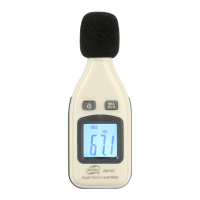
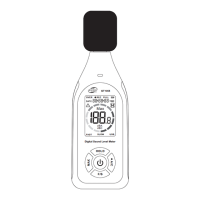
The microphone component of the sound level meter.
The screen displaying measurements and status.
The control for turning the unit on and off.
Selector for different measurement ranges (e.g., 30-80dB).
Enables capturing and holding the maximum noise level.
Allows selection between A and C weighting for noise analysis.
Shows the currently selected measurement range.
Displays the real-time measured sound level.
Indicates when the unit's battery needs replacement.
Shows when the maximum measured value is being held.
Shows the unit of measurement, typically dB.
Indicates if A or C weighting is active.
Visual representation of the current sound level within the selected range.
Signals when the measured sound level is outside the selected range.
Indicates the selected time weighting mode.
Instructions for opening the battery door and installing batteries.
Guidance on connecting the DC adapter for power.
Step-by-step guide to powering on the sound level meter.
Procedure to set the desired measuring range to avoid 'Under' or 'Over' indications.
Choosing between A or C weighting for general or low-frequency noise.
Choosing between FAST for peaks and SLOW for average sound levels.
Activating the mode to capture and hold the maximum noise level.
Warning against operating the unit in extreme environmental conditions.
Recommendation to remove the battery if the unit is not used for a long period.
Importance of using the windscreen in windy conditions to avoid false readings.
Specifies height, humidity, and temperature constraints for operation.
Defines the decibel range for measurements (e.g., 30dBA-130dBA).
Specifies the measurement accuracy, e.g., ±1.5 dB at 94 dB.
Indicates the frequency spectrum the meter can measure (e.g., 31.5Hz-8.5KHz).
The range over which the meter maintains linearity.
Available weighting options: A and C.
The smallest increment the digital display can show (e.g., 0.1 dB).
How often the measurement is updated (e.g., 2 Times/Second).
The speed at which the bar graph updates.
Signal for readings exceeding the selected range.
Terminal for analog output signal (0.707 Vrms).
Terminal for DC output signal (10 mV/dB).
Available time weighting modes: FAST/SLOW.
Specifies the type of microphone used (1/2 Inch Electric Condenser).
Indicates the Max Hold feature is active.
Details power sources: 4xAA batteries or DC 6V adapter.
Estimated operational time on alkaline batteries (approx 30 hours).
Time taken for the unit's self-calibration process (3 seconds).
Specifies temperature and humidity ranges for operation.
Specifies temperature and humidity ranges for storage.
The total weight of the unit, including batteries.
Physical size of the sound level meter (256x70x35mm).
The Digital Sound Level Meter, Model GM1357, is a precision instrument designed for measuring sound levels across various environments. It is engineered to meet the measurement requirements of safety engineers, health and industrial offices, and sound quality control professionals. This device is suitable for use in diverse settings, including factories, offices, traffic areas, homes, and audio systems.
The GM1357 adheres to international standards, specifically IEC651 TYPE2 and ANSI S1.4 TYPE2, ensuring accurate and reliable measurements. It boasts an accuracy of up to ±1.5dB, making it suitable for professional applications. The meter has a broad measurement range, from 30dB to 130dB, allowing it to capture a wide spectrum of sound levels, from quiet environments to very loud noises.
A key feature of this sound level meter is its ability to provide two equivalent weighted sound pressure levels: A and C. A-weighting is commonly used for general sound level measurements, as it approximates the human ear's response to sound. C-weighting, on the other hand, is useful for checking the low-frequency content of noise, providing a more linear response across the frequency spectrum.
The device also incorporates dynamic characteristic modes, offering both "Fast" and "Slow" responses. The "Fast" mode is ideal for capturing sudden, short bursts of sound or peak noise levels, while the "Slow" mode is designed for measuring average sound levels over a period, providing a more stable reading in fluctuating noise environments.
For advanced analysis, the GM1357 includes AC and DC output terminals. The AC output (0.707 Vrms corresponding to each range step) can be connected to a frequency analyzer or level recorder, allowing for detailed spectral analysis of the sound. The DC output (10 mV/dB) is suitable for connecting to FFT analyzers or graphic recorders, enabling continuous logging and visualization of sound level changes over time.
The device features a clear LCD display that shows the instantaneous sound pressure level, the measuring value, and the measurement unit. It also indicates the selected frequency weighting (A/C), the level range, and provides a bar graph for visual representation of sound levels. The display includes indicators for "Under" and "Over" range conditions, ensuring that measurements are taken within the device's optimal operating range. A "MAX" hold function allows the instrument to capture and display the maximum noise level detected during a measurement period, which is particularly useful for identifying peak noise events.
To begin using the GM1357, first ensure that four AA 1.5V alkaline batteries are correctly installed in the battery compartment. The device can also be powered by an external DC 6V power supply. If the battery voltage drops below the operating threshold, a "low battery" mark will appear on the LCD, indicating that the batteries need to be replaced.
Before taking measurements, it is recommended to perform a calibration using a standard acoustic calibrator. This involves setting the equivalent weight to SPL (dBA), time weighting to FAST, and the level range to 60 to 110 dB, with the MAX function disabled. The microphone is then carefully inserted into the 1/2 inch hole of the calibrator. Once the calibrator is turned on, an internal potentiometer (located inside the battery compartment and shown in Figure 1) is adjusted until the LCD displays the desired level, typically 94 dB. This ensures the accuracy of the measurements. The product is pre-calibrated from the factory, with a recommended recalibration cycle of one year.
Once powered on, select the desired measuring range using the level range control switch. It is important to choose a range that avoids "Under" or "Over" indications on the LCD to ensure accurate readings. For general sound level measurements, select A-weighting (dBA). If the sound source consists of short bursts or peaks, set the response to "Fast." For measuring average sound levels, use the "Slow" time weighting. The "MAX" hold switch can be activated to capture and display the maximum noise level encountered during the measurement.
The device is equipped with a 1/2 inch Electret Condenser Microphone, which should be protected by the included windscreen when operating in windy conditions to prevent the pickup of undesired signals. The LCD display provides a comprehensive overview of the measurement, including the level range, instantaneous sound pressure level, measuring value, measurement unit, frequency weighting (A/C), and a bar graph. Indicators for "Rang over," "Fast time weighting," "Slow time weighting," and "Range under" are also present.
For advanced applications, the AC and DC output terminals allow connection to external recording and analysis equipment. The AC output provides a signal for frequency analyzers or level recorders, while the DC output is suitable for FFT analyzers or graphic recorders.
To ensure the longevity and optimal performance of the Digital Sound Level Meter, proper maintenance is essential. The device should be operated within specified environmental conditions: below 2,000 meters in height, humidity less than 80% RH, and an operating temperature range of 0-40°C. It is crucial to avoid operating the unit in high temperature and humidity environments, as this can affect its accuracy and lifespan.
For cleaning, use a dry cloth to wipe the unit. Never use any solvents, as these can damage the device's casing or internal components.
When the unit is not in use for an extended period, it is important to remove the batteries from the compartment. This prevents potential battery leakage, which can corrode the battery terminals and damage the device.
If operating the unit in the presence of wind, always mount the windscreen. This accessory is designed to prevent the microphone from picking up unwanted wind noise, ensuring that only the actual sound levels are measured accurately.
The device is designed for use in conditions below 200 feet in height, with humidity below 80% RH, and temperatures ranging from 0 to 40°C. Adhering to these environmental guidelines will help maintain the device's accuracy and reliability.
Regular calibration is recommended to ensure the continued accuracy of the sound level meter. Although the product is factory-calibrated, a recalibration cycle of one year is suggested to maintain its precision over time.
 General
| Display | LCD |
|---|---|
| Power Supply | 9V Battery |
| Type | Anemometer |
| Wind Speed Range | 0.3 to 30 m/s |
| Temperature Range (wind speed) | -10°C to 45°C (14°F to 113°F) |
| Resolution | 0.1 m/s |
| Units | m/s |
| Measurement Range | 0.3 to 30 m/s |
| Operating Temperature | -10°C to 45°C (14°F to 113°F) |
| Operating Humidity | Below 90%RH |
| Temperature Range | -10°C to 45°C (14°F to 113°F) |

 To Next Page