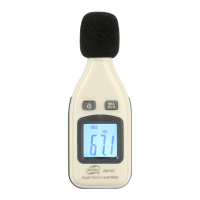
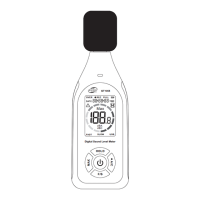
This document describes the GM510, GM511, and GM520 Pressure Manometers, which are designed for measuring pressure in various applications.
Function Description
The pressure manometers are widely applied in measuring the pressure of fans, resistance/wind velocity/oven pressure, differential pressure of filter, and monitoring the gas content in the air in the process of combustion. The device measures the intensity of pressure, the force applied on a square unit. It provides both absolute pressure (difference between the reading and the absolute zero) and positive/negative pressure readings. Positive pressure means the right pressure is bigger than the left one, while negative pressure means the left pressure is bigger than the right one.
The units feature data save and adjustment, automatic turn-off, connecting with PC to read and export the data with a USB wire.
Important Technical Specifications
The manometers offer a range of selectable pressure units including bar, mbar, kPa, kgf/cm², mmHg, cmH₂O, Ozf/in², psi, inHg, inH₂O, ftH₂O.
Measuring Range:
- GM510/GM511: ±10kPa
- GM520: ±35kPa
Accuracy:
- GM510/GM511: ±0.3%FSO (25°C)
- GM520: ±0.3%FSO (25°C)
Repeatability: ±0.2% (Maximum +/-0.5%FSO)
Linearity/Hysteresis: ±0.29%FSO
Response: Typical 0.5s
Low battery indication: Yes
Overload indication: Err1
Down overload indication: Err2
Operating temperature: 0~50°C
Storage temperature: -10~60°C
Power supply: 1.5V AAA battery*4
USB communication: Yes
Specific Model Specifications:
| Model |
Unit |
Range |
Resolution |
Maximum pressure |
| GM510 |
bar |
0.100 |
0.001 |
0.500 |
| GM511 |
bar |
0.350 |
0.001 |
1.500 |
| GM520 |
bar |
1.000 |
0.1 |
5.000 |
| GM510 |
mbar |
10.00 |
0.01 |
50 |
| GM511 |
mbar |
35.00 |
0.01 |
150 |
| GM520 |
mbar |
100.0 |
0.1 |
500 |
| GM510 |
kPa |
1.000 |
0.001 |
5.000 |
| GM511 |
kPa |
3.500 |
0.001 |
15.00 |
| GM520 |
kPa |
10.00 |
0.01 |
50 |
| GM510 |
kgf/cm² |
0.101 |
0.001 |
0.509 |
| GM511 |
kgf/cm² |
0.356 |
0.001 |
1.529 |
| GM520 |
kgf/cm² |
1.019 |
0.1 |
5.095 |
| GM510 |
mmHg |
75.0 |
0.1 |
375.0 |
| GM511 |
mmHg |
262.5 |
0.1 |
1125.0 |
| GM520 |
mmHg |
750.0 |
0.1 |
3750.0 |
| GM510 |
cmH₂O |
101.9 |
0.1 |
509.5 |
| GM511 |
cmH₂O |
356.6 |
0.1 |
1528.5 |
| GM520 |
cmH₂O |
1019 |
0.1 |
5095 |
| GM510 |
Ozf/in² |
23.20 |
0.01 |
116.00 |
| GM511 |
Ozf/in² |
81.20 |
0.01 |
348.00 |
| GM520 |
Ozf/in² |
232.0 |
0.1 |
1160 |
| GM510 |
psi |
1.450 |
0.001 |
7.251 |
| GM511 |
psi |
5.076 |
0.001 |
21.755 |
| GM520 |
psi |
14.50 |
0.01 |
72.51 |
| GM510 |
inHg |
2.95 |
0.01 |
14.76 |
| GM511 |
inHg |
10.33 |
0.01 |
44.29 |
| GM520 |
inHg |
29.50 |
0.1 |
147.6 |
| GM510 |
inH₂O |
40.1 |
0.1 |
200.5 |
| GM511 |
inH₂O |
140.3 |
0.1 |
601.5 |
| GM520 |
inH₂O |
401.0 |
0.1 |
2005 |
| GM510 |
ftH₂O |
3.34 |
0.01 |
16.70 |
| GM511 |
ftH₂O |
11.69 |
0.01 |
50.10 |
| GM520 |
ftH₂O |
33.40 |
0.1 |
167.0 |
Environmental temperature compensation: Applicable to GM511/GM520, but not to GM510.
Usage Features
The device features a large LCD display, data hold function, differential mode and record mode, USB port for data transfer, and reset and data adjustment capabilities. It also includes a low battery indication and automatic power off.
Panel Description:
- Pressure input
- LCD
- DIF mode key
- Unit shift key
- Backlight key
- HOLD key
- Record key
- Power key
Display Description:
- Data hold function
- Record mode
- USB communication
- Low battery indication
- DIF mode
- Minimum/maximum value
- Main display
- Pressure unit
- Record time
How to Operate:
- Power supply: Press ON/OFF key to turn the unit on or off.
- Difference: Press the DIF key to display the value that is the difference between the current pressure and the pressure value when pressing the DIF key, with DIFFERENTIAL PRESSURE displayed on LCD.
- HOLD key: Press HOLD key to hold the reading on the LCD with a "HOLD" icon displayed on the upper left corner of LCD, press HOLD key again to go back to normal measuring state.
- Record key:
- It is available to review MAX/MIN/AVG values under record mode.
- (1) Press the REC key and the character "RECORD" shows on the LCD while all keys except ON/OFF key and backlight will be locked, and time counter works with the current time shows on LCD.
- (2) Press the REC key again, MAX shows on LCD and the maximum value and its pickup time will be shown on the LCD.
- (3) Press the REC key once again, MIN shows on the LCD and minimum value and its pickup time will be shown on the LCD.
- (4) Press REC key again, an average value shows with AVG character.
- (5) Press REC again to show the maximum, minimum and average value repeatedly in order.
- (6) Press the REC key for 2 seconds to exit record mode.
- Backlight: Press the backlight key to activate it.
- Auto turn-off: If there is no any further operation on the key within 1 minute, the unit will turn off automatically. This function can be cancelled by pressing on the HOLD key for a while and then turn the device on until "no" appears on the LCD.
- Unit: Press the UNIT key to show 11 units for option.
- USB: Built-in USB port allows connection with PC.
- Error: If there is any mistake reading appears, it will be shown on the LCD as following:
- (1) Err1: Pressure beyond positive range
- (2) Err2: Pressure beyond negative range
- (3) Err3: DIF difference beyond position limit
- (4) Err4: DIF difference beyond negative limit
- Battery replacement: " " flashes when the battery is insufficient, replace it with 4 1.5V AAA batteries.
Reset and calibration:
- Reset: Pressure difference shall read zero after turning on, if not, reset the device as the steps below: press the DIF key and DIFFERENTIAL PRESSURE shows on the LCD, meanwhile hold on pressing on the HOLD key for about 3 seconds until the zero appears which indicates the reset is done, release the HOLD key and backlight key to return to normal measure mode.
- (3) Press on the DIF key to increase 1 kPa and hold on pressing the DIF key for 2 seconds to increase the value quicker.
- GM510/GM511 calibration range: 1.00kPa~10.00kPa, -1.00kPa~-10.00kPa
- GM520 calibration range: 1.00kPa~35.00kPa, -1.00kPa~-35.00kPa
- (4) Press the HOLD key after selecting the desired value for calibration and import the differential value into the device.
- (5) Press the backlight to exit calibration mode and return to normal measurement mode. If there is any further calibration repeat the step4 and step 5.
- Calibration: In operation, if there is any error between the device and your standard, please calibrate it as the steps below:
- (1) Power on.
- (2) Hold on pressing the HOLD key and backlight key for about 3 seconds until the reading "1.00" shows on LCD with its unit "kPa" that is inner value of the device, which may be ignored by the users and indicates it is under calibration mode and the 2 keys said above could be released.
-
- Restore ex-factory setting: Users may restore the device to ex-factory settings if the calibration data confused due to mistake operation:
- (1) Holding on pressing the DIF key, HOLD key, backlight key and REC key at one time
- (2) Power on the device
- (3) After full display and 0 appears release the REC key
- (4) At 00 appearing release the backlight key
- (5) At 000 appearing press the backlight key and REC key
- (6) At 0000 appearing release all the keys and complete the operation
- (7) After restoring to ex-factory setting, refer to point 1 and point 2 above for reset and calibration if necessary.
Maintenance Features
Keep-up:
- Case cleaning: Use only fresh water to clean the case of the product, forbidden to use any erosive liquid such as alcohol etc. Never impact it or operate and store it in humid environment.
- Do not store the product in the environment below:
- a. Humid or dusty environment
- b. High density of salt or sulfur
- c. Environment full of the other chemical gas
- d. High temperature or humidity, or environment in direct sunlight.
Maintenance:
- Please refer to the guaranty card offered.
- We hold no responsibility for the product due to the following reason: Unauthorized disassembly of the product, improper transportation after purchasing and wrong storage, damage due to abuse, failure to provide purchasing proof or unauthorized amendment on the purchasing invoice/guaranty card.
Claim:
- We reserve the right to change the specification or instruction manual of the product without further notification.
- Old battery dealing must be complied with the local law and regulations.
Notes:
- This product has been calibrated before loading, do not change the parameters without the presence of professionals and equipment.
- Amendment and maintenance must be kept by professionals not just doing it with reference to the manual.
- Clean the unit with cloth only without any solvent or liquid.
- Take out the battery if the unit is expect not to be used.

 Need help?
 General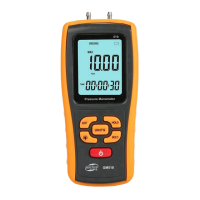

 To Next Page