-06-
-07-
(3)
(4)
(5)
(6)
5.B
6.A
“no”
7.
8.USB
9.E
(1)Err1:
(2)Err2:P
(3)Err3:DIF difference beyond position limit
(4)Err4:DIF difference beyond negative limit
Press the REC key once again, MIN shows on the LCD
and minimum value and its pickup time will be shown
on the LCD.
Press REC key again, an average value shows with
AVG character.
Press REC again to show the maximum, minimum and
average value repeatedly in order.
Press the REC key for 2 seconds to exit record mode.
acklight
Press the backlight key to activate it.
uto turn-off
If there is no any further operation on the key within 1
minute, the unit will turn off automatically. This function
can be cancelled by pressing on the HOLD key for a
while and then turn the device on until appears on
the LCD.
Unit
Press the UNIT key to show 11 units for option.
Built-in USB port allows connection with PC.
rror
If there is any mistake reading appears, it will be shown
on the LCD as following:
Pressure beyond positive range
ressure beyond negative range
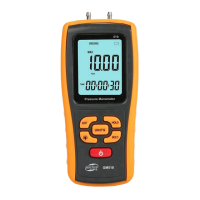
How to operate
1.P
2.
3.
“ ”
4.
(1) “ ”
(2)
ower supply
Press ON/OFF key to turn the unit on or off.
Difference
Press the DIF key to display the value that is the
difference between the current pressure and the
pressure value when press the DIF key, with
DIFFERENTIAL PRESSURE displayed on LCD.
HOLD key
Press HOLD key to hold the reading on the LCD with a
icon displayed on the upper left corner of LCD,
press HOLD key again to go back to normal measuring
state.
Record key
It is available to review MAX/MIN/ AVG values
under record mode.
Press the REC key and the character
shows on the LCD while all keys except ON/OFF key
and backlight will be locked, and time counter works
with the current time shows on LCD.
Press the REC key again, MAX shows on LCD and
the maximum value and its pickup time will be shown
on the LCD.
2.Operation


 To Next Page