Benewake(Beijing)Co., Ltd
CE30-D Product Manual - V04
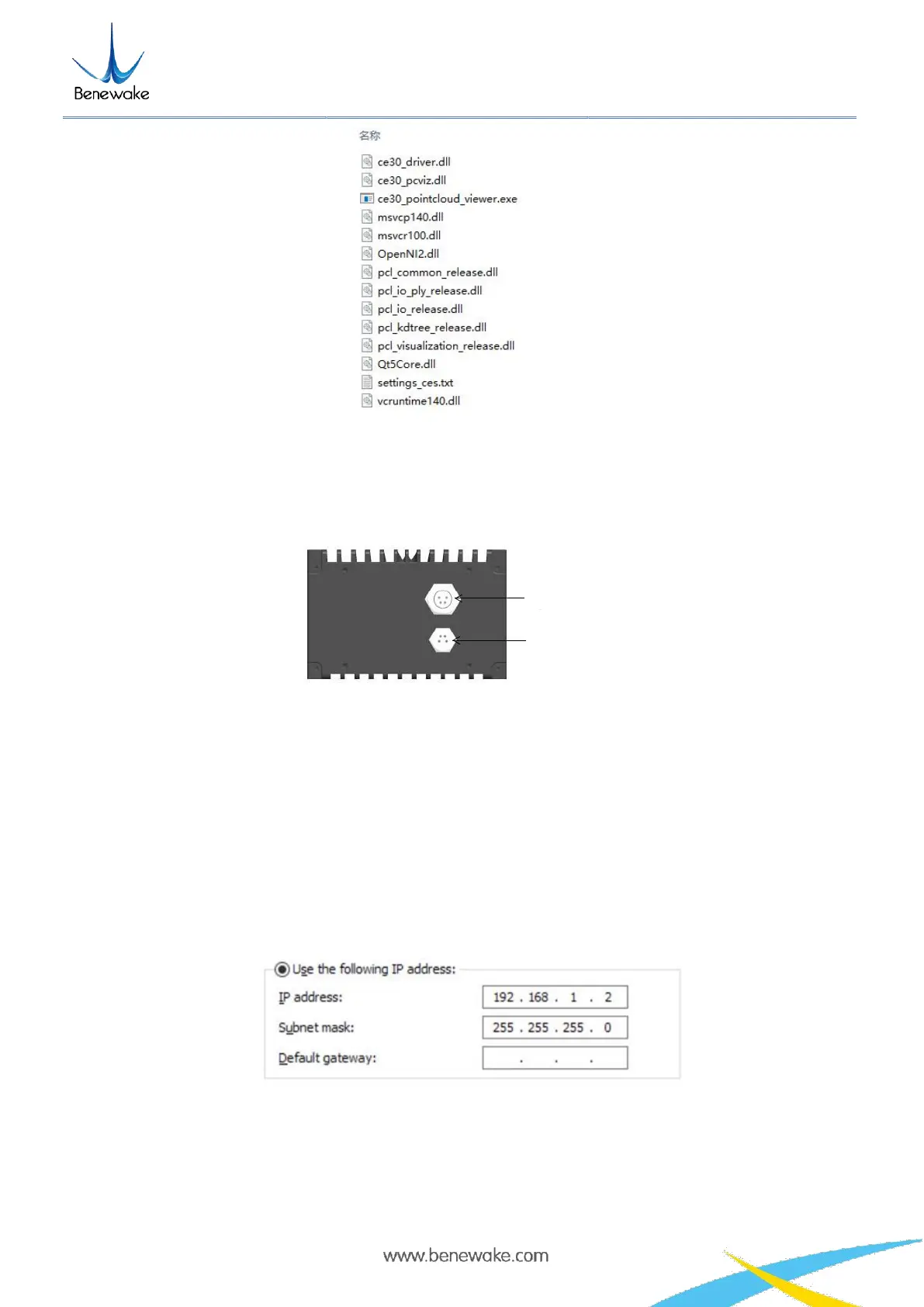
Figure 2 Display program and documents necessary for its operation
2.1 Connection
Figure 3 CE30-D aerial plug wiring instructions
a. Use the two aerial plug cables attached in the package (including one power supply plug cable and one
network port plug cable) to connect the LiDAR with the aerial plug cables as illustrated in Figure 3;
connect the power interface to the adapter DC 12V (≥3A), DC 5.5*2.5mm; connect the aerial plug
network port (RJ45) to the computer.
b. Set the Ethernet IP address and subnet mask in the directory “Control panel\Network and
Internet\Network Connections” as shown in Figure 5.
Figure 4 Network Settings
c. Open the CMD command interface in the Windows running window; enter and execute the command to
check whether the data connection is available:
ping 192.168.1.80 -t


 To Next Page