18
Events registration (Events Log)
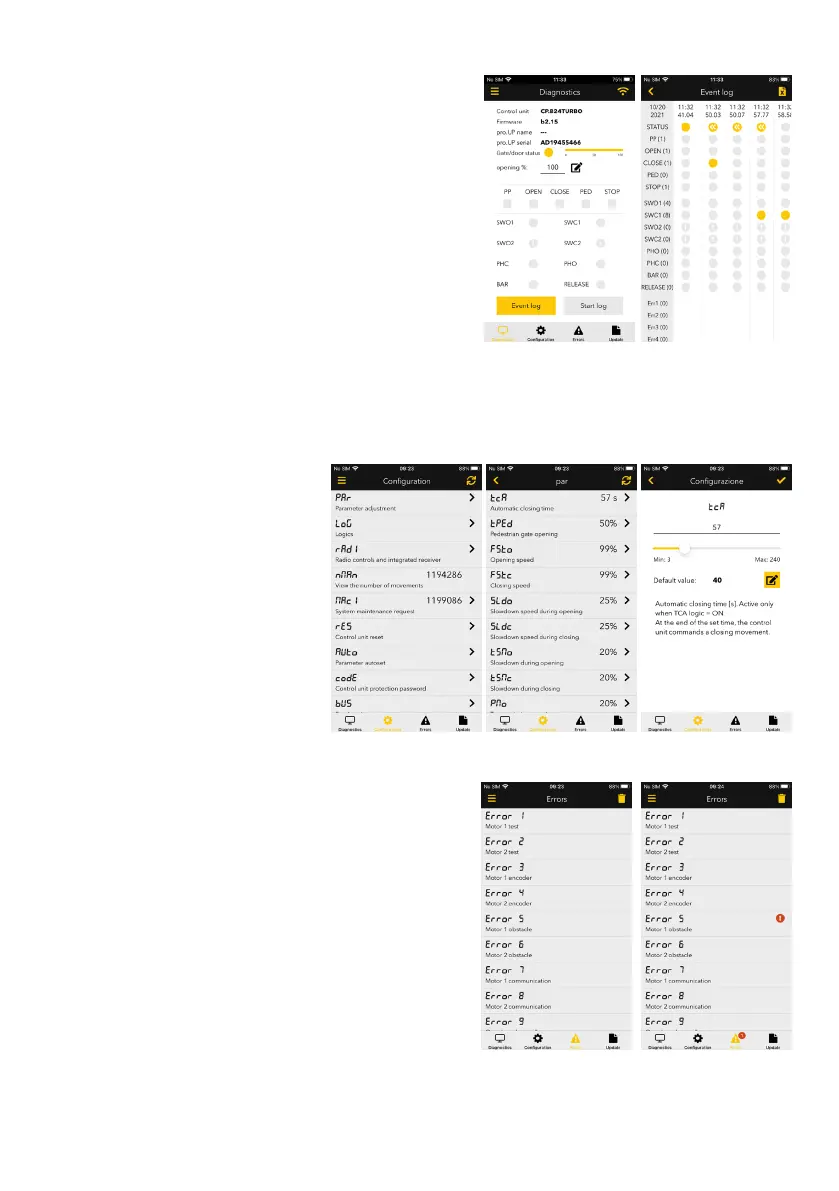
The Diagnostics and Command screen also contains the events
registration section.
Having enabled the function, the app records the events that take
place on the control unit, i.e. the changes in status of the commands
and the inputs, as well as the errors that occur.
You can then consult the record by vertically and horizontally scrolling
the screen.
The first column is fixed and shows the statuses of registration, when
an events log was started. The other columns appear when a status
change occurs.
The column heating outlines the time stamp of when the event
occurred.
On the top right, there is a button to export the log record in a .csv text
file; in this file, other than the events, information is also provided on
the control unit and the pro.UP used.
The number of events which can be registered is approx. 30,000,
after which registration will continue by chronologically overwriting
starting from the first.
Control unit configuration
The Configuration tab has access to all the
structure of the menu on the control unit.
Each voice can be browsed, read and edited
individually.
Under the name of each function, there is a
brief description and on the side the value
set. Entering, you access the editing and
analysis screen of the same item.
Each time the information is saved, it is
written on the control unit.
NOTE: it is not possible to make changes
during events log registration.
Errors display
The Errors section contains the fixed list of errors possible; they are
the same as those that would appear on the control unit display.
Also here, there is the error name and a brief description. When an
error is active, it is highlighted and a warning alert appears on the
errors TAB icon and, at the end of the error.
The list of errors is always the same for all control units: if a control
unit does not manage that type of error (e.g. Check motor 2 for sliding),
that error will simply never activate.


 To Next Page
 Loading...