19
Firmware upgrade of the control unit
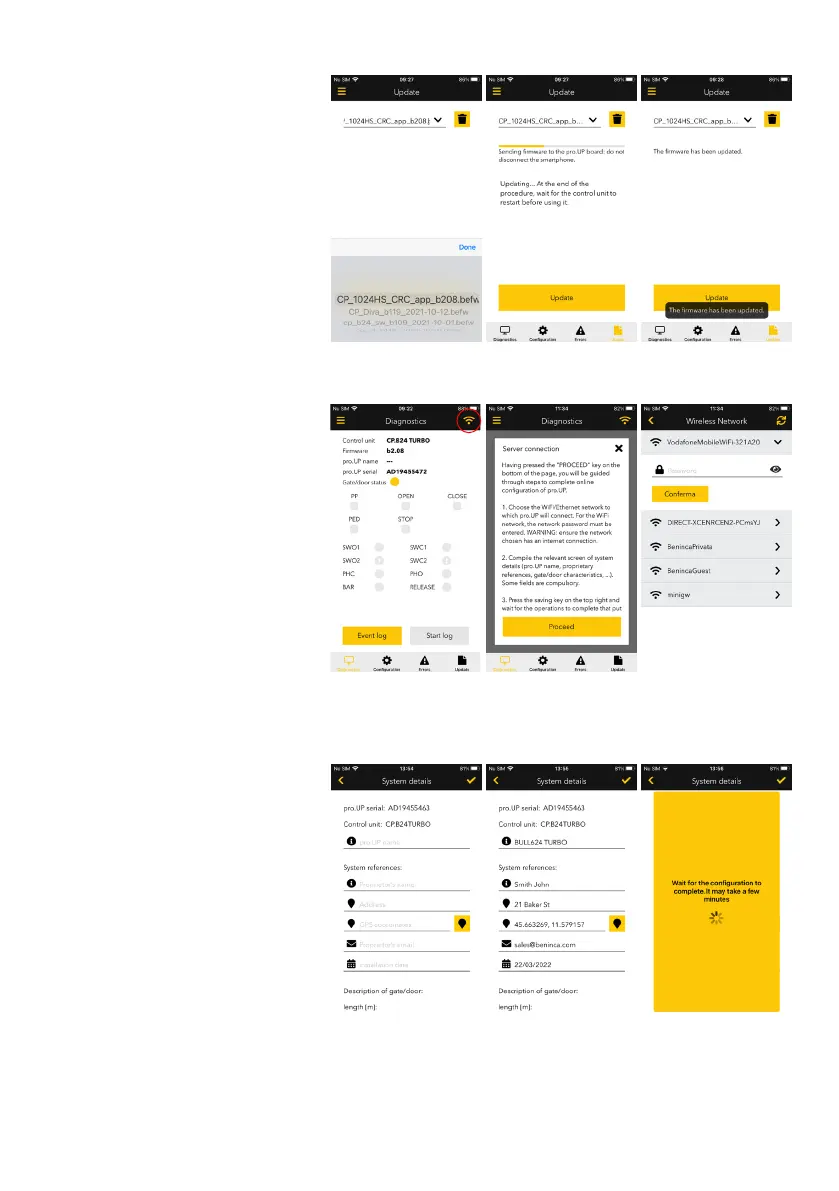
From the firmware upgrade section you
access the search of files to upload on the
control unit.
The file must be appropriately saved on
the telephone and should be specifically
requested to the Benincà support service.
The procedure starts by pressing the «Up-
grade» button on the bottom, after which the
progress bar appears of the loading status.
When the upload is complete, the app will
advise of the successful operation with a
dedicated text and a confirmation message
overlaid.
Online connection
Once the point-point WiFi connection (from
local) is executed to a pro.UP, you can
configure it for connection to the server
and then you can access from remote at
any time via Internet.
Simple press the button with the WiFi sym-
bol on the top right of the Diagnostics and
Control page.
The tutorial popup appears that explains the
operations to carry out.
The first message is to choose the WiFi
network to which the pro.UP* must connect.
(*) on release of this manual, pro.UP only
supports the connection via WiFi, however
the firmware is being developed to con-
nect to a LAN network using the Ethernet
connection.
You then access the «System details» screen
where you can assign a name to the pro.UP,
enter the information relating to the owner
of the system and some date regarding the
gate. There is also a field where you can
add a photo of the system and notes field.
Having pressed the save key on the top
right, pro.UP will try to connect to the chosen
network and then the cloud server.


 To Next Page
 Loading...