20
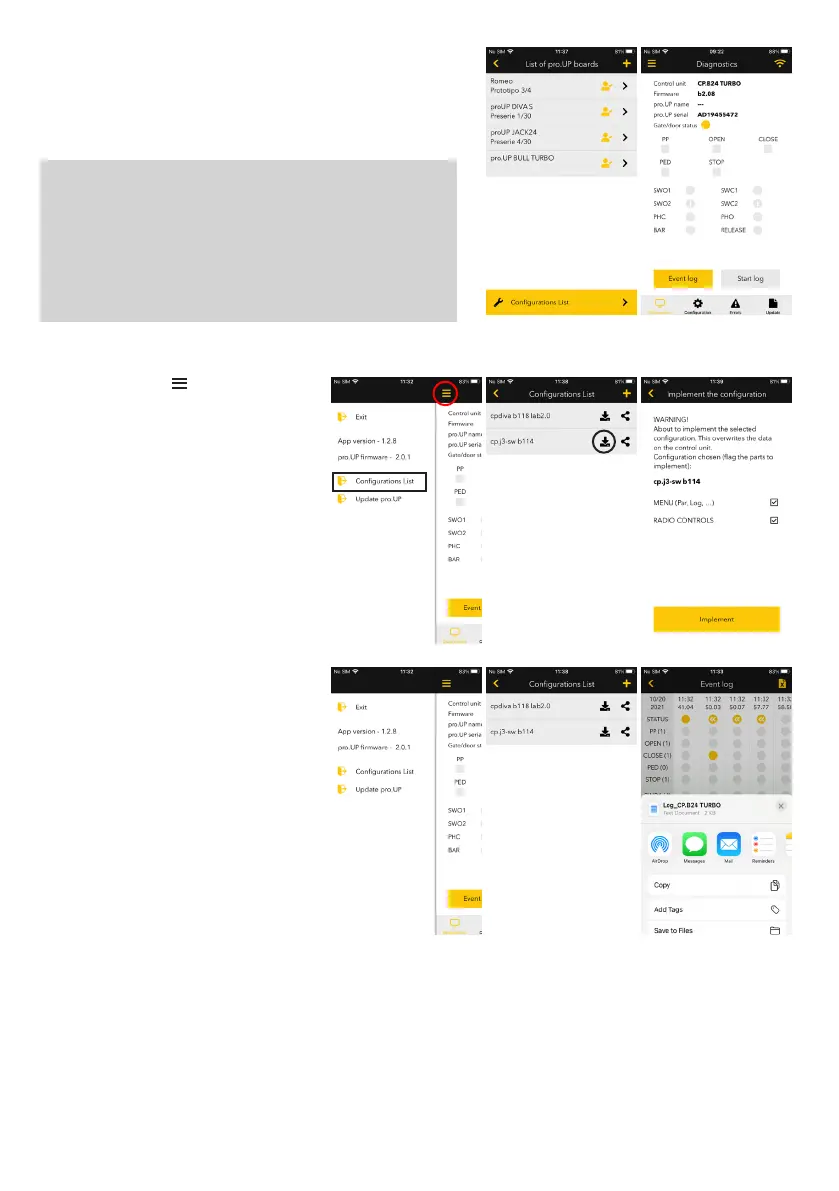
When the connection is successful, pro.UP will appear on the list of
the main access screen in the Programming and Diagnostics section.
Clicking on it, you access the Diagnostics page.
WARNING!! SAFETY INFORMATION!!
When there are remote connections (via Internet), you must
ensure the passageway is guarded by a professional technician
in the event of changes to parameters or operating logic, or on
sending commands (e.g. AUTORESET) which would involve one
or more automatic calibration manoeuvres of automation.
The professional technician at the end of calibration should check
the impact forces according to standards in force (EN12453).
Configuration
From the side menu , you can access the
List of Configurations.
The list appears of all the configurations of the
Benincà control units created by the installers
and on the server, under his account.
From here you can:
> Implement a configuration previously
created on the control unit to which pro.UP
is connected.
You can choose whether to implement the
complete configuration, only part of the menu
(PAR e LOG) or only the radio part (RADI).
> Share a configuration:
you can also share a configuration with
someone else.
Once shared, the other installer can import it
on his list of configurations (next slide).
> continues on next page....


 To Next Page
 Loading...