30
Adjusting corner t
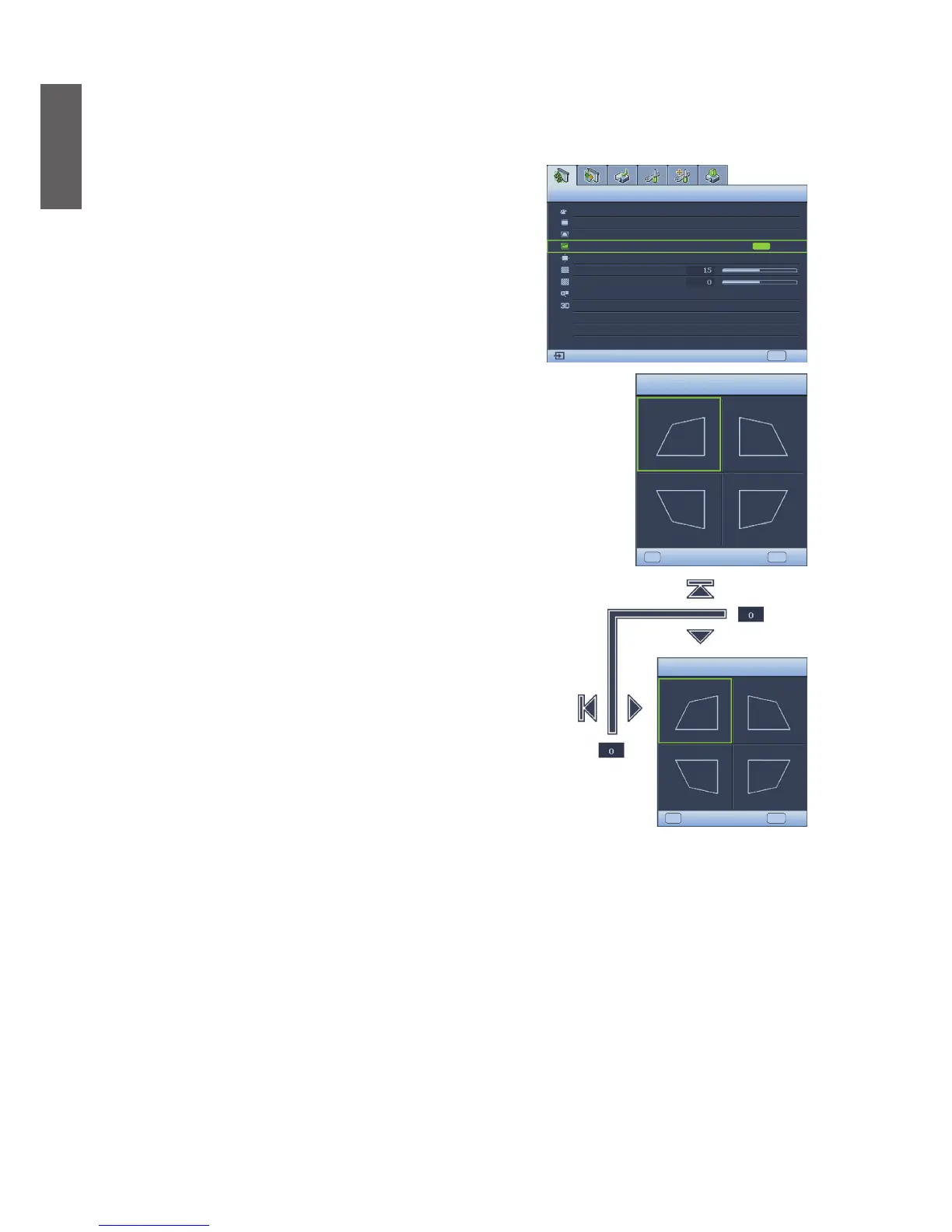
Manually adjust four corners of the image by setting the horizontal and vertical values.
y Using the OSD menu
1. Press MENU/EXIT and then press ◄/► until the
DISPLAY menu is highlighted.
2. Press ▼ to highlight Corner Fit and press MODE/
ENTER. The Corner Fit page displays.
Display
MENU
EXIT
S-VIDEO
Wall Color
OFF
Auto
ENTER
Aspect Ratio
2D Keystone
Corner Fit
Position
Phase
H. Size
Digital Zoom
3D
3. Press ▲, ▼, ◄, ► to select one of the four corners and
press MODE/ENTER.
Corner Fit
MENU
EXIT
Enter
ENTER
4. Press ▲/▼ to adjust vertical values from 0 to 60.
5. Press ◄/► to adjust horizontal values from 0 to 60.
Corner Fit
MENU
EXIT
Enter
RESET


 To Next Page