4English
• To select the Auto-Dimming Book Reading Mode, touch the Auto-Dimming Book
Reading Mode Key . To exit from this mode, touch the key again.
• To select the Auto-Dimming Digital Reading Mode, touch the Auto-Dimming Digital
Reading Mode Key . To exit from this mode, touch the key again.
Refer to the table below for the information about the brightness and color temperature
settings under each light mode and the corresponding light mode indicator status:
The lamp’s sensor detects the illuminance of the desktop and the Ambient Brightness
Indicator indicates the illuminance condition in three different colors:
• Red: The illuminance condition is too dark. Please increase the lamp’s brightness.
• Green: The illuminance condition is good.
• Blue: The illuminance condition is too bright. Please decrease the lamp’s brightness.
When the lamp is turned off, the Ambient Brightness Indicator will still light up in red, green or blue to
indicate the illuminance condition of the desktop. If the ambient brightness is extremely low, the
Ambient Brightness Indicator will go out so as not to disturb the user’s sleep at night.
USB Charging
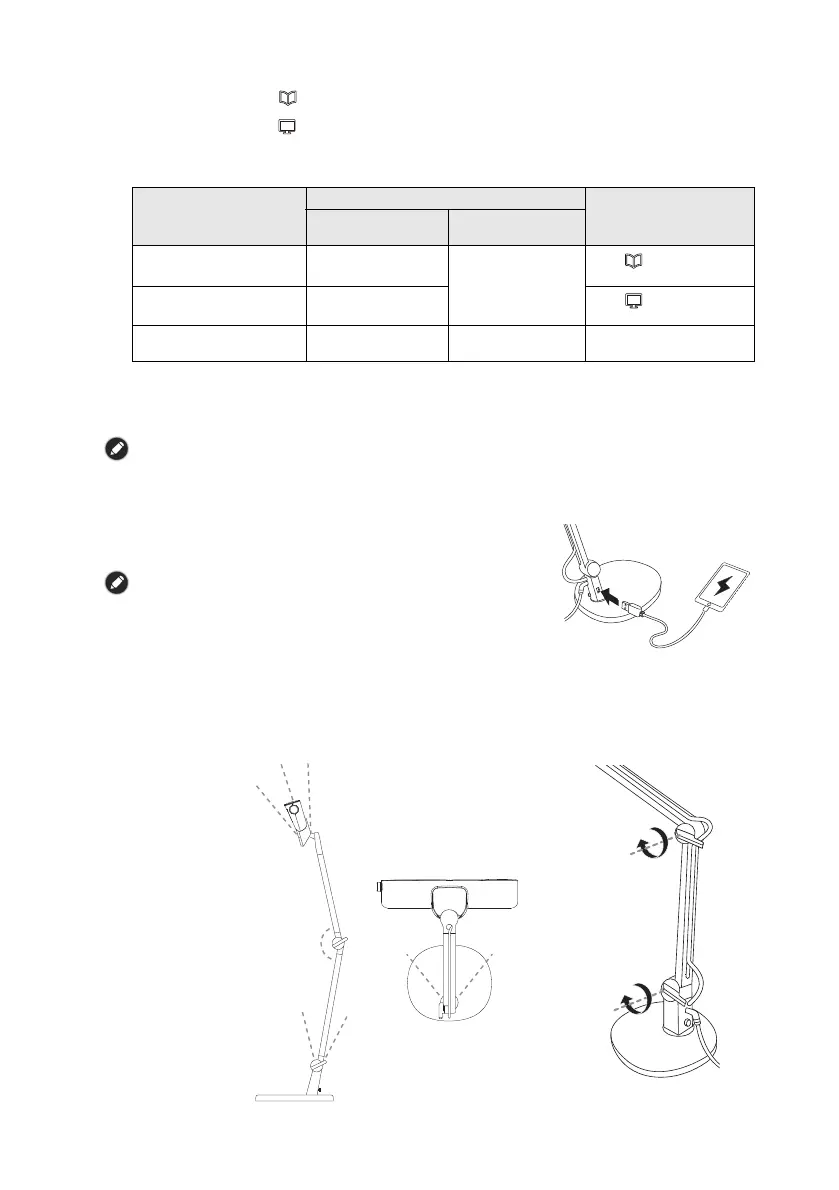
The USB Type A port on the lamp arm provides 5V/0.8A
(800mA) power supply for charging compatible mobile
devices. Connect the device’s USB charging connector to
the USB port to charge the device.
The USB charging port is designed for charging compatible mobile
devices only. Do NOT connect any external power supply to this
port.
Adjusting the Angle of the Lamp Arm
You can adjust the angle of the lamp arm according to your desktop space to obtain a
suitable lighting effect.
• The lamp arm pivot is spring-loaded. Tighten the lamp arm pivot by turning the pivot
knob clockwise.
• Refer to the figure below for the safe angle range for lamp arm adjustment.
Light Mode
Settings
Status of the Light
Mode Indicator
Color
Temperature
Brightness
Auto-Dimming
Book Reading Mode
5700K
Optimized
according to
ambient light
condition
The indicator light
lights up
Auto-Dimming
Digital Reading Mode
4000K
The indicator light
lights up
Manual Dimming
Mode
Adjustable. Range:
2700K - 5700K
Adjustable Off
35°
45° 45°
MAX 160°
20°
34°
34°


 To Next Page
 Loading...