35
2. Press the looping key or the key on the remote control repeatedly to cycle through the
available video sources.
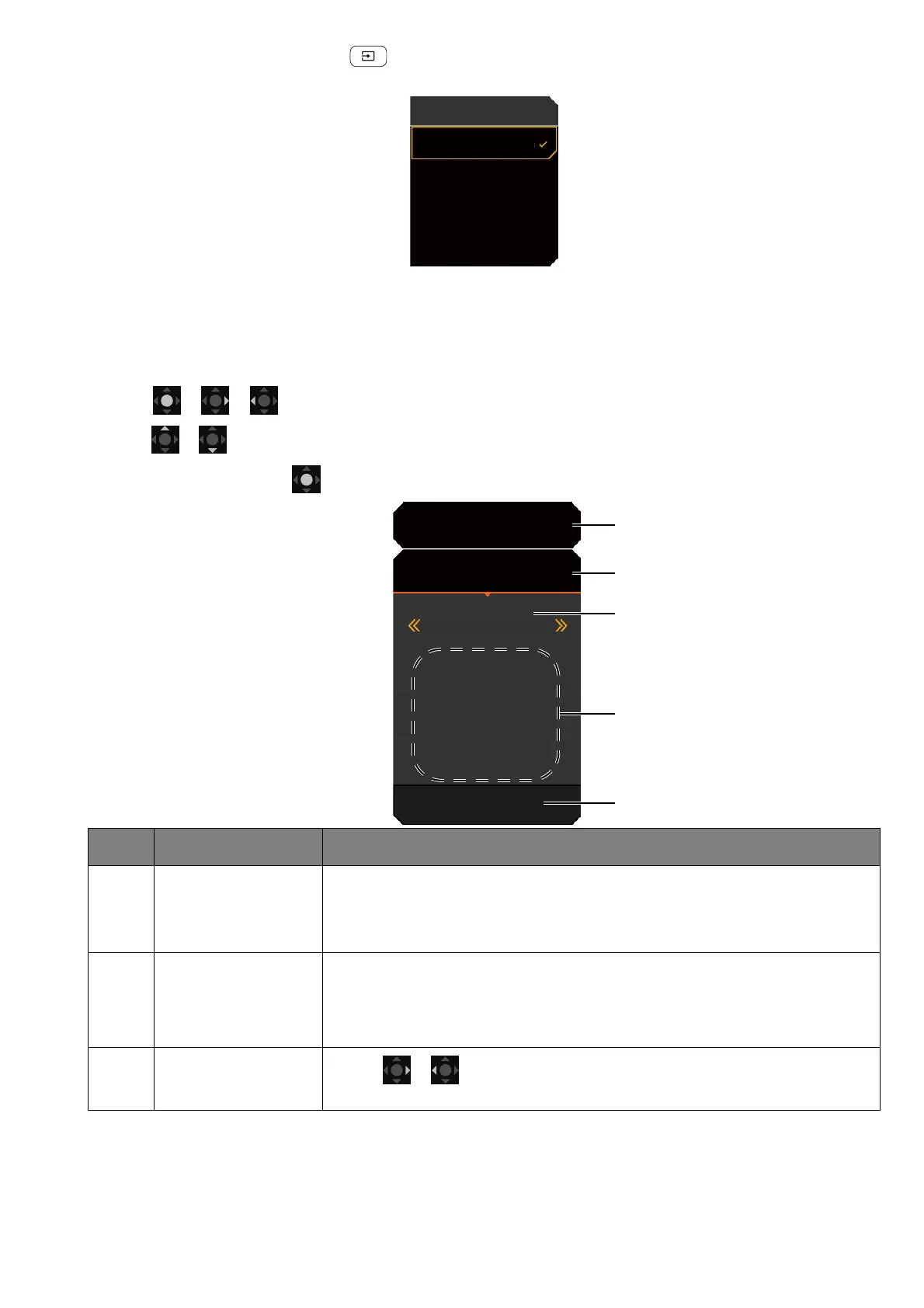
Working with the Quick Menu
The Quick Menu is a quick access to change some monitor settings frequently adjusted by
scenario. It also provides the access to the main menu.
• Press / / to bring up the Quick Menu.
• Press / to different settings.
• Go go Menu and press to access the main menu.
No. Item Description
1System
information
Displays current system information, including resolution, refresh
rate, HDR status, and Adaptive-Sync status. See Activating the
FreeSync™ function on page 42 for more information on
Adaptive-Sync status.
2Input source and
the preset
scenario
Displays the current video source / scenario.
To change the scenario that goes with an input, go to Menu >
Input. See Setting up your monitor for different scenarios on page
33 for more information.
3 Color mode
Press / to cycle through the available color modes. See
Color Mode on page 50 for more information.
HDMI 1: Cinema
HDMI 2: Game
DP: Standard
USB-C: Game
Input
HDR: OFF
FreeSync Premium
3840 x 2160
120 Hz
HDMI2: Game
Color Mode
Custom
Light Tuner
0
Brightness
50
AMA
1
Menu








 To Next Page