37
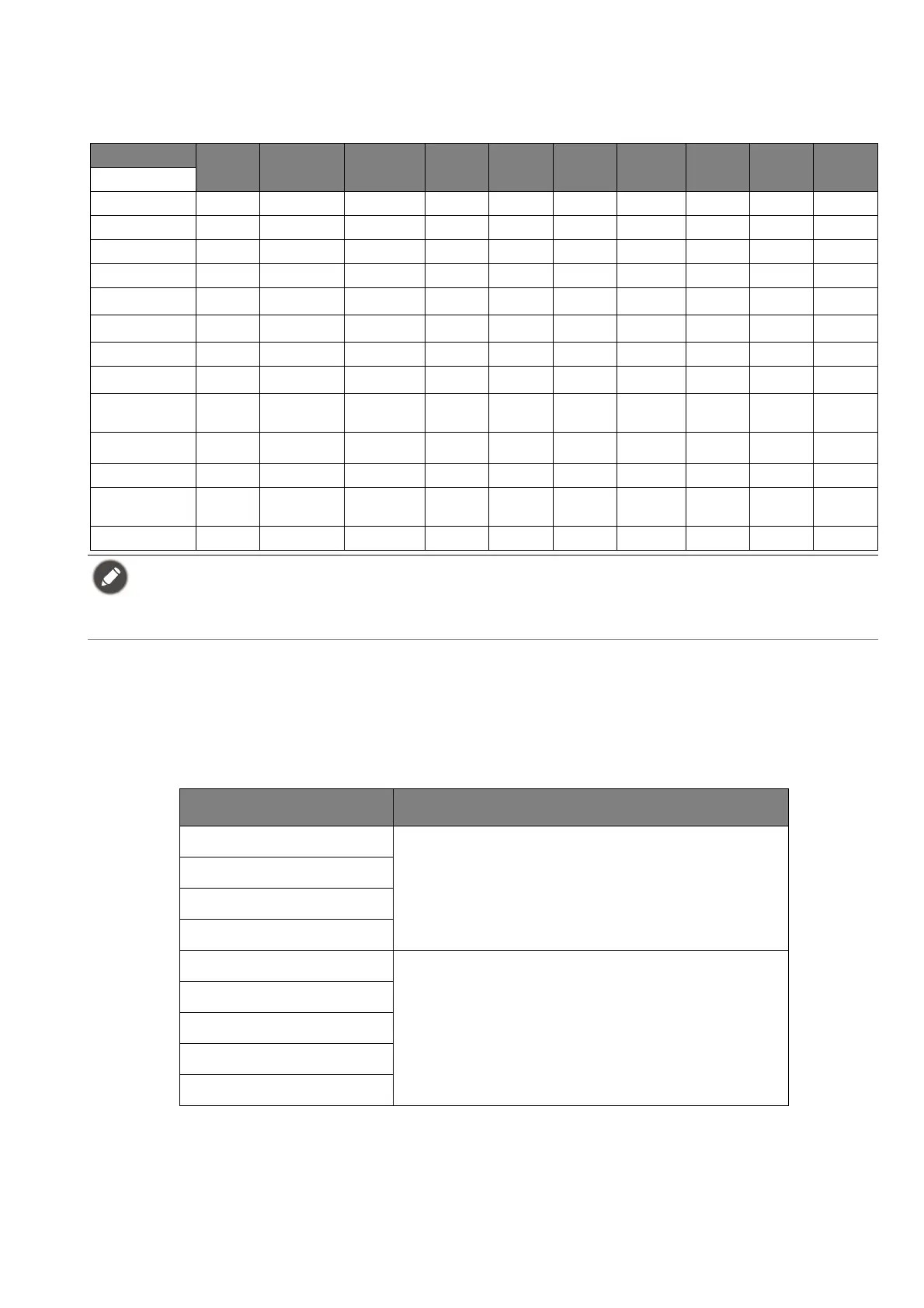
Available menu options to each Color Mode
Depending on the Color Mode you just set, the available options for color adjustment may vary.
The list is for reference only as available options also vary by input. Menu options that are not
available will become grayed out.
Adjustable OSD settings
While some settings (e.g., OSD language) are changed and take effect immediately regardless of
other monitor settings or input, most OSD settings can be adjusted and saved to go with inputs,
color modes, or scenarios. As an input, a color mode, or a scenario is selected, the desired
settings are applied.
Color Mode
Game
HDRi
Cinema HDRi HDR FPS RPG
Racing
game
sRGB M-book
Display
P3
Custom
Options
Black eQualizer XX XVXXXXXX
Light Tuner VV XXVVXXXV
Bri. eQualizer V V V VVVVVVV
Color Vibrance VV XVVVXXXV
Brightness
V
(1)
V
(1)
VVVVV
V
(1)
V
V
(1)
Contrast
V
(1)
V
(1)
X VVVVXV
V
(1)
Sharpness V V V VVVVVVV
Gamma XX XXXXXXX
V
(1)
Color
Temperature
XX XXXXXXX
V
(1)
B.I.+
VV XXXXX
V
(2)
X
V
(2)
Low Blue Light XX XVVVXXXV
Adjust by
duration
XX XXXXX
V
(1)
X
V
(1)
Color Weakness XX XVVVXXXV
• V: Available.
• X: Not available.
•
(1)
: Available only when B.I.+ is disabled.
•
(2)
: Available only when Adjust by duration is disabled.
Items Description
Scenario
Saved and applied by input switch.
Display Mode
Overscan
RGB PC Range
Color Mode
Saved and applied by input and scenario
switch.
Audio mode
Volume
Low Blue Light
Color Weakness








 To Next Page